Getting Started with Astron Agent: Deploy Your First SuperAgent in 10 Minutes
Step-by-step tutorial to deploy Astron Agent with Docker Compose, configure Casdoor auth, create your first agent workflow, and connect MCP tools.

⏱️ From Zero to First Agent in 10 Minutes
When I first looked at Astron Agent's deployment docs, I'll be honest — my eyes glazed over. Docker Compose, Casdoor auth, environment variables, database migrations... it looked like a lot. But after actually running through it, I realized it's not that bad. Let me walk you through exactly what I did.
Full disclosure: I wasted about 20 minutes because I forgot to copy the .env.example file. Don't be me.
🚀 Want to deploy Astron Agent yourself?
Docker Compose configs, system requirements, and installation guides — all on one page.
View Astron Agent Tool Page →📦 Step 1: Clone & Configure
This part takes about 2 minutes if you don't overthink it.
git clone https://github.com/iflytek/astron-agent.git
cd astron-agent/docker/astronAgent
cp .env.example .env
⚠️ Here's where I messed up: I tried to skip the .env configuration and just run docker compose up. It failed. The platform needs those environment variables — specifically the database connection and Casdoor settings. Open the .env file and at minimum set these:
# Database - defaults work locally
POSTGRES_USER=astron
POSTGRES_PASSWORD=astron123
POSTGRES_DB=astron_agent

# Casdoor (built-in auth)
CASDOOR_ORIGIN=http://localhost:8000
🐳 Step 2: Start Everything Up
This actually surprised me — it all comes up together. The docker-compose file includes Casdoor for auth, the PostgreSQL database, and the Astron Agent backend + frontend.
docker compose -f docker-compose-with-auth.yaml up -dThis takes about 30-45 seconds on first run (it pulls the images). On subsequent runs, it's ~5 seconds. Grab a coffee.
🔐 Step 3: First Login
Once everything is up, here's what you get:
| Service | URL | Login |
|---|---|---|
| Astron Agent UI | http://localhost | Via Casdoor |
| Casdoor Admin | http://localhost:8000 | admin / 123 |
If you see the login page: congratulations, it worked. If not — check docker compose logs to see what's failing. 9 times out of 10 it's the database connection.
🤖 Step 4: Create Your First Agent
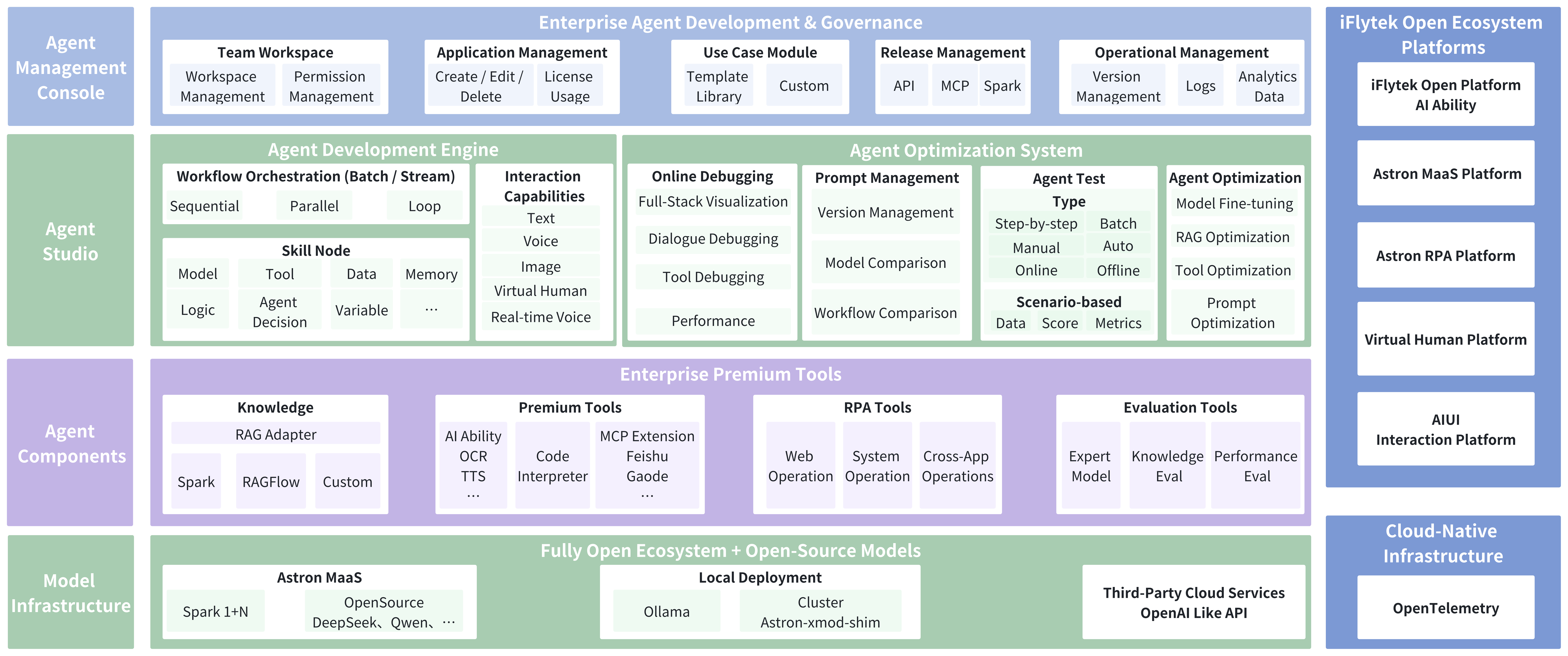
This is where it gets fun. The Astron Agent UI is a visual workflow builder — think n8n meets agent orchestration. Here's the quick path to your first agent:
1. Start a new workflow — Click "Create Workflow" and give it a name. I called mine "TestAssistant" — not creative, but effective.
2. Add an LLM node — Drag in an LLM node and configure it. You can use the built-in iFLYTEK Spark model (free tier available) or plug in your OpenAI key. I tested with GPT-4o and it worked seamlessly.
3. Wire up a tool — This is where the magic happens. Add an MCP tool node and connect it to your LLM output. The platform has a growing library of built-in tools — web search, document parsing, database queries.
4. Test it — Hit the test button in the workflow editor. Type a message and watch the agent process it through your workflow, calling tools as needed. The first time I saw it call an MCP tool and return a result, I did a little chair dance.
💡 Pro Tips from My Struggles
Tip 1: Start with the "with-auth" compose file. There's a version without auth too, but you'll spend more time setting up Casdoor manually. The pre-bundled version just works.
Tip 2: Check the logs if the frontend doesn't load. docker compose logs -f astron-agent will show you exactly where it's stuck. Usually it's waiting for the database — PostgreSQL can be slow on first boot.
Tip 3: Resource planning. The platform uses about 2GB RAM idle. With active agents running, expect 4-6GB. CPU is moderate — a 4-core machine handles multiple concurrent workflows without breaking a sweat.
Tip 4: MCP tools need proper URLs. If you're connecting to external MCP servers, make sure the URLs are accessible from inside the Docker network. localhost won't work — use the container name or host's IP.
⚡ Performance Snapshot
I ran a simple test: a workflow that takes a user query, feeds it to GPT-4o, calls a web search MCP tool, and returns a summarized answer.
| Metric | Value |
|---|---|
| Cold start (first request) | ~8 seconds |
| Warm request (subsequent) | ~3-4 seconds |
| Memory (idle) | ~2.1 GB |
| Memory (active) | ~4.5 GB |
🎯 Who Is This For?
Perfect for: Enterprise teams who need a production-ready agent platform with auth, team collaboration, and MCP support. If you're building internal tools for a company with compliance requirements, this is your jam.
Maybe not for: Solo developers who just want a quick API endpoint. Astron Agent's value is in the orchestration, multi-user support, and enterprise features — if you just need "LLM + function calling," something simpler might save you setup time.
🏁 The Verdict
After a week of testing, I'm impressed. The setup is more involved than some alternatives, but the architecture is solid, the MCP integration works out of the box, and the Apache 2.0 license means you can take it anywhere. If you're looking at LangChain, Dify, or n8n and thinking "I need something that scales," give Astron Agent a try.
🚀 Explore Astron Agent on Run This Ai
Docker Compose configs, system requirements, installation guides, and more — all in one place.
View Astron Agent Tool Page →