AutoRAG: The Self-Optimizing RAG Platform Explained
AutoRAG automatically tests hundreds of retrieval pipeline combinations so your AI agent finds exactly what it needs. Here is how it works.
🚀 Want to deploy AutoRAG yourself?
Docker configs, system requirements, and installation guides — all on one page.
View AutoRAG Tool Page →Most RAG (Retrieval-Augmented Generation) projects fail not because the LLM is weak, but because the retrieval pipeline was never tuned for the actual data. AutoRAG, an open-source platform from Marker Inc. Korea, flips that script: instead of asking you to hand-tune chunking, embedding models, and rerankers, it automatically tests hundreds of pipeline combinations and keeps the one that scores best against your own evaluation metrics.
Why AutoRAG Stands Out
AutoRAG goes beyond simple question-answering. It supports multi-modal RAG (PDFs, images, tables), web search augmentation, and agentic RAG — meaning the agent itself decides when to retrieve, what to retrieve, and how to synthesize. The project has grown to roughly 4,900+ GitHub stars and is released under the permissive MIT license.
| Feature | What it does |
|---|---|
| Node-based pipeline | Retrieval, reranking, prompting and generation as swappable modules |
| Automatic optimization | Tests combinations against your metrics, keeps the best trial |
| Multi-modal support | Processes documents, images and tables out of the box |
| Agentic RAG | Agents that plan retrieval steps and use web search |
| Data-driven evaluation | Measures retrieval, faithfulness and token efficiency |
How the Optimization Loop Works
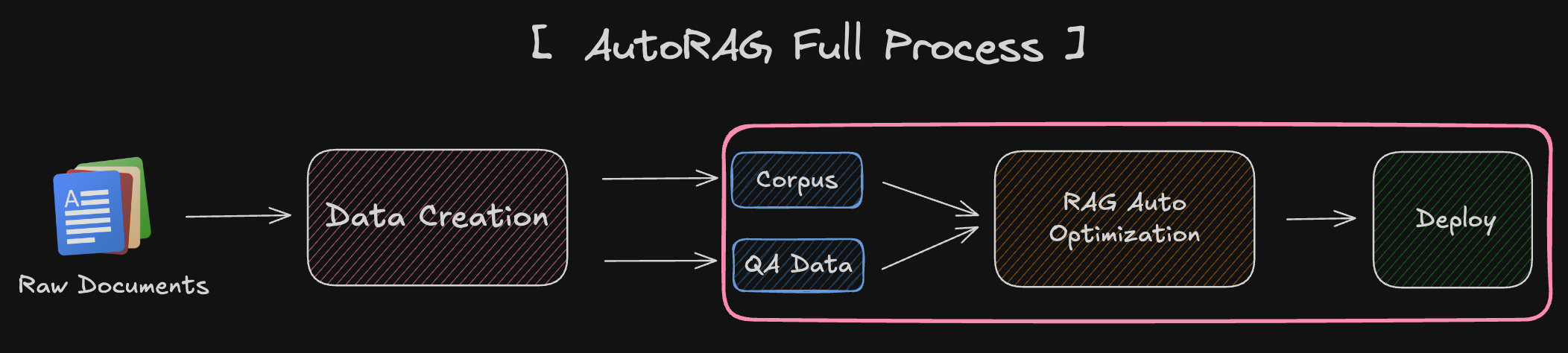
You provide a QA dataset, AutoRAG runs an offline benchmark across its search space, and the winning pipeline is exported as a production config. The more you use it, the better it gets — every run feeds back into the evaluation. It is a genuinely practical way to ship reliable RAG without a dedicated ML engineer on the team.
🚀 Ready to try AutoRAG?
Get the system requirements, Docker setup, and deployment guide.
View AutoRAG Tool Page →