Cua — Open-Source Infrastructure for Computer-Use AI Agents
Explore Cua, the open-source platform for building and deploying AI agents that can control full desktops across macOS, Linux, and Windows. Features sandboxes, SDKs, and benchmarking.

What Is Cua?
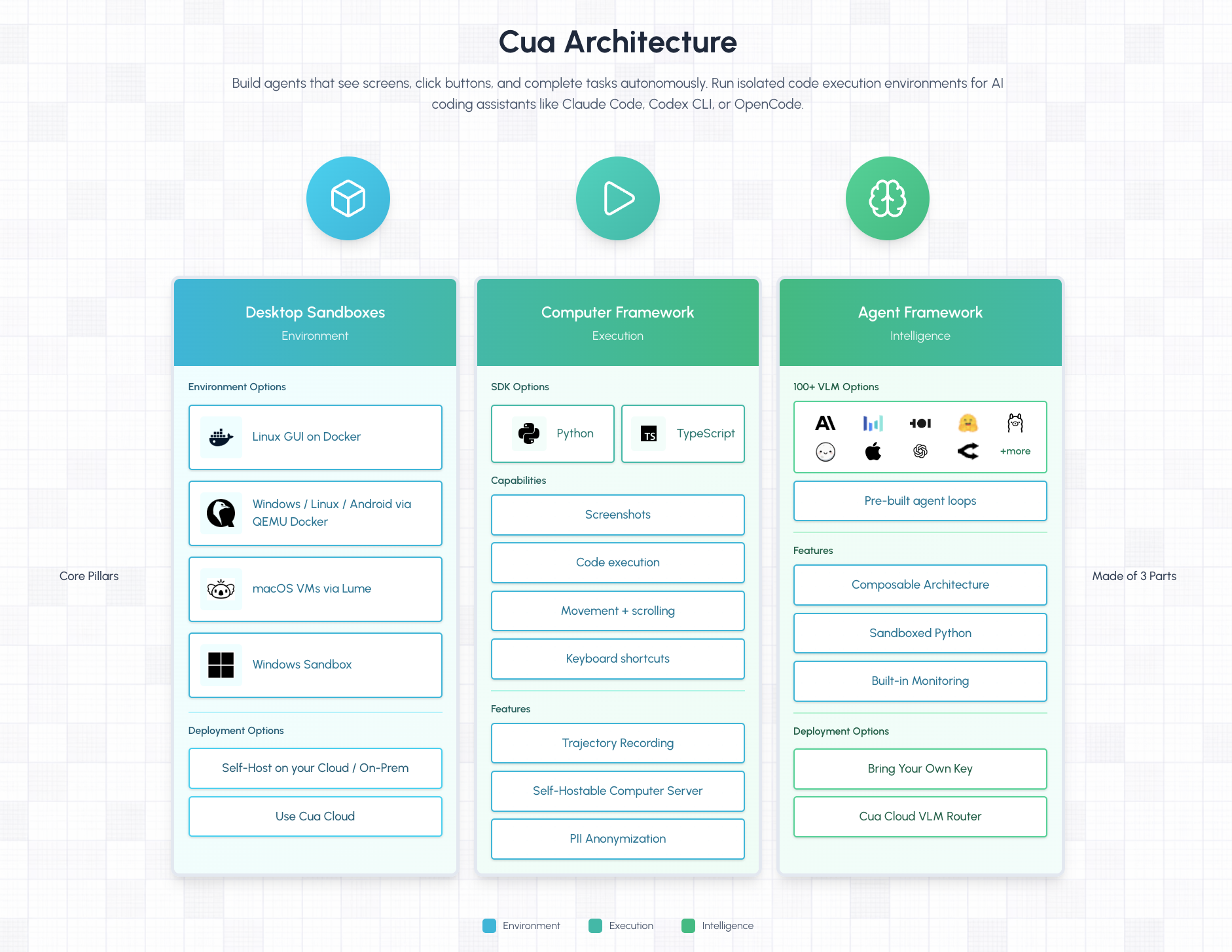
Cua is an open-source infrastructure platform purpose-built for computer-use AI agents — agents that can see, click, type, and navigate desktop interfaces just like a human. Developed by trycua, the project provides sandbox environments, SDKs, and benchmarks for training and evaluating agents that control full desktops across macOS, Linux, and Windows.
🚀 Explore Cua on Run This Ai
Docker Compose configs, system requirements, installation guides, and more — all in one place.
View Cua Tool Page →With over 19,300 GitHub stars, an MIT license, and native Docker support, Cua has quickly become the leading framework for developers building agents that interact with graphical user interfaces. Whether you're training a model to navigate macOS, running Windows sandbox tests, or benchmarking agent performance, Cua provides the complete infrastructure stack.
Key Features
Cross-Platform Sandbox Environments
Cua provides ready-to-use sandbox environments for all three major operating systems. Run macOS agents with native virtualization, spin up Linux containers for headless testing, and create Windows sandboxes for full desktop automation — all from a single API.
Comprehensive SDK Suite
The platform ships with SDKs in Python, Swift, and TypeScript, making it accessible to developers across the stack. Each SDK provides high-level APIs for screen capture, mouse/keyboard control, file operations, and application launching within sandboxed environments.
Built-in Benchmarking
Cua Bench is a dedicated evaluation framework that ships with Cua. It includes standardized benchmarks for computer-use tasks, reinforcement learning environments, and detailed performance metrics. Track your agent's progress across common desktop tasks and compare results with community baselines.
Production-Ready Agent Hosting
Cua Drivers allow you to deploy computer-use agents as background services that run 24/7 on macOS, Windows, and Linux machines. This makes it ideal for production automation workflows — monitoring dashboards, managing CI/CD pipelines, or running data extraction tasks that require a full desktop environment.
Why Self-Host Cua?
Running Cua on your own infrastructure gives you complete control over agent execution. No data leaves your environment, no rate limits, and no per-query costs. The self-hosted Docker image includes the full Cua stack — sandbox orchestrator, SDK runtime, and benchmarking suite — in a single container.
Use Cases
- AI Agent Training: Train models to navigate real desktop UIs using Cua's sandboxed environments
- Automated QA Testing: Run visual regression tests across macOS, Windows, and Linux in isolated containers
- Desktop Automation: Deploy background agents that monitor systems, extract data from legacy apps, or automate repetitive UI workflows
- Research & Evaluation: Benchmark agent performance with Cua Bench and compare against community models
Quick Start with Docker
docker pull xenium/cua:latest
docker run -d --name cua -p 8080:8080 -v ./data/cua:/data xenium/cua:latest
Conclusion
Cua represents a major step forward in computer-use AI infrastructure. By providing standardized sandboxes, cross-platform SDKs, and built-in benchmarking, it removes the infrastructure complexity from building agents that interact with real desktops. Whether you're a researcher training the next generation of GUI agents or a developer automating desktop workflows, Cua is the most complete open-source solution available today.
🚀 Deploy Cua on Run This Ai
Get Docker Compose configs, system requirements, and installation guides — all verified and ready to use.
View Cua Tool Page →