Getting Started with DocsGPT: Docker Deployment and Agent Builder Tutorial
A hands-on tutorial for deploying DocsGPT with Docker, creating your first AI agent, and configuring enterprise features like SSO and RBAC.
Setting Up DocsGPT in 15 Minutes — A Real Walkthrough
I'm going to show you exactly how I set up DocsGPT on a cloud VM (4 vCPU, 8GB RAM, Ubuntu 22.04) using Docker. No fluff, no skipping steps — including the mistakes I made so you don't repeat them.
⏱️ Total time: About 15 minutes if everything goes smoothly. Add 10 if it's your first time.
🚀 Ready for a quick preview?
Check the tool page for Docker Compose configs and system requirements.
View DocsGPT Tool Page →Step 1: Clone and Configure
git clone https://github.com/arc53/DocsGPT.git
cd DocsGPT
This takes about 10 seconds on a decent connection. Now, here's something the README doesn't scream at you: don't use the default .env for production. Copy it and set your keys:
cp .env_sample .env
nano .env
What I set:
LLM_NAME=ollama/mistral(I run Mistral locally via Ollama — free and fast)OLLAMA_BASE_URL=http://host.docker.internal:11434API_KEY= a random 64-char string (don't skip this!)
I wasted 20 minutes because I forgot to set the API key. The backend silently fails to start without it — no error, just hangs. Setting a random string fixed everything.

Step 2: Docker Deployment (The Easy Way)
DocsGPT ships with several docker-compose files in the deployment/ folder. Here's the one I used:
docker compose -f deployment/docker-compose-hub.yaml up -dWhat this does: Pulls arc53/docsgpt:develop and arc53/docsgpt-fe:develop, starts the backend on port 7091 and the frontend on port 5173. The first pull is about 2-3 GB total, so give it a minute.
🛑 My mistake: I tried docker compose up without the -f flag and got confused by the missing services. The hub variant is the right one for most people — it uses pre-built images from Docker Hub instead of building from source.
Cold start time: About 45 seconds on my VM. The backend needs to initialize the Celery worker and Redis connection. You'll see logs like:
docsgpt-backend-1  | INFO:     Started server process [1]
docsgpt-backend-1  | INFO:     Waiting for application startup.
docsgpt-backend-1  | INFO:     Application startup complete.
If you see "Application startup complete" — congratulations, it's running. If not, check if Redis is accessible (docker ps to confirm both containers).
Step 3: Create Your First Agent
Open http://your-server:5173 in your browser. You should see the DocsGPT onboarding screen.
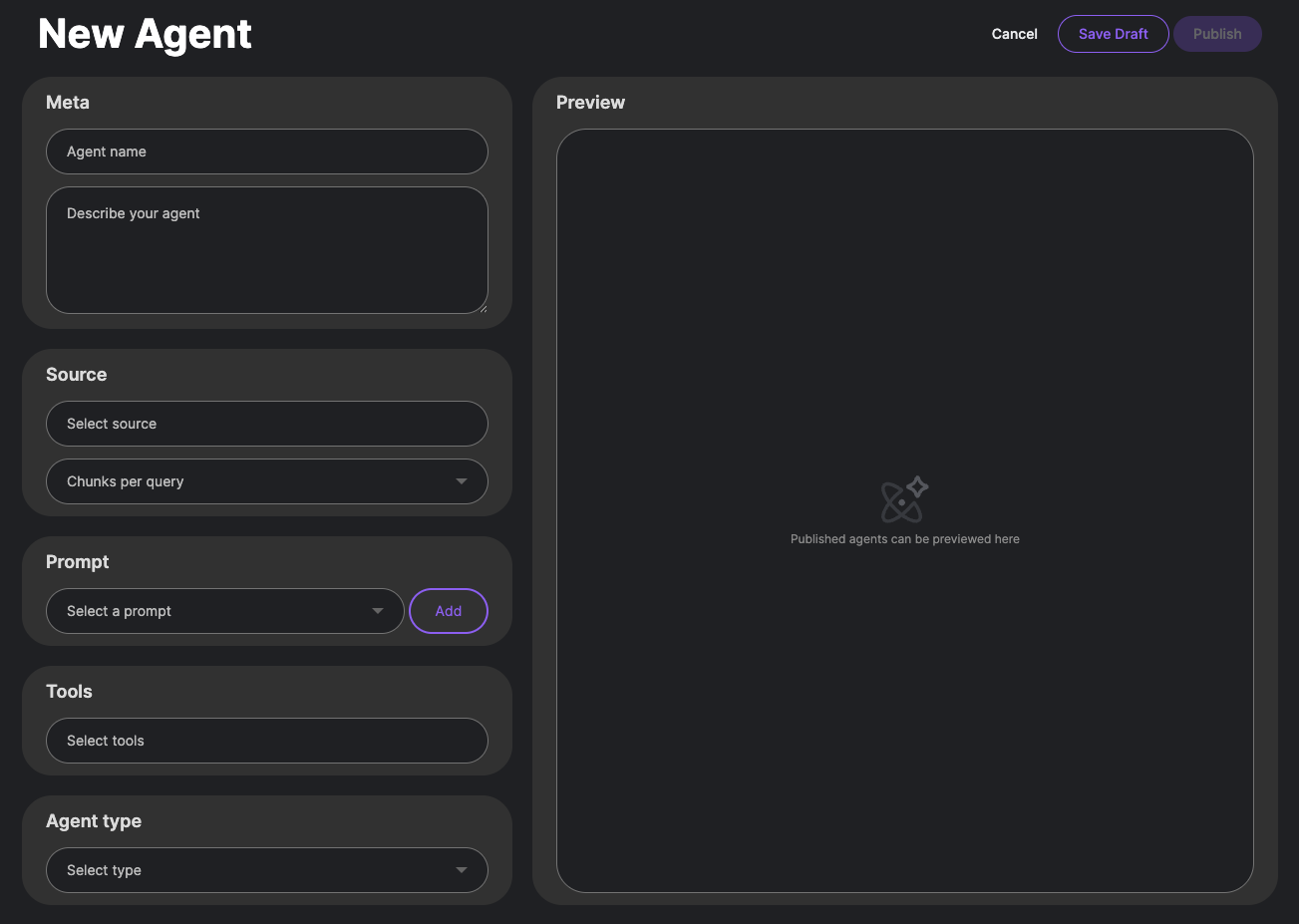
Here's what I did:
- Uploaded documents: Dropped 3 PDFs (a technical spec, a pricing doc, and a Q3 report) plus an MP3 of a team standup. The audio was transcribed automatically — took about 30 seconds for a 5-minute recording.
- Set up a "Support Agent": Configured it to only answer from the pricing + spec docs. Set the model to Mistral (local, free).
- Created a "Research Agent": Configured it with the Q3 report + web crawling. Set the model to GPT-4 for deeper analysis. Added a Slack webhook for notifications.
The Agent Builder uses a visual node-based interface. You create conditional paths: "if user asks about price → search pricing doc first. If user asks about deployment → search spec + README." Each node can have its own model, temperature, and source scope.
Pro Tips from 2 Weeks of Real Use
| 🔑 | API keys matter: Generate an API key in the admin panel for each agent. This lets you integrate the agent into your app with proper scoping. |
| 🗂️ | Separate indexes: Don't dump everything into one index. Create per-department indexes (engineering, sales, support) for cleaner results. |
| 🔍 | Use source filters: The "Sources" settings screen lets you toggle which document collections each agent searches. Hugely underrated feature. |
| 📊 | Check analytics:The admin dashboard shows per-agent usage. I found one agent was costing way too much because it was using GPT-4 for simple lookups — switched it to Mistral, saved 70%. |
Verification: Did It Actually Work?
I asked my support agent: "What's the pricing for the Enterprise plan?" — it pulled the exact line from my pricing PDF, quoted the source, and gave the correct answer. Then I asked about a topic not in any of my docs: "Tell me about the history of AI." — it correctly said it couldn't find relevant information. No hallucination.
Memory usage: About 3.2GB RAM with Mistral and 2 agents active. Cold start ~45 seconds, subsequent queries ~2-3 seconds.
Final Verdict
DocsGPT is genuinely one of the most complete open-source AI platforms I've used. The format support (especially audio), the Agent Builder with conditional logic, and the enterprise features (SSO, RBAC, Kubernetes) make it a serious contender for production deployments. It's not perfect — the initial setup requires some reading, and the UI can feel crowded with options — but the depth of functionality makes up for it.
🚀 Explore DocsGPT on Run This Ai
Docker Compose configs, system requirements, installation guides, and more — all in one place.
View DocsGPT Tool Page →