DS4 with Docker: Step-by-Step Installation Tutorial for DeepSeek 4
Learn how to deploy DS4 in Docker in ten minutes: start the arraying/ds4 container, download DeepSeek 4 Flash weights automatically, and query an OpenAI-compatible local API with curl.
🚀 Want to deploy DS4 yourself?
Docker configs, system requirements, and installation guides — all on one page.
View DS4 Tool Page →Step-by-Step: Run DeepSeek 4 Locally with Docker
This tutorial walks you through a complete DS4 deployment with Docker. In about ten minutes you will have the DeepSeek 4 Flash model answering prompts from a local, OpenAI-compatible API — completely offline.
Step 1 — Prerequisites
- Docker Engine 20.10+ (or Docker Desktop)
- At least 4 GB RAM (8 GB recommended) and a GPU with Metal, CUDA or ROCm support
- ~10 GB free disk space for the model weights
Step 2 — Start the Container
Create a working directory and a docker-compose.yml:
services:
  ds4:
    image: arraying/ds4:latest
    restart: unless-stopped
    ports:
      - 8080:8080
    volumes:
      - ./data/ds4:/data
Then start it: docker compose up -d. On first launch the container downloads the DeepSeek 4 Flash weights automatically — grab a coffee while it pulls.
Step 3 — Send Your First Prompt
Once the container is up, test it with a plain HTTP request:
curl http://localhost:8080/v1/chat/completions \
  -H "Content-Type: application/json" \
  -d '{"model":"ds4-flash","messages":[{"role":"user","content":"Explain how DS4 works in one sentence"}]}'
Because the API is OpenAI-compatible, you can point existing clients — LangChain, Open WebUI, custom scripts — at http://localhost:8080/v1 with no code changes.
Step 4 — Pick Your Model Size
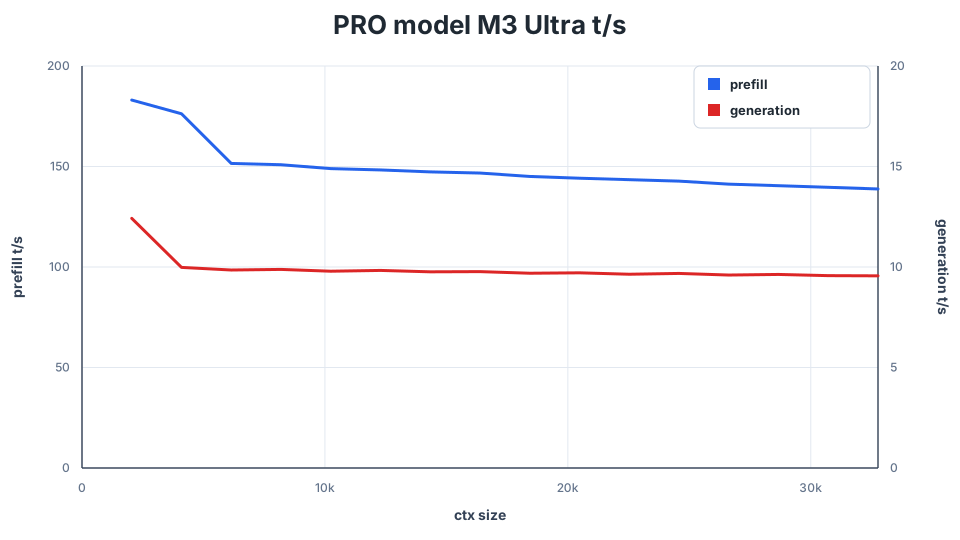
DS4 runs both the Flash model (fast, lightweight — ideal for everyday workloads) and the PRO model (heavier, higher quality — for complex reasoning). Switch by changing the model field in your requests. For a preview of expected throughput on high-end Apple Silicon, antirez's benchmark charts are worth a look:
Common Pitfalls
| Issue | Fix |
|---|---|
| Out of memory on start | Increase RAM or use the smaller Flash model |
| No GPU detected | Install the latest Metal/CUDA/ROCm drivers and verify with docker info |
| Slow first request | Normal — model weights are still loading into VRAM |
That's it — you now run DeepSeek 4 Flash and PRO entirely on your own hardware. For the full deployment reference, including system requirements and prebuilt compose files, head to the DS4 tool page.
🚀 Want to deploy DS4 yourself?
Docker configs, system requirements, and installation guides — all on one page.
View DS4 Tool Page →