Getting Started with Microsoft GraphRAG: Installation and Your First Pipeline
Learn how to install Microsoft GraphRAG, configure your first pipeline, and run global and local queries over your documents.
Getting Started with Microsoft GraphRAG
Microsoft GraphRAG is a powerful data pipeline that extracts structured knowledge graphs from unstructured text. This tutorial walks you through installing GraphRAG, configuring your first pipeline, and running a query. Whether you are analyzing corporate documents, research papers, or internal knowledge bases, GraphRAG enables deep discovery that standard RAG cannot match.
Prerequisites
- Python 3.10 or later
- An OpenAI API key (or Azure OpenAI endpoint) with GPT-4 access
- At least 4GB of RAM (8GB recommended for larger datasets)
- Basic familiarity with command-line tools
Installation
Install GraphRAG via pip:
pip install graphragVerify the installation:
graphrag --versionInitializing Your First Project
Create a new directory and initialize GraphRAG:
mkdir my-graphrag-project
cd my-graphrag-project
graphrag init --root .
This creates a settings.yaml configuration file and a prompts/ directory. Open settings.yaml and add your API key:
llm:
  api_key: ${GRAPHRAG_API_KEY}
  model: gpt-4o
  max_tokens: 4000
  temperature: 0.0
Preparing Input Data
Place your text files in the input/ directory. GraphRAG supports plain text files (.txt). For testing, create a sample file:
echo "Microsoft was founded by Bill Gates and Paul Allen in 1975.\nOpenAI was founded by Sam Altman, Greg Brockman, and others in 2015.\nMicrosoft invested heavily in OpenAI starting in 2019." > input/sample.txt
Running the Indexing Pipeline
Run the full indexing pipeline:
graphrag index --root .This will extract entities, relationships, and communities from your documents. The process may take several minutes depending on document size. You will see progress indicators as each stage completes: document chunking, entity extraction, summarization, community detection, and embedding generation.
Running Queries
Once indexing is complete, you can ask questions using two query modes. Global search synthesizes information across the entire graph:
graphrag query --root . --method global "What companies are involved in AI development?"Local search narrows to specific entities and neighborhoods:
graphrag query --root . --method local "Tell me about Microsoft's investments"The global method uses community summaries for broad questions, while local method traverses specific entity neighborhoods for targeted answers.
Auto-Tuning for Better Results
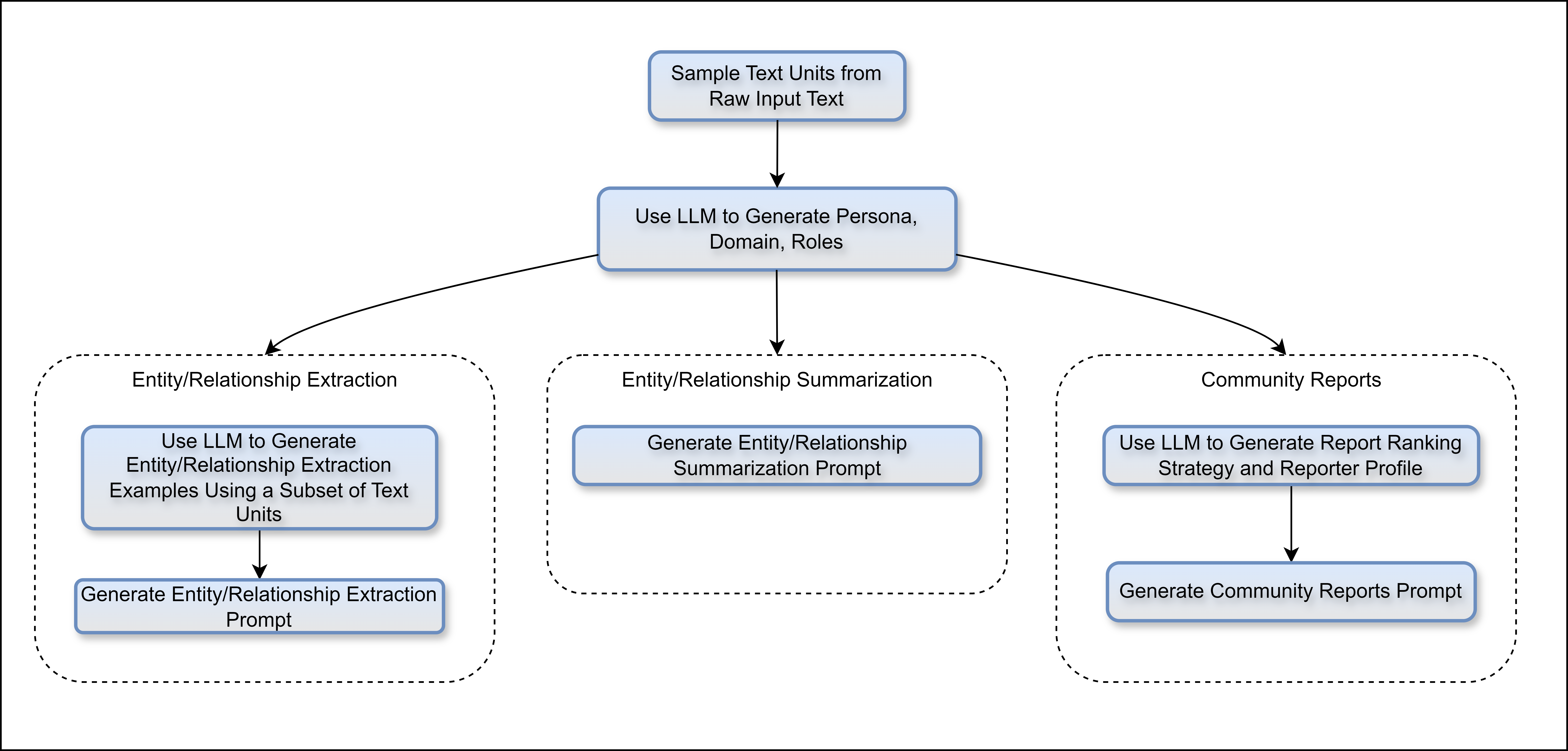
GraphRAG includes an auto-tuning feature that optimizes prompts for your specific data:
graphrag prompt-tune --root .This analyzes your documents and adjusts extraction prompts to improve entity recognition and relationship quality.
Conclusion
Microsoft GraphRAG brings enterprise-grade graph-enhanced RAG capabilities to anyone with Python and an LLM API key. Its modular architecture and auto-tuning make it suitable for document collections of any size. Start with a small dataset to understand the pipeline, then scale up to your full corpus.