Getting Started with Skyvern: Quick Docker Deployment Guide

Getting Started with Skyvern
Skyvern is an AI-powered browser automation agent that can handle complex web workflows without relying on fragile DOM selectors. This guide walks you through deploying Skyvern using Docker, so you can start automating browser tasks in minutes.
Prerequisites
Before you begin, make sure you have:
- Docker and Docker Compose installed on your server
- At least 4GB of RAM (8GB recommended for complex workflows)
- A modern Linux distribution or macOS
Quick Start with Docker
The fastest way to get Skyvern running is with Docker. Pull the official image and start a container:
docker pull skyvern/skyvern:latest
docker run -d --name skyvern \
  -p 8080:8080 \
  -v ./data/skyvern:/data \
  skyvern/skyvern:latest
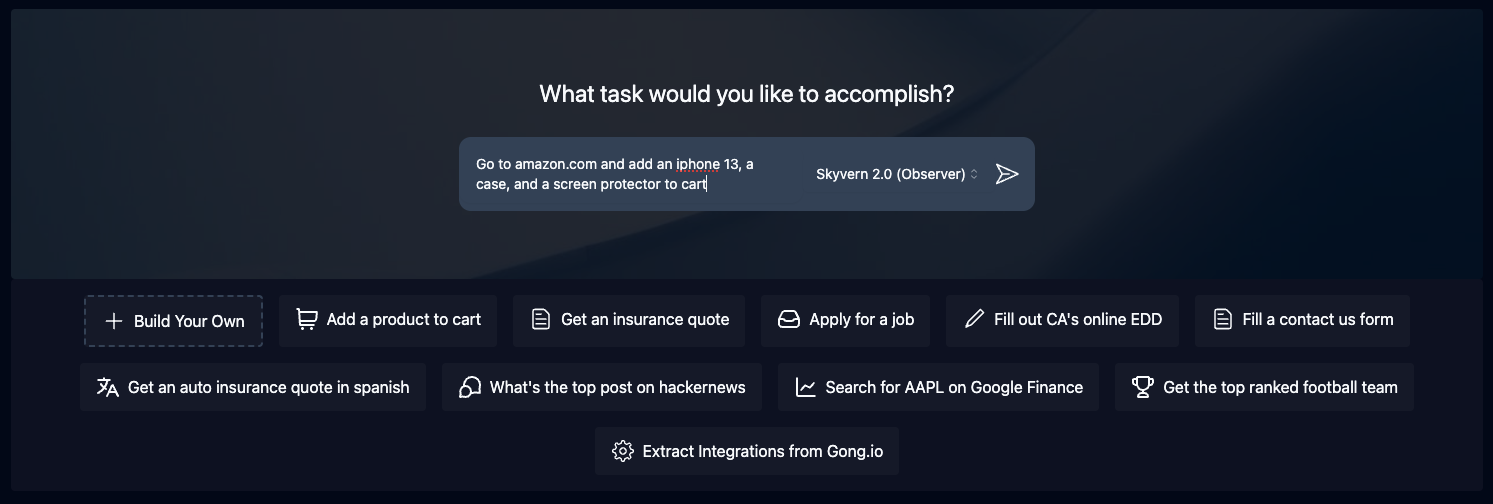
Once the container is running, open your browser and navigate to http://localhost:8080. You will see the Skyvern web UI where you can create and manage your automation workflows.
Using the REST API
Skyvern also exposes a powerful REST API for headless automation. Here is an example using curl to run a simple task:
curl -X POST http://localhost:8080/api/v1/tasks \
  -H "Content-Type: application/json" \
  -d '{
    "url": "https://example.com",
    "navigation_goal": "Fill out the contact form with sample data",
    "data_extraction_goal": "Extract the confirmation message"
  }'
Workflow Automation Examples
Skyvern excels at a wide range of browser automation tasks:
- Form Filling: Automatically fill and submit web forms across any website
- Data Extraction: Extract structured data from pages without CSS selectors
- Job Applications: Automate multi-step application workflows
- Invoice Processing: Download and organize invoices from vendor portals
- Shopping Checkouts: Navigate through e-commerce checkout flows
Docker Compose (Production)
For a more robust setup, use Docker Compose:
version: "3.8"
services:
  skyvern:
    image: skyvern/skyvern:latest
    restart: unless-stopped
    ports:
      - "8080:8080"
    volumes:
      - ./data/skyvern:/data
Why Choose Skyvern?
Traditional browser automation tools break when websites update their markup. Skyvern uses computer vision to understand the visual page, making it resilient to UI changes. Its LLM-powered reasoning means it can handle new scenarios without script modifications. And since it is fully self-hosted, your data stays private.
Conclusion
Deploying Skyvern takes just minutes with Docker. Whether you need to automate form submissions, extract web data, or build complex browser workflows, Skyvern gives you a reliable, AI-powered foundation. Start your first automation today.