GFPGAN: The AI Face Restoration Tool With 37k Stars That Actually Preserves Identity
GFPGAN uses StyleGAN priors to restore blurry old faces with remarkable quality. Here's the complete guide to the most popular open-source face restoration tool.

What Is GFPGAN?
Have an old family photo with faces so blurry you can barely recognize them? GFPGAN can fix that. With over 37,000 GitHub stars, it's the most popular open-source AI face restoration tool — and it produces results that genuinely look like the original person, not a smoothed-out mannequin.
Developed by TencentARC, GFPGAN uses a clever combination of StyleGAN (a face generation model) and a U-Net restoring network. The StyleGAN provides "prior knowledge" about what human faces should look like — eye shapes, nose structures, skin textures — while the U-Net handles the noisy, degraded input. The result is face restoration that preserves identity while adding realistic detail that was lost to compression, blur, or low resolution.
🚀 Want to deploy GFPGAN yourself?
Docker configs, system requirements, and installation guides — all on one page.
View GFPGAN Tool Page →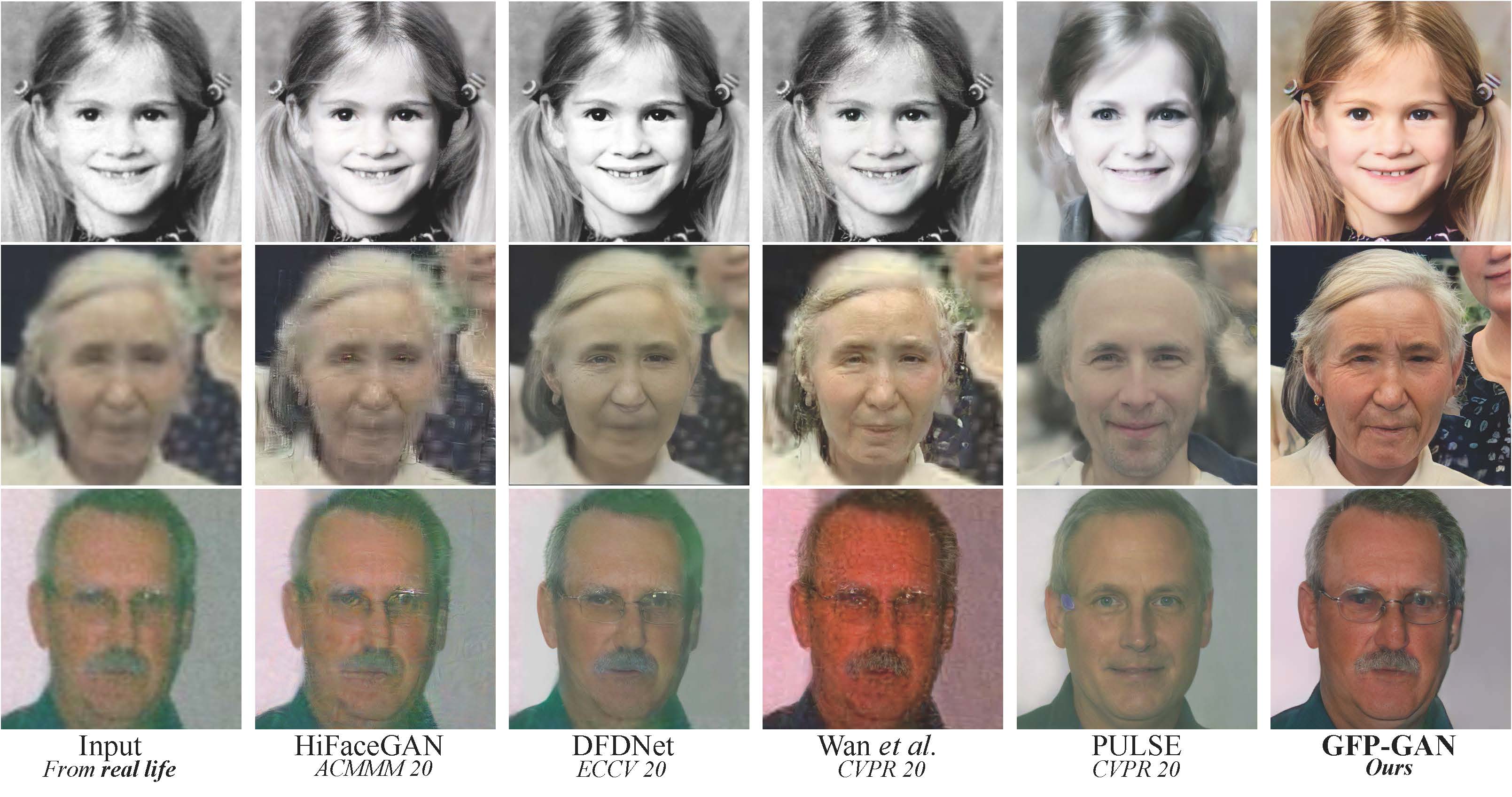
The teaser image above shows what GFPGAN can do. On the left, blurry, compressed faces. On the right, the same faces after restoration — note how facial features are sharpened, skin texture is realistic, and identity is preserved.
Why GFPGAN Is the Best Face Restoration Tool
1. StyleGAN Face Prior
This is GFPGAN's secret weapon. The model uses a pre-trained StyleGAN as a "dictionary of faces" — it knows what realistic eyes, noses, mouths, and skin should look like. When restoring a degraded face, it pulls from this prior to add realistic detail rather than hallucinating artifacts. This is why GFPGAN results look like the actual person, not a generic smoothed face.
2. Rescues Severely Degraded Faces
GFPGAN handles extreme cases that simpler upscalers fail on. Faces at 32x32 pixels, heavy JPEG compression artifacts, motion blur — GFPGAN reconstructs recognizable facial features from inputs most tools would give up on. It's particularly good at restoring eyes and mouths, which are critical for facial recognition and emotional expression.
3. Identity Preservation
Unlike generic upscalers that produce "average" faces, GFPGAN actively works to preserve identity. The model includes a facial component loss that ensures the restored face maintains the same eye shape, nose structure, and facial geometry as the original. This is essential for restoring photos of real people where identity matters.
4. Video Face Restoration
GFPGAN can process video frames, restoring faces frame by frame while maintaining temporal consistency. This makes it useful for restoring old videos, enhancing surveillance footage, and cleaning up video calls. The GPU-accelerated processing handles real-time video at 720p on modern GPUs.
5. Works with Real-ESRGAN Integration
GFPGAN integrates directly with Real-ESRGAN for complete photo restoration. Real-ESRGAN handles the background, textures, and overall image upscaling, while GFPGAN focuses specifically on restoring faces within the image. Together, they produce fully restored photos with enhanced backgrounds and crisply detailed faces.
Getting Started
Installation
git clone https://github.com/TencentARC/GFPGAN.git
cd GFPGAN
pip install -r requirements.txt
python setup.py develop
Restore a Face Image
python inference_gfpgan.py -i inputs/ -o results/ -v 1.3 -s 2-i: input folder (put your blurry face photos here)-o: output folder (restored photos appear here)-v: version (1.3 = best quality, 1.2 = faster)-s: upscale factor (2 for 2x, 4 for 4x)
Python API
import cv2
from gfpgan import GFPGANer

restorer = GFPGANer(
    model_path='experiments/pretrained_models/GFPGANv1.3.pth',
    upscale=2, arch='clean', channel_multiplier=2,
    bg_upsampler=None  # use RealESRGANer here for full restoration
)

img = cv2.imread('old_photo.jpg', cv2.IMREAD_COLOR)
_, _, restored_img = restorer.enhance(img, has_aligned=False, only_center_face=False, paste_back=True)
cv2.imwrite('restored_photo.jpg', restored_img)
Self-Hosting with Docker
docker pull wpafbo79/gfpgan:latest

docker run -d \
  --name gfpgan \
  --gpus all \
  -v ./inputs:/inputs \
  -v ./outputs:/outputs \
  wpafbo79/gfpgan:latest
GFPGAN vs Other Face Restoration Tools
| Feature | GFPGAN | CodeFormer | Real-ESRGAN |
|---|---|---|---|
| Face restoration | ★★★★★ | ★★★★☆ | ★★★☆☆ |
| Identity preservation | ★★★★★ | ★★★★☆ | ★★☆☆☆ |
| Extreme degradation | ★★★★★ | ★★★★☆ | ★★☆☆☆ |
| General upscaling | ★★☆☆☆ | ★★☆☆☆ | ★★★★★ |
| Video support | ✅ | ✅ | ❌ |
| Min VRAM | 2GB | 2GB | 4GB |
Best Use Cases
Old Photo Restoration
Bring blurry family photos from decades ago back to life. GFPGAN handles the faces, while Real-ESRGAN can handle the rest of the photo.
Video Enhancement
Restore faces in old VHS recordings, security footage, or low-quality video calls.
Forensic Applications
Enhance facial details in surveillance and evidence photos where identity is critical.
Historical Archives
Restore faces in historical photographs, paintings, and scanned documents.
Tips for Best Results
- Use
-v 1.3for the best quality model (GFPGANv1.3) - Set
-s 2for 2x upscale — it's the sweet spot for face restoration - Pair with Real-ESRGAN as
bg_upsamplerfor complete photo restoration - Use
only_center_face=Falsewhen restoring group photos - For severely damaged photos, pre-process with denoising before GFPGAN
Conclusion
GFPGAN is the definitive face restoration tool in the open-source world. Its StyleGAN prior lets it reconstruct facial details that other tools simply can't — and it preserves identity while doing so. With 37k GitHub stars, video support, and integration with Real-ESRGAN for full photo restoration, it's the tool of choice for anyone serious about fixing faces in photos and videos.
🚀 Explore GFPGAN on Run This Ai
Docker Compose configs, system requirements, installation guides, and more — all in one place.
View GFPGAN Tool Page →