How to Monitor Your Servers with Glances (Docker + Web UI)
Learn how to deploy Glances with Docker, set up multi-server monitoring, export metrics to InfluxDB, and use the built-in MCP server for AI assistant integration.

Getting Started with Glances
Glances is the easiest way to get a real-time overview of your server health. Whether you manage a single VPS or a fleet of containers, Glances provides a unified dashboard for CPU, memory, disk, network, processes, and more. In this guide, you will learn how to deploy Glances using Docker and access its powerful web interface.
Quick Start with Docker
The fastest way to run Glances is with a single Docker command:
docker run -d --name glances -p 8080:8080 --restart unless-stopped -e GLANCES_OPT=-w nicolargo/glances:latestThis starts Glances in web server mode on port 8080. Open http://localhost:8080 in your browser and you will see the full monitoring dashboard immediately.
Docker Compose Setup
For a more production-ready setup, use this Docker Compose configuration:
version: "3"
services:
  glances:
    image: nicolargo/glances:latest
    restart: unless-stopped
    ports:
      - "8080:8080"
    volumes:
      - /var/run/docker.sock:/var/run/docker.sock:ro
      - glances_data:/data
    environment:
      - GLANCES_OPT=-w
      - TZ=UTC

volumes:
  glances_data: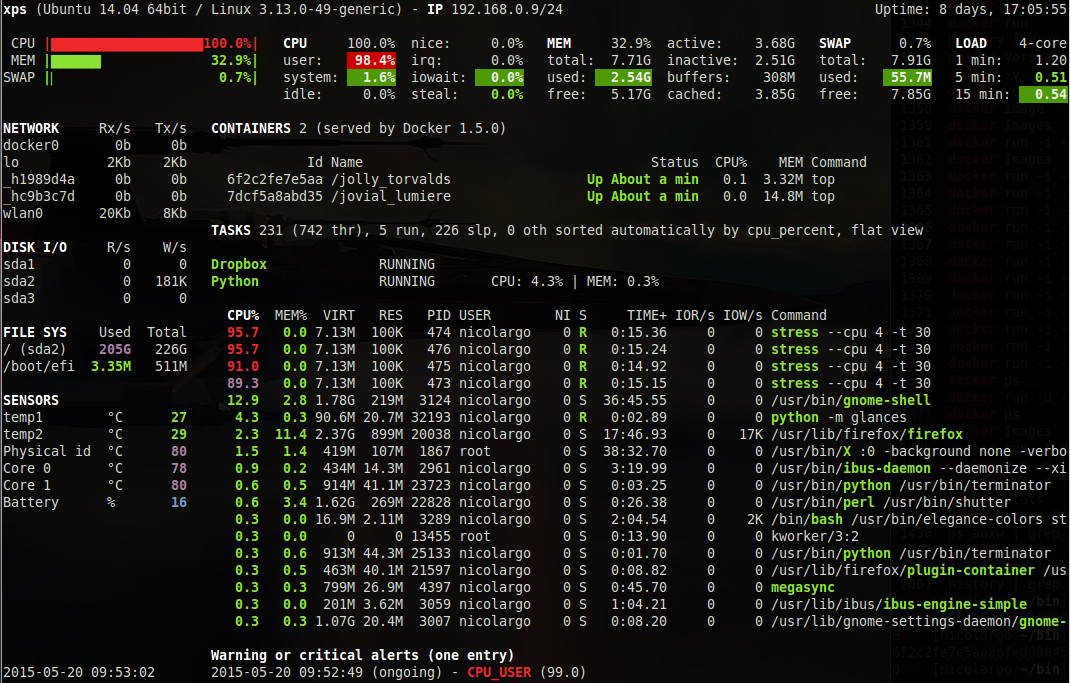
Client/Server Mode for Multi-Server Monitoring
To monitor multiple servers from one Glances dashboard, run a Glances server on each machine:
# Server (headless mode)
docker run -d --name glances-server -p 61209:61209 nicolargo/glances:latest glances -s

# Client (connects to the server)
docker run -it --rm nicolargo/glances:latest glances -c SERVER_IP
Exporting Metrics
Glances can export data to popular time-series databases for long-term storage and alerting:
# Export to InfluxDB
docker run -d --name glances -p 8080:8080 nicolargo/glances:latest glances --export influxdb --influxdb-host INFLUX_HOST
Using the MCP Server with AI Assistants
Glances 4.5.1+ includes a built-in MCP (Model Context Protocol) server. This means AI coding assistants like Claude and Cursor can query your system metrics directly. Configure your AI tool to connect to the Glances MCP endpoint for natural-language system monitoring.
Why Self-Host Glances?
Self-hosting Glances gives you complete control over your monitoring infrastructure. No data is sent to third parties, no subscription fees, and no rate limits. You can customize the dashboard, plugins, and export targets to fit your exact needs. It runs on any system with Python or Docker — from a Raspberry Pi to a 64-core production server.
Conclusion
Glances is the Swiss Army knife of system monitoring — lightweight, powerful, and endlessly flexible. With Docker deployment taking under 30 seconds, there is no reason not to have it running on every machine you manage.