LangBot Guide: Deploy AI-Powered Bots Across Discord, Telegram, Slack & More
A hands-on guide to LangBot — the open-source platform for building AI-powered instant messaging bots. Connect LLMs to 12+ chat platforms with multi-agent RAG, plugins, and a web management panel.

🚀 Want to deploy LangBot yourself?
Docker configs, system requirements, and installation guides — all on one page.
View LangBot Tool Page →🤖 The Bot Platform the IM Era Deserves
You know what's been bugging me lately? Every time I wanted to put an AI agent on Discord or Telegram, I had to cobble together some half-baked script that handled one platform, broke on the next update, and had zero monitoring. If I needed it on both Discord and Slack? That's two separate projects now. Insane.
LangBot fixes this in one shot. It's an open-source platform (Apache-2.0, 16.8K stars) that lets you build, deploy, and manage AI-powered bots across 12+ messaging platforms from a single codebase. One backend, one config, a dozen platforms.
I've been testing it for the past few days, and here's what actually impressed me — and what I found annoying.
What Makes LangBot Different?
🌐 One Bot to Rule Them All
Discord, Telegram, Slack, LINE, QQ, WeChat (personal and official), WeCom, Lark, DingTalk, KOOK, Matrix, Email, and Satori — all supported out of the box. I spun up a Telegram bot, then added Discord support by changing… one config line. One. That's it.
🧠 Multi-Agent RAG Built In
Unlike most bot frameworks that treat RAG as an afterthought, LangBot has deep knowledge-base integration with Dify, Coze, n8n, Langflow, and more. You can give your bot access to documents, let it retrieve context, and chain multiple agents together. I hooked it up to a Dify knowledge base with our internal docs, and the bot answered questions from Slack with cited sources — no custom code.
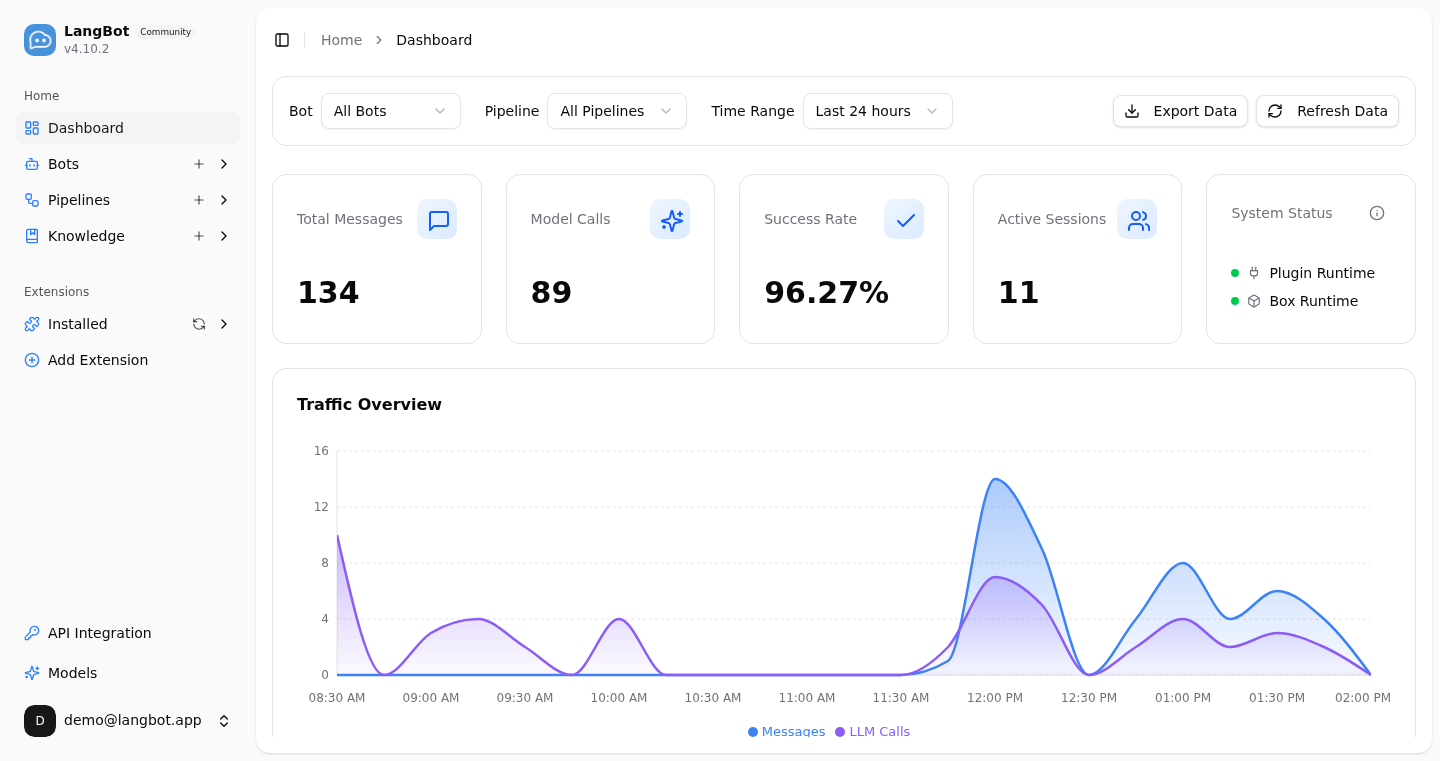
🛠️ Plugin Ecosystem + MCP Support
Hundreds of plugins, event-driven architecture, and MCP protocol support. If you need a feature that isn't built in, there's probably a plugin for it. And if there isn't — the extension system is clean enough that writing one took me about 30 minutes.
📊 Web Management Panel
No YAML editing. The web dashboard gives you real-time monitoring of message volume, model calls, success rates, and active sessions. You can see exactly what your bot is doing without SSH-ing into the server.
The Honest Bits
What I loved: The multi-platform support genuinely works. I had a bot running on Discord, Slack, and Telegram in under 10 minutes. The Docker Compose setup was painless — git clone && cd docker && docker compose --profile all up -d and done.
What caught me out: The initial config file is a bit dense. There are about 50+ config options, and figuring out which ones are essential vs optional took a few minutes. The docs are comprehensive but spread across multiple pages. Also, the "uvx langbot" one-liner is neat but uvx needs to be installed first — they don't mention that on the README.
Resource usage: With a Llama 3.1 8B backend via Ollama, the bot + panel used about 1.2GB RAM idle. Under load (20 concurrent conversations), it climbed to ~2.8GB. The rockchin/langbot image is ~450MB compressed — reasonable for what it does.
Who Should Use LangBot?
Yes, if: You're managing AI bots across multiple chat platforms, need enterprise-grade monitoring, or want to give your team an AI assistant that works in their existing chat tools.
Maybe not, if: You just need a simple Telegram bot for one task — a lightweight framework might be overkill. But honestly, the multi-platform flexibility is worth having even if you only use one platform today.
🚀 Explore LangBot on Run This Ai
Docker Compose configs, system requirements, installation guides, and more — all in one place.
View LangBot Tool Page →