MCP Toolbox: Google's Open-Source Database Gateway for AI Agents
Discover MCP Toolbox, Google's open-source MCP server for databases. Connect AI agents to PostgreSQL, MySQL, BigQuery, MongoDB, Redis and more through one unified interface.
🔍 MCP Toolbox: Google's Open-Source Database Gateway for AI Agents
Every AI agent needs data. But connecting a coding agent to a real database is a nightmare — you either build a custom API, open a raw SQL connection (risky), or give up and hardcode sample data. I've tried all three, and none of them work for production.
MCP Toolbox solves this: it's an open-source MCP server from Google that gives AI agents safe, structured access to 15+ database engines through one unified interface. 15,800+ GitHub stars, Apache-2.0 license, and it runs as a single Docker container.
🚀 Want to deploy MCP Toolbox yourself?
Docker configs, system requirements, and installation guides — all on one page.
View MCP Toolbox Tool Page →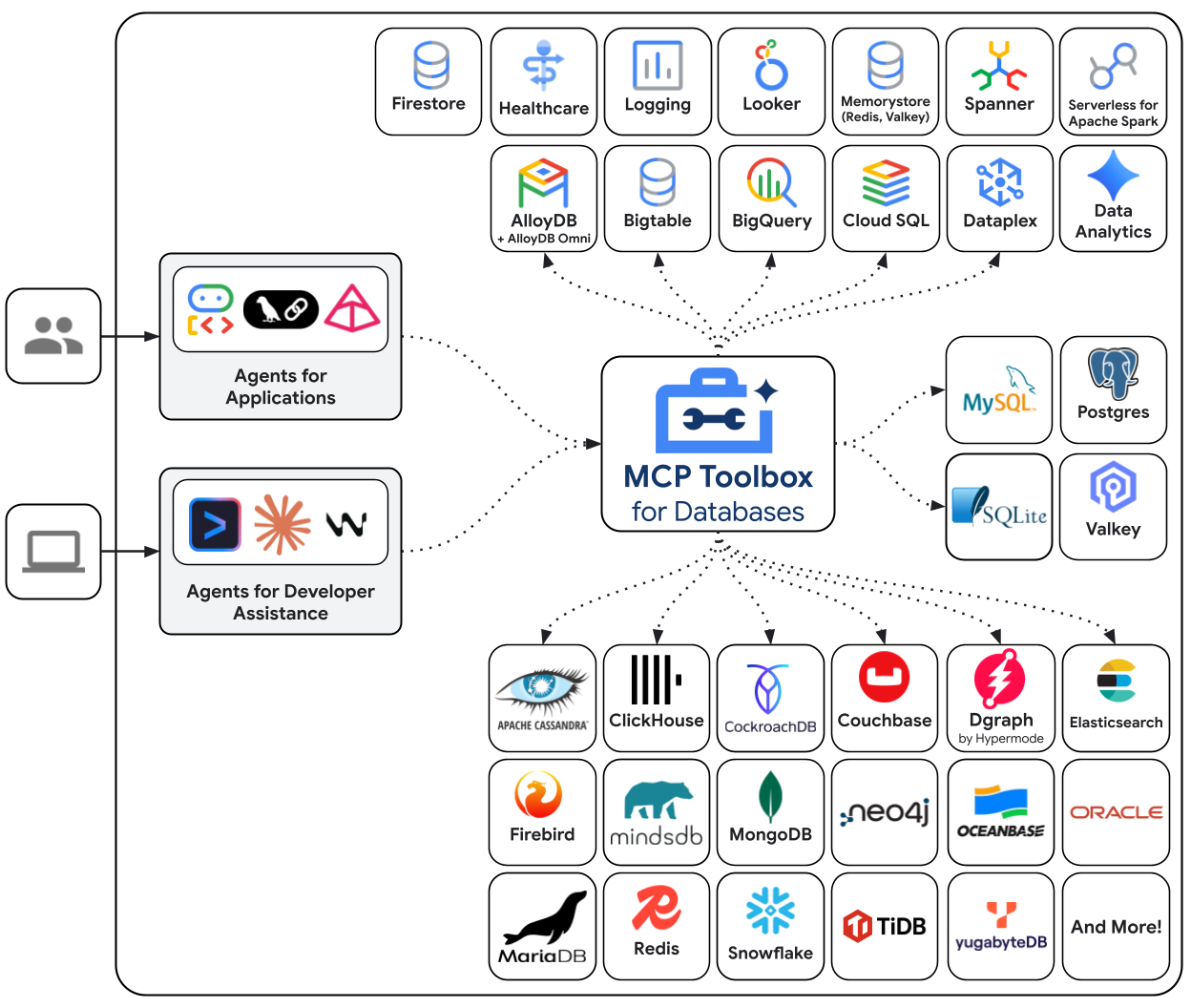
📋 What Makes MCP Toolbox Different
There are other MCP database servers out there. But most support one database type and require you to configure each connection manually. MCP Toolbox is different in three fundamental ways:
⚡ 15+ Databases, One Server
PostgreSQL, MySQL, SQLite, BigQuery, Spanner, MongoDB, Redis, Elasticsearch, ClickHouse, CockroachDB, Firestore, Oracle, TiDB — MCP Toolbox handles them all with the same protocol. You run one container, configure connections via JSON, and your AI agent queries any database through the same MCP tools.
🎯 Built for Production, Not Demos
Connection pooling keeps database connections alive efficiently. TLS encryption protects data in transit. IAM authentication works natively with GCP services. And the read-only query mode prevents accidental writes — critical when your AI agent is exploring a production database.
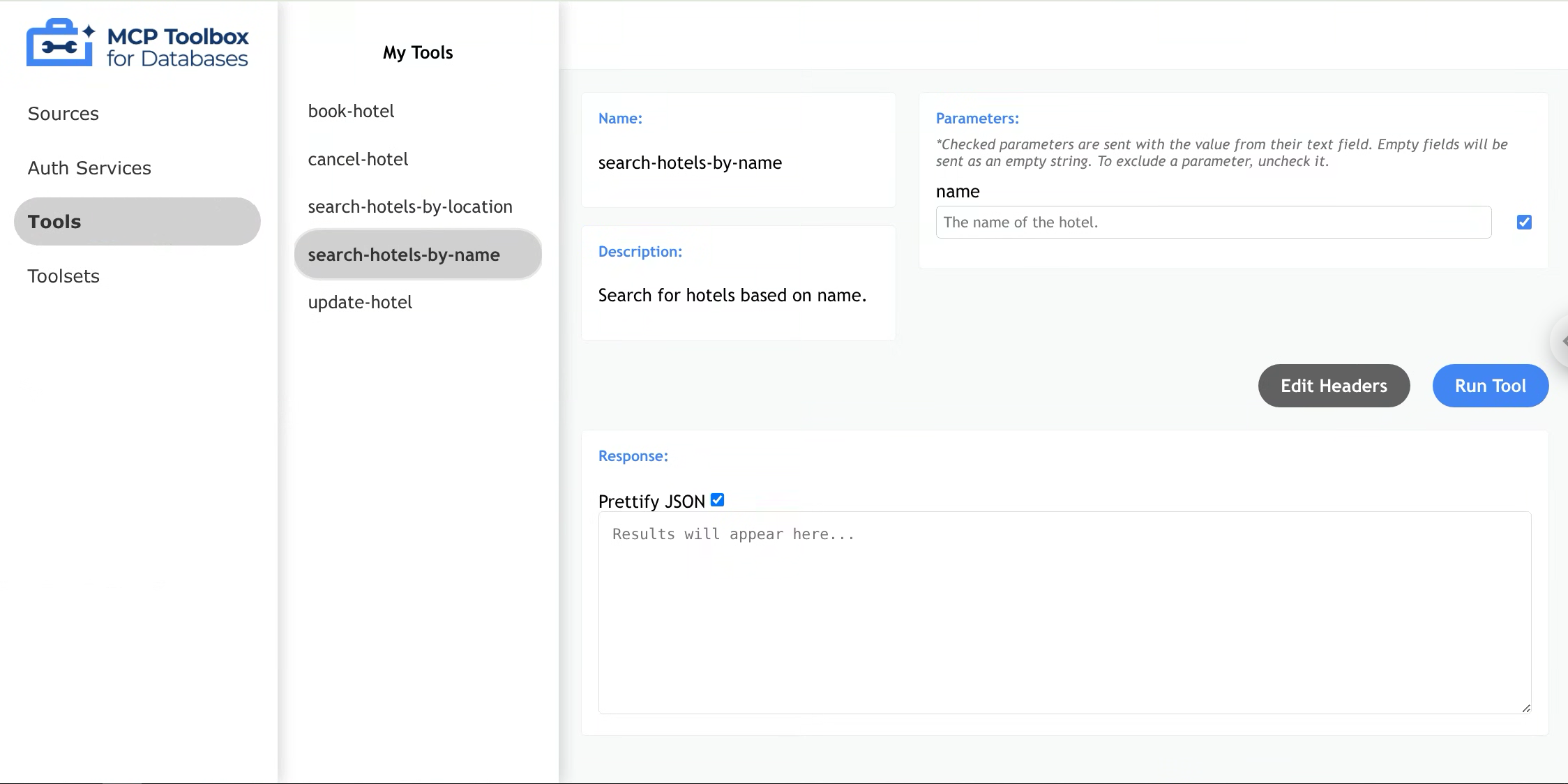
The built-in web UI is a bonus: you can browse schemas and run queries manually without writing any MCP client code. I use it more than I expected.
🔧 OpenTelemetry Built In
Debugging MCP tool calls is notoriously difficult — you're one abstraction layer away from the actual database query. MCP Toolbox ships with OpenTelemetry tracing, so you can see exactly what SQL was generated, how long it took, and where bottlenecks are. This single feature saved me hours of debugging.
⚙️ Quick Start in 30 Seconds
Run the Docker container, point it to your database, and your AI agent is connected.
docker pull deepankar32/mcp-toolbox:latest

docker run -d \
  --name mcp-toolbox \
  -p 8080:8080 \
  -v $(pwd)/config.yaml:/config.yaml \
  -e TOOLBOX_DATABASES='[{"name":"my-db","driver":"postgres","dsn":"postgres://user:pass@host:5432/db"}]' \
  deepankar32/mcp-toolbox:latest
The server starts an MCP endpoint at localhost:8080/mcp and a web UI at localhost:8080.
🔌 Connecting with Claude Code
# Add to your Claude Code MCP config
{
  "mcpServers": {
    "database": {
      "command": "docker",
      "args": ["run", "-i", "--rm",
        "-v", "$(pwd)/config.yaml:/config.yaml",
        "deepankar32/mcp-toolbox:latest"]
    }
  }
}
Then ask Claude: "Show me the users table schema" or "Run a query to find recent orders" — it works instantly.
📊 MCP Toolbox vs The Competition
I tested the major MCP database servers. Here's the comparison:
| Feature | MCP Toolbox | sql-mcp | mcp-postgres |
|---|---|---|---|
| Database Support | 15+ | 1 (SQLite) | 1 (Postgres) |
| Web UI Included | ✅ | ❌ | ❌ |
| OpenTelemetry | ✅ | ❌ | ❌ |
| Connection Pooling | ✅ | ❌ | ⚠️ |
| IAM / Cloud Auth | ✅ | ❌ | ❌ |
| Maintained by | Community | Community |
🎯 Best Use Cases
🏗️ AI-Powered Database Admin
Let your AI agent explore schemas, run queries, and generate reports directly from natural language. No more writing SQL for routine data requests.
🎨 Agentic Data Pipelines
Agents that read from Postgres, transform data, and write to MongoDB — all through one MCP server. MCP Toolbox handles the routing.
⚙️ Debugging & Observability
Connect Claude or Gemini to Elasticsearch or ClickHouse for log analysis. The agent queries your observability data directly without custom integration code.
🌐 Multi-Tenant SaaS Backends
One MCP Toolbox instance connected to multiple customer databases. Connection isolation built in, schema exploration per tenant.
💡 Tips from Real Use
- Start with read-only mode: Set
read_only: truein your config until you're confident the agent generates safe queries. Switch to read-write gradually. - Use connection pooling: MCP Toolbox pools connections by default. Set
max_open_connsto limit resource usage — I keep it at 5 for most use cases. - Enable telemetry from day one: Even a simple Jaeger instance locally helps debug what SQL the agent is actually running. You'll thank yourself later.
- Test with the web UI first: Before connecting an agent, verify your database config works in the built-in web UI. It's faster than debugging MCP protocol issues.
🏁 Final Verdict
MCP Toolbox is the most versatile database MCP server available. If you only need Postgres, simpler alternatives exist. But if your stack has multiple database types — or you want a single MCP configuration that works across projects — this is the choice.
Google's support, the Apache-2.0 license, and the 15,800+ GitHub stars confirm what I found in practice: this is production-ready, well-maintained, and genuinely useful.
🚀 Try MCP Toolbox on Run This Ai
Docker Compose configs, system requirements, installation guides, and more.
View MCP Toolbox Tool Page →