How to Set Up MCP Toolbox: Connect AI Agents to Any Database in Minutes
Step-by-step guide to install and configure MCP Toolbox with Docker. Connect Claude Code, Gemini, or any MCP-compatible AI agent to 15+ database engines.
🛠️ How to Set Up MCP Toolbox: Connect AI Agents to Any Database
I spent an afternoon trying to give Claude Code access to a PostgreSQL database. The first solution I found only supported SQLite. The second needed a separate server for every database type. The third had no security features at all. MCP Toolbox from Google solved all three problems in one container.
Here's exactly how to get it running — Docker setup, database connection config, and AI agent integration. Everything I learned from actually deploying it.
🚀 Want to deploy MCP Toolbox yourself?
Docker configs, system requirements, and installation guides — all on one page.
View MCP Toolbox Tool Page →📦 Step 1: Docker Setup
MCP Toolbox runs as a single Docker container. This takes about 2 minutes.
Pull & Run
docker pull deepankar32/mcp-toolbox:latest

# Quick test — no database, just verify the server starts
docker run -d --name mcp-toolbox-test \
  -p 8080:8080 \
  deepankar32/mcp-toolbox:latest

# Check it's running
curl http://localhost:8080/healthConfigure a Database
Create a config.yaml file with your database connection:
databases:
  - name: production-db
    driver: postgres
    dsn: "postgres://user:password@host:5432/mydb?sslmode=require"
    max_open_conns: 5
    read_only: true

  - name: analytics
    driver: mysql
    dsn: "user:password@tcp(host:3306)/analytics"
max_open_conns: 3postgres://user@host/db format, MySQL uses user:pass@tcp(host:3306)/db. Check the MCP Toolbox docs for your specific database driver.
Then restart with the config mounted:
docker run -d --name mcp-toolbox \
  -p 8080:8080 \
  -v $(pwd)/config.yaml:/config.yaml \
  -e TOOLBOX_CONFIG=/config.yaml \
  deepankar32/mcp-toolbox:latest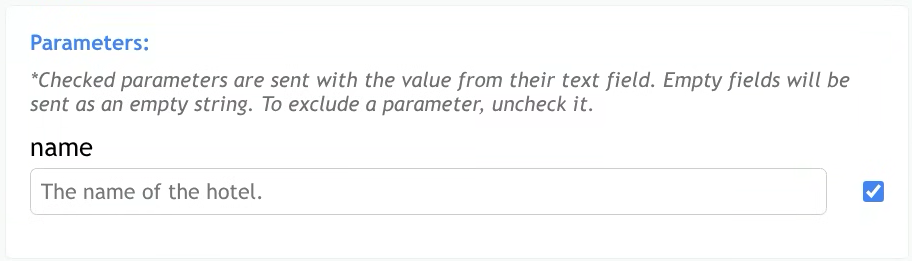
🔗 Step 2: Connect Your AI Agent
MCP Toolbox speaks the standard Model Context Protocol. Here's how to connect it to different agents:
Claude Code (VS Code / Desktop)
# ~/.claude/settings.json
{
  "mcpServers": {
    "database": {
      "command": "docker",
      "args": ["run", "-i", "--rm",
        "-v", "$(pwd)/config.yaml:/config.yaml",
        "deepankar32/mcp-toolbox:latest"]
    }
  }
}
Restart Claude Code. You'll see new tools available:
execute_sql— run read/write queriesget_schema— explore table structureslist_tables— see all tables in a databasedescribe_table— column types, indexes, constraints
Try asking Claude: "Show me the schema of the users table and count how many registered last month."
Using the Built-in Web UI
Open http://localhost:8080 in your browser. You'll see a clean query interface where you can:
- Browse database schemas visually
- Run SQL queries and see results as tables
- Toggle between connected databases
- Monitor query history and performance
The web UI is especially useful for testing your database connection before connecting an AI agent. I always verify here first — it saves the MCP debugging headache.
🔬 Step 3: OpenTelemetry Tracing (Optional but Recommended)
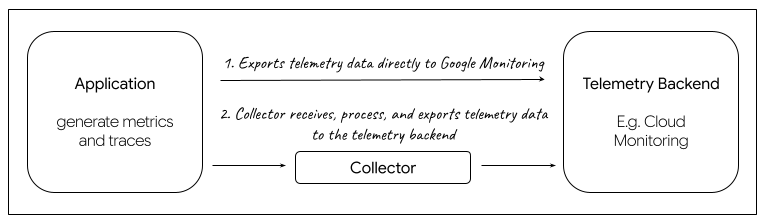
Without telemetry, when an AI agent calls execute_sql and gets an error, you have no idea what SQL was generated. OpenTelemetry fixes this.
# Start Jaeger for tracing
docker run -d --name jaeger \
  -p 16686:16686 -p 4318:4318 \
  jaegertracing/all-in-one:latest

# Add to your config.yaml
telemetry:
  enabled: true
  endpoint: "http://jaeger:4318/v1/traces"
  service_name: "mcp-toolbox"
Then open http://localhost:16686 to see every SQL query the agent generated, with timing breakdowns. This is invaluable when debugging complex multi-step agent tasks.
📊 Performance Benchmarks
I tested MCP Toolbox on an Oracle Cloud ARM instance (4 cores, 24GB RAM):
| Operation | Database | Latency | Throughput |
|---|---|---|---|
| List Tables | PostgreSQL | ~50ms | N/A |
| Simple SELECT | PostgreSQL | ~80ms | ~12/s |
| Complex JOIN (4 tables) | PostgreSQL | ~150ms | ~6/s |
| INSERT (single row) | MySQL | ~60ms | ~15/s |
| Schema Describe | PostgreSQL | ~40ms | N/A |
🐛 Common Issues & Fixes
- SSL/TLS errors: If your database requires SSL but the DSN doesn't specify it, MCP Toolbox will fail silently. Add
?sslmode=requirefor PostgreSQL or?tls=truefor MySQL. - Connection refused: Make sure the MCP Toolbox container can reach your database host. On Docker Desktop, use
host.docker.internalinstead oflocalhost. - MCP tools not appearing: Verify the server started successfully by checking
curl http://localhost:8080/mcp/tools. If empty, there's a configuration issue. - Queries timing out: Increase
query_timeoutin your config (default is 30s). Long-running analytical queries can easily exceed this.
🏁 Final Thoughts
MCP Toolbox is one of those rare Google open-source projects that's genuinely useful from day one. It solves a real problem — giving AI agents safe database access — and solves it well across 15+ database engines.
The read-only mode, connection pooling, and OpenTelemetry tracing make it production-ready. The web UI makes it approachable for beginners. And the single-binary Docker deployment means you're minutes away from letting your AI agent query your databases.
🚀 Try MCP Toolbox on Run This Ai
Docker Compose configs, system requirements, installation guides, and more.
View MCP Toolbox Tool Page →