How to Deploy Mesh LLM with Docker: A Step-by-Step Tutorial
Deploy your own Mesh LLM node with Docker Compose, connect it to the public mesh or keep it private, and start sharing compute with your agents. Step-by-step with commands.
🚀 Want to deploy Mesh LLM yourself?
Docker configs, system requirements, and installation guides — all on one page.
View Mesh LLM Tool Page →Prerequisites
- A machine with Docker installed (Linux, macOS, or Windows with WSL2)
- At least 4 GB RAM and 2 vCPUs for a basic node
- Network access to pull the image from GitHub Container Registry
Step 1 — Pull the Image
The official image is published to GHCR and is pulled automatically by Compose:
docker pull ghcr.io/mesh-llm/mesh-llm:latest
Step 2 — Docker Compose
Create a docker-compose.yml with a single service and a persistent data volume:
services:
  mesh-llm:
    image: ghcr.io/mesh-llm/mesh-llm:latest
    restart: unless-stopped
    ports:
      - "8080:8080"
    volumes:
      - ./data/mesh-llm:/data
Step 3 — Start the Node
docker compose up -d
Open http://localhost:8080 in your browser. The web console lets you chat with models, manage nodes, and configure what your mesh shares publicly.
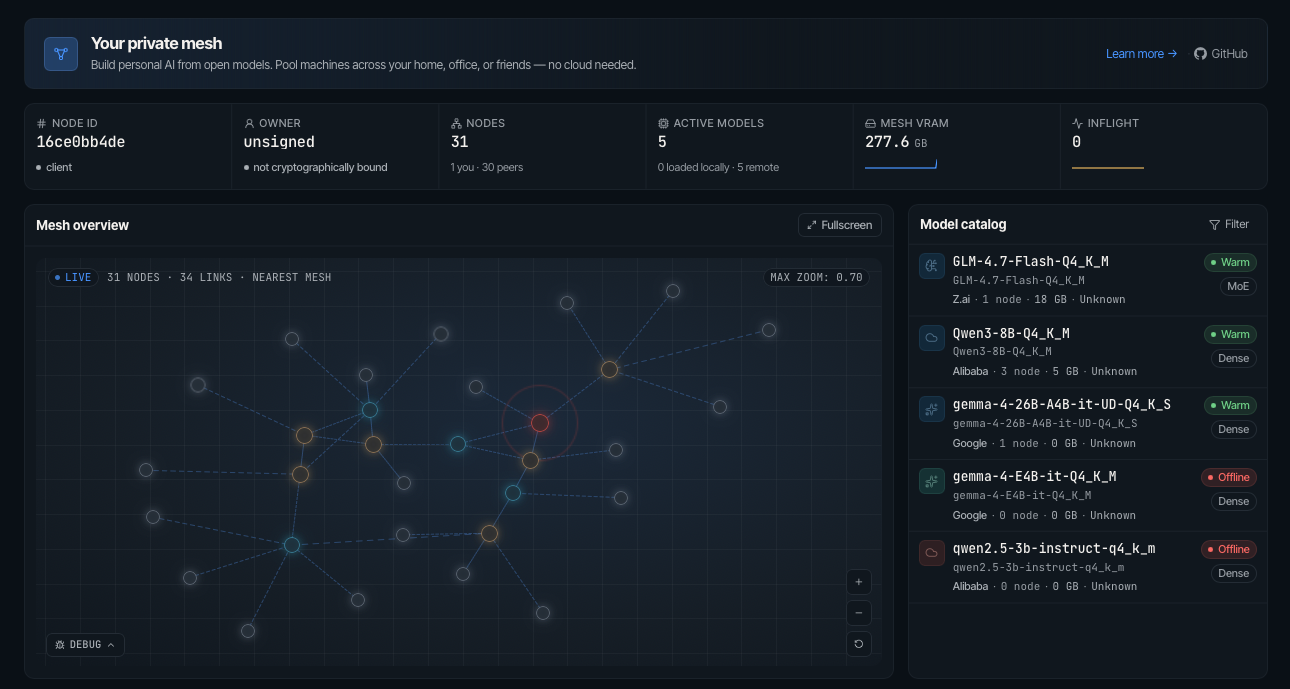
Step 4 — Headless API Mode
For agents and automation, run API-only with MESH_HEADLESS=1 in the environment. Your Rust-powered endpoint then serves inference requests to any client, private or public.
Verifying Your Setup
| Check | Command |
|---|---|
| Container health | docker ps |
| Console reachable | curl -I http://localhost:8080 |
| Logs | docker compose logs -f |
That's it — your node is live. Add more machines, join the public mesh, or keep everything private behind your firewall.
🚀 Want to deploy Mesh LLM yourself?
Docker configs, system requirements, and installation guides — all on one page.
View Mesh LLM Tool Page →