How to Set Up and Use Oh My Pi: A Step-by-Step Tutorial
Learn how to install, configure, and use Oh My Pi (omp) — the AI coding agent for the terminal. Step-by-step guide covering installation, LLM provider setup, shell completions, LSP integration, debugging, and advanced features.
How to Set Up and Use Oh My Pi: A Step-by-Step Tutorial
Oh My Pi (omp) is a powerful AI coding agent that lives in your terminal. In this hands-on tutorial, we'll walk through installation, configuration, and real-world usage so you can start coding with AI assistance right away.
🚀 Want to deploy Oh My Pi yourself?
Docker configs, system requirements, and installation guides — all on one page.
View Oh My Pi Tool Page →Prerequisites
Before you begin, make sure you have:
- macOS, Linux, or Windows with a modern terminal
curl, Homebrew, or Bun installed (pick your preferred method)- An API key for at least one LLM provider (OpenAI, Anthropic, DeepSeek, etc.)
- Bun ≥ 1.3.14 (for the Bun installation method)
Step 1: Install Oh My Pi
The fastest way to install on macOS or Linux is with a single command:
curl -fsSL https://omp.sh/install | shAlternatively, if you use Homebrew:
brew install can1357/tap/ompFor Windows users, open PowerShell as Administrator and run:
irm https://omp.sh/install.ps1 | iexStep 2: Configure Your LLM Provider
Oh My Pi supports over 40 LLM providers. Set your API key as an environment variable or in a config file:
# For OpenAI
export OPENAI_API_KEY="sk-your-key-here"

# For Anthropic
export ANTHROPIC_API_KEY="sk-ant-your-key-here"

# For DeepSeek
export DEEPSEEK_API_KEY="your-deepseek-key"
Step 3: Set Up Shell Completions
Oh My Pi generates its own completion scripts, so they never drift from the actual CLI:
# zsh — add to ~/.zshrc
eval "$(omp completions zsh)"

# bash — add to ~/.bashrc
eval "$(omp completions bash)"

# fish
omp completions fish > ~/.config/fish/completions/omp.fish
Step 4: Your First Task
Let's put Oh My Pi to work. Navigate to a project directory and start a session:
cd ~/projects/my-app
omp
Once inside the interactive session, you can ask Oh My Pi to perform tasks directly. For example:
# Ask it to explain the codebase structure
> "What does this project do? Give me a high-level overview."

# Ask it to find and fix a bug
> "Find the bug in the authentication handler and fix it."

# Refactor code
> "Extract the database connection logic into a separate module."
Step 5: Advanced Features
Using LSP Integration
Oh My Pi integrates with your project's language server to provide code intelligence — go-to-definition, find references, hover information, and more:
> "Find all references to the User model."
> "Show me the definition of the authenticate function."
Running Python Code
Oh My Pi can execute Python code inline, making it perfect for data analysis and ML workflows:
> "Run this Python script and show me the results."
> "Analyze the CSV data in ./data/sales.csv and create a summary."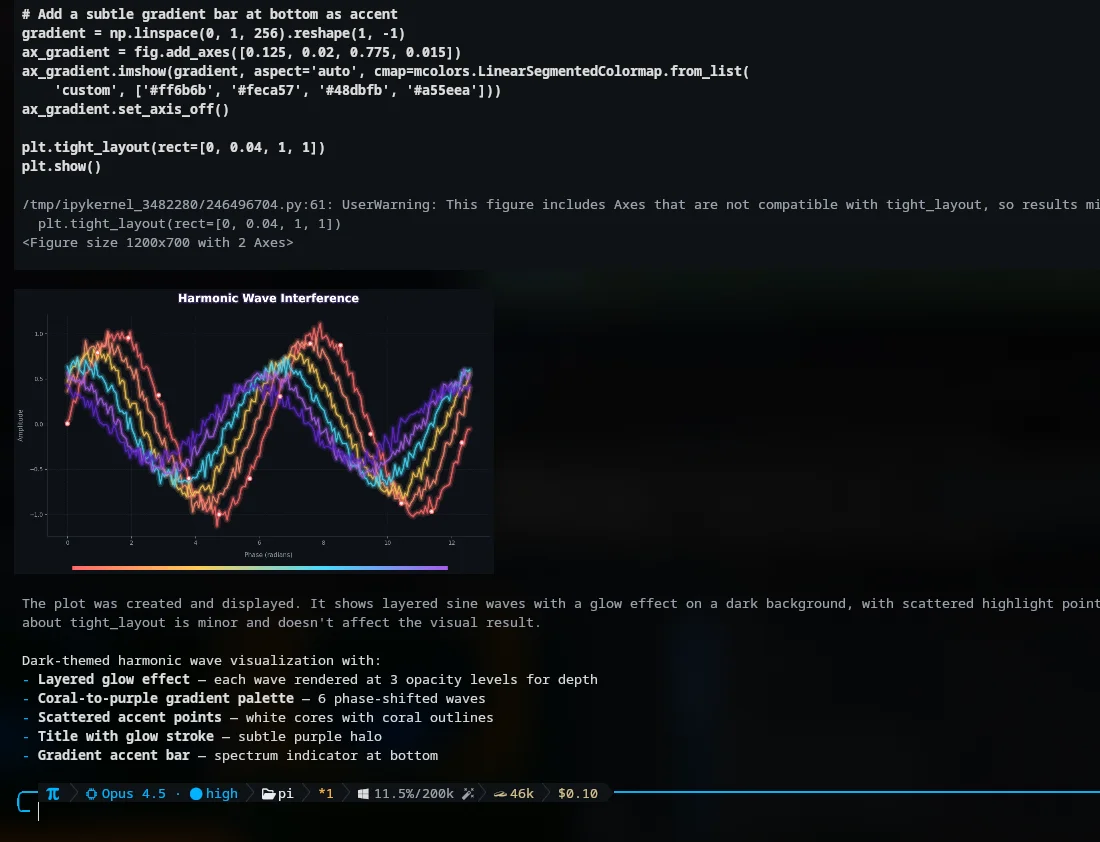
Browser Automation
You can ask Oh My Pi to interact with web pages — scrape data, fill forms, or test web applications:
> "Go to the login page and test the form validation."
> "Scrape the latest articles from this blog and save them as markdown."
Step 6: Debugging with DAP
Oh My Pi includes a full Debug Adapter Protocol (DAP) integration with 28 operations. Set breakpoints, inspect variables, and step through code:
> "Set a breakpoint at line 42 of app.py and start debugging."
> "Step into the calculate_total function and show me the variable values."
Tips for Best Results
- Use specific models for specific tasks: Fast models for simple edits, strong models for complex reasoning
- Leverage subagents: For complex tasks, Oh My Pi can spawn specialized sub-agents that work in parallel
- Keep context focused: Start fresh sessions for unrelated tasks to maintain context quality
- Use hash-anchored edits: Trust that edits are verified — Oh My Pi won't leave files in an inconsistent state
🚀 Want to deploy Oh My Pi yourself?
Docker configs, system requirements, and installation guides — all on one page.
View Oh My Pi Tool Page →Conclusion
Oh My Pi transforms your terminal into an AI-powered development environment. With support for 40+ LLM providers, deep LSP/DAP integration, and a robust tool harness, it's one of the most capable terminal-based coding agents available today. The installation takes seconds, and the productivity gains start immediately. Try it on your next project and see the difference a true terminal AI agent makes.