How to Self-Host Paca with Docker: AI Agents on Your Scrum Board
Step-by-step tutorial: install Paca on your own Linux server with one command or Docker Compose, connect AI agents via MCP, and build visual automations.
Paca is an AI-native, self-hosted project management platform — a free open-source alternative to Jira, Trello, ClickUp, and Monday where AI agents work on your Scrum board, not beside it. In this tutorial, you will get Paca running on your own server with Docker in minutes, and connect an AI agent via its MCP server.
🚀 Want to deploy Paca yourself?
Docker configs, system requirements, and installation guides — all on one page.
View Paca Tool Page →Step 1: System Requirements
Paca runs on any Linux server with Docker. The official images are published on Docker Hub (pacaai/paca-web, pacaai/paca-api, pacaai/paca-agent-runner, pacaai/paca-realtime). For a small team, 2 CPU cores and 4 GB RAM are enough; for production workloads with active AI agents, plan for 4 cores and 8 GB RAM.
Step 2: One-Command Install
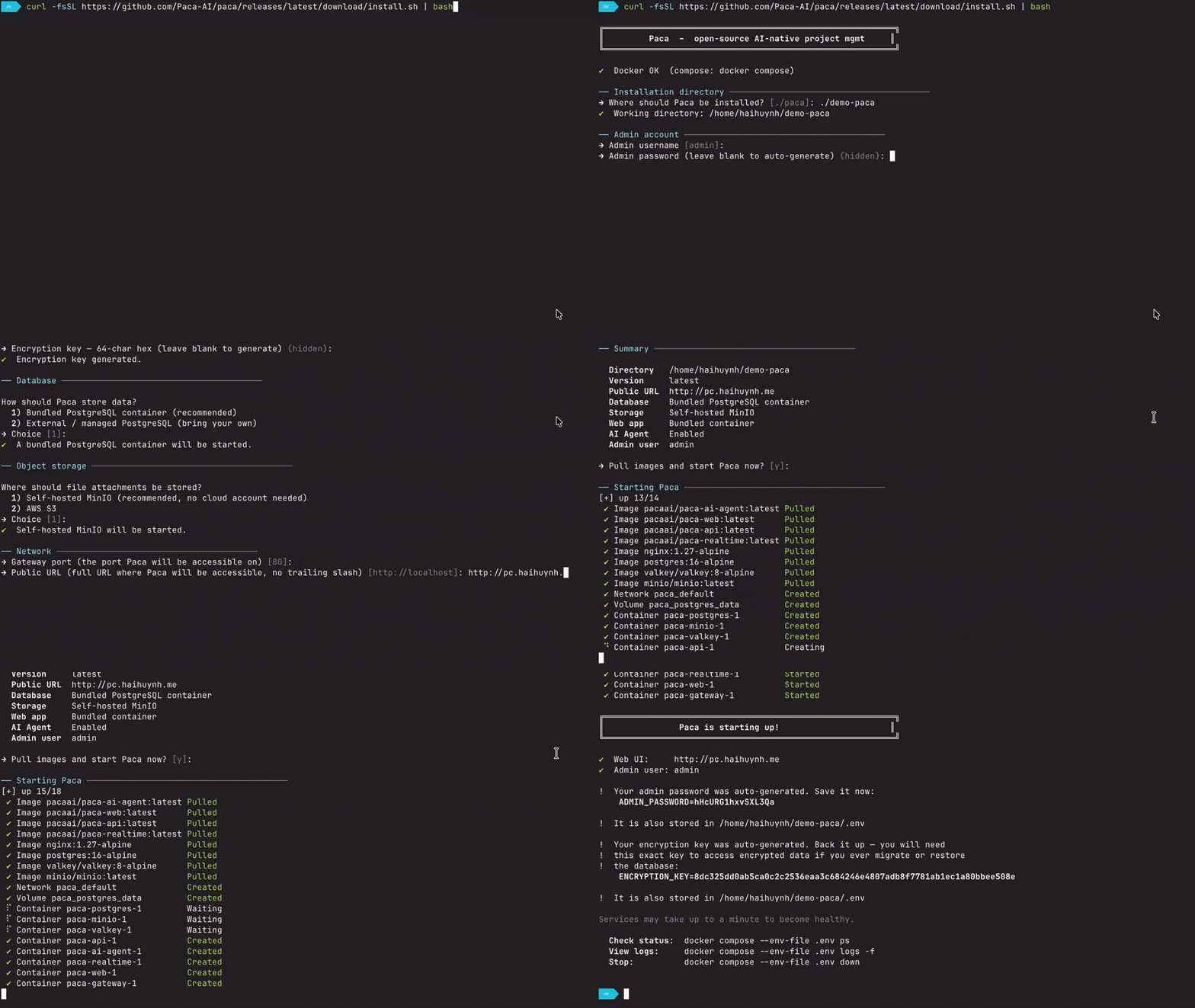
The recommended path is the interactive installer — no repository clone required:
curl -fsSL https://github.com/Paca-AI/paca/releases/latest/download/install.sh | bash
The script walks you through configuration (database, storage, domain/HTTPS, AI agent, secrets) and starts the full stack. When it finishes, open http://your-server-ip.
Step 3: Docker Compose Alternative
Prefer explicit control? The production compose file ships in the repo and wires up PostgreSQL, Valkey, MinIO, Caddy, and the Paca services:
services:
  paca:
    image: pacaai/paca-web:latest
    restart: unless-stopped
    ports:
      - 8080:8080
    volumes:
      - ./data/paca:/data
For unattended/CI installs, set PACA_YES=1 so the script never blocks on a prompt, and steer every setting with environment variables (see deploy/README.md).
Step 4: Connect AI Agents via MCP
Paca ships an MCP server, so any MCP-compatible agent — Claude, Codex, Gemini CLI — can read and update your boards. There is also a Claude Code skill that adds a /paca slash command, letting you create tasks, update docs, and manage sprints in plain English without leaving your editor. For local coding agents, the paca-acp-bridge streams your conversation to Paca over an authenticated WebSocket — your code never leaves your machine.
Step 5: Automate with the Visual Engine
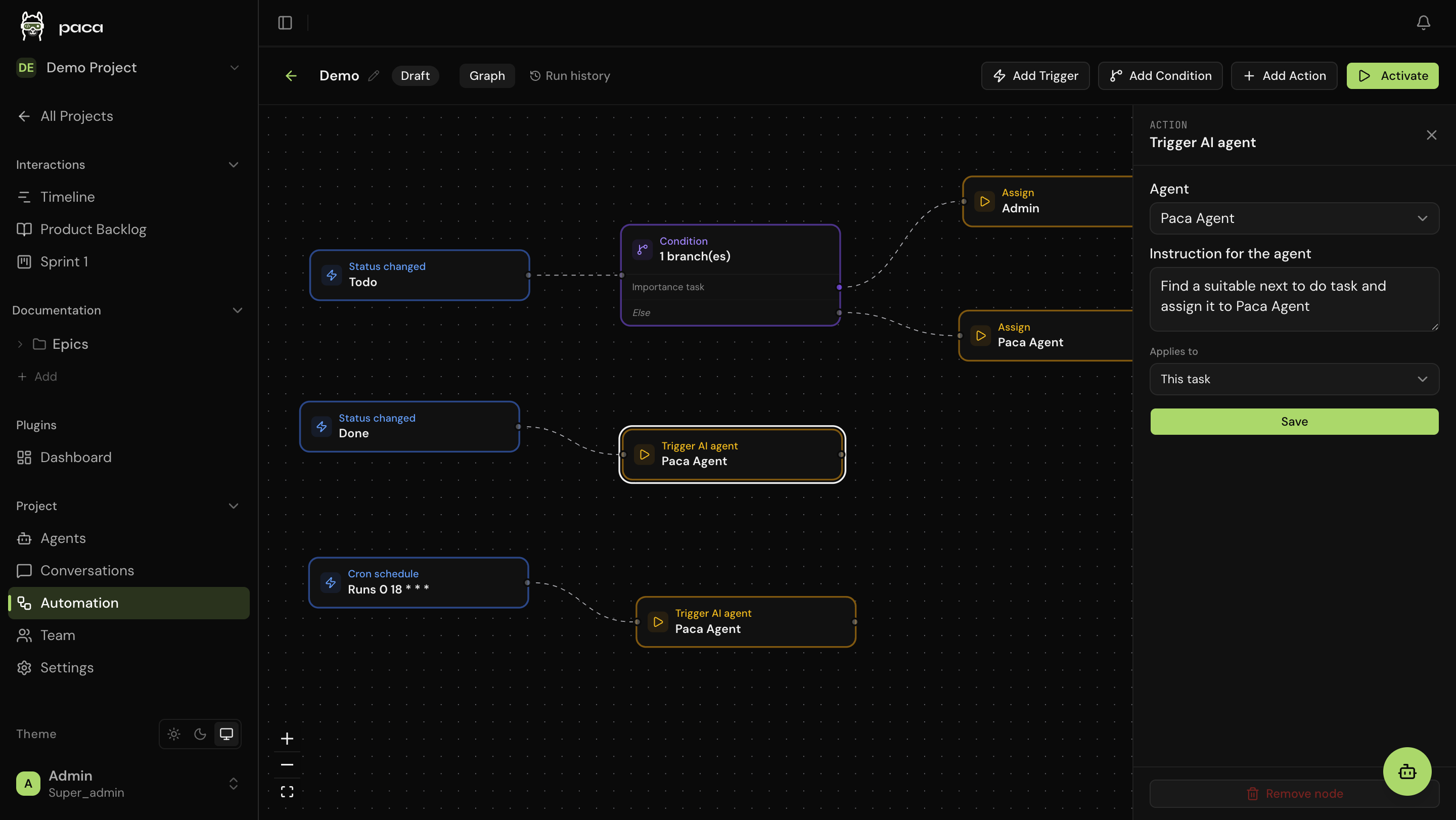
v0.11+ includes a redesigned, n8n-style automation builder. Compose Trigger → Condition → Action flows on an interactive canvas with nine built-in trigger types — cron schedules, due-date offsets, dependency gates, and authenticated webhooks. Actions can retarget linked tasks, dispatch AI agents with custom prompts, or call external APIs, with every run traced in the Run History panel.
💡 Pro tip: Install community plugins from Settings → Plugins → Marketplace right inside the UI — no command line needed. For custom plugins, use ./scripts/install-local-plugin.sh ./my-plugin --api-key <key>.
🚀 Want to deploy Paca yourself?
Docker configs, system requirements, and installation guides — all on one page.
View Paca Tool Page →That's it — you now have a self-hosted Scrum platform where humans and AI agents collaborate as equals, for free, forever. Check the Paca tool page on Run This Ai for the full Docker setup, requirements, and deployment notes.