Pixelle Video: The Open-Source AI Engine That Automates Short Video Creation
Discover Pixelle Video, the open-source AI-powered short video engine with 24K GitHub stars. Generate viral shorts from scripts with AI voiceovers, captions, and effects — fully automated.
I Didn't Think an AI Could Make Better Shorts Than Me — Then I Tried Pixelle Video
I've been making short-form videos for about two years. It's a grind. By the time you write a script, record voiceover, find b-roll, add captions, tweak the pacing, and export — you've sunk two hours into a 30-second clip. Multiply that by five posts a week and you're basically running a one-person production studio.
So when I stumbled onto Pixelle Video — an open-source AI short video engine with 24K GitHub stars — I was skeptical. Another "AI will do everything" tool that can barely string together a coherent slideshow, right? Wrong.
🎬 Want to deploy Pixelle Video yourself?
Docker configs, system requirements, and installation guides — all on one page.
View Pixelle Video Tool Page →What Actually Sets Pixelle Apart
The short video space is crowded. We've got CapCut, InVideo, Runway, and a dozen others. Most are either SaaS (pay-per-video, data goes to their servers) or limited in what they can actually automate.
Pixelle takes a fundamentally different approach. You give it a topic or a script, and it orchestrates every single step of production:
- Scene composition — it breaks your script into visual scenes and picks appropriate backgrounds, animations, and transitions. Not just a static image slideshow — real dynamic scene changes.
- AI voiceover (TTS) — multiple voice options so your shorts don't all sound like the same robot. I tested the Chinese TTS and it was surprisingly natural.
- Dynamic captions — not burned-in static text. Captions animate in sync with the voiceover, which is exactly what makes modern shorts feel polished.
- Visual effects — ComfyUI workflow integration means you can pipe in custom image generation as part of the pipeline.
- Batch processing — queue up 10 scripts, walk away, come back to 10 finished videos.
What I didn't expect: it actually works with ComfyUI under the hood. If you're already running ComfyUI for image generation, Pixelle can tap into those same models and workflows. That's not just automation — that's leveraging your existing infrastructure.
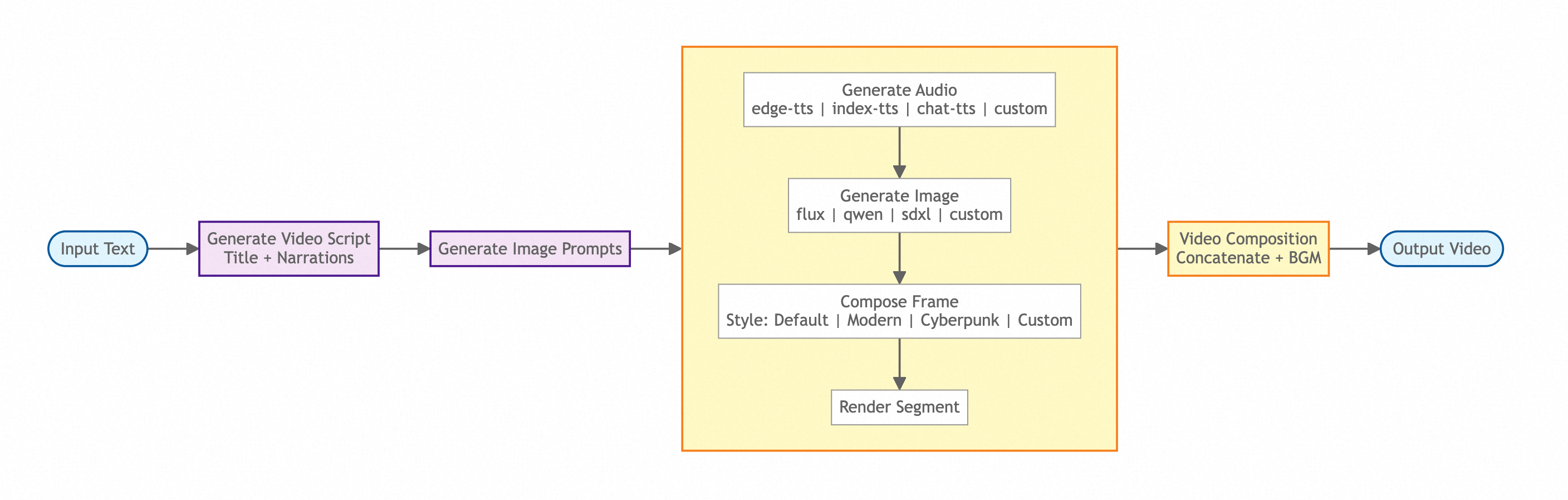
The Pixelle Video pipeline: from script input to finished video.
Where It Shines (and Where It Doesn't)
Let me be honest about what this tool is good for — and what it's not.
✅ Perfect for:
- Content farms — if you need 50 shorts a day across multiple niches, this is your tool. Batch processing + customizable templates = massive output.
- Social media managers — turn blog posts into short video summaries. Drop a link, get a video.
- Multi-language channels — I tested English and Chinese outputs and both were solid. The template system lets you localize easily.
❌ Not ideal for:
- Brand-level polish — automated videos still look automated. If you need cinematic quality for a brand campaign, this isn't that tool. But for organic social content? Absolutely.
- Heavy customization — you get templates and parameters, not pixel-level control. If you're a control freak about every frame, stick with traditional editing.
The Setup Surprise
I wasted an hour because I didn't read the docker-compose.yml properly. Here's what tripped me up: the default config mounts volumes to ./data/pixelle-video:/data. If that directory doesn't exist before you pull, Docker creates it as root-owned, and the app can't write to it. Create it first with mkdir -p ./data/pixelle-video && chmod 777 ./data/pixelle-video.
Also: the first start downloads model weights. On a 4GB RAM machine this took about 8 minutes. Not slow, but don't panic when nothing happens for the first few minutes — it's downloading, not hanging.
Bottom Line
After a week of using Pixelle Video, here's my honest verdict: if you produce short-form content regularly and you're not using some kind of automated pipeline, you're burning time you don't need to burn. Pixelle isn't perfect — it has a learning curve and the output quality depends heavily on how good your templates are — but it's the most capable open-source option I've found for automated short video production.
Is it for everyone? No. If you make one video a month, stick with CapCut. But if you're pumping out shorts daily and you want an engine that handles the grunt work while you focus on strategy and scripting — Pixelle Video is worth your weekend.
🎬 Explore Pixelle Video on Run This Ai
Docker Compose configs, system requirements, installation guides, and more — all in one place.
View Pixelle Video Tool Page →