How to Self-Host Supabase with Docker for AI-Powered RAG

How to Self-Host Supabase for AI-Powered RAG
Supabase is the go-to open-source backend for AI applications, combining Postgres reliability with built-in vector search via pgvector. This guide walks you through setting up Supabase with Docker, configuring pgvector for RAG pipelines, and connecting your AI application to query embeddings in real time. By the end, you will have a fully self-hosted Supabase instance ready for production AI workloads.
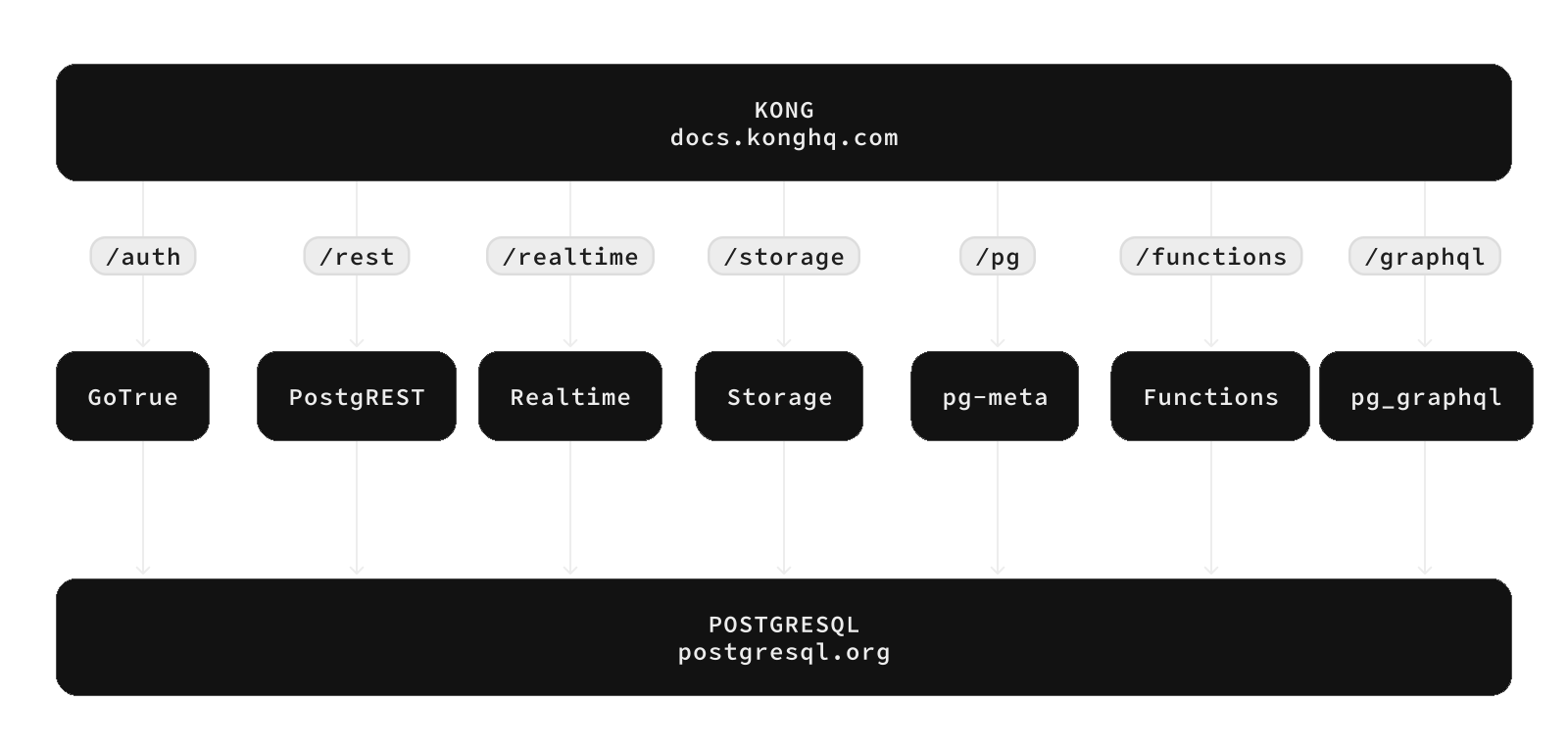
Prerequisites
Before you begin, make sure you have Docker and Docker Compose installed on your server. A Linux VM with at least 2 CPU cores and 4GB RAM is recommended for production use. You will also need a basic understanding of Postgres and SQL.
Step 1: Pull the Supabase Docker Image
The official Supabase Docker image bundles Postgres 15 with all required extensions pre-installed, including pgvector for vector similarity search, PostGIS for geospatial queries, and the real-time engine.
docker pull supabase/postgres:latestStep 2: Start the Supabase Container
Run the container with persistent storage to keep your data across restarts. The container exposes port 8080 for the Supabase Studio dashboard and the Postgres API.
docker run -d \
  --name supabase \
  -p 8080:8080 \
  -p 5432:5432 \
  -v ./supabase-data:/data \
  supabase/postgres:latest
Step 3: Enable Vector Search with pgvector
pgvector is included by default in the Supabase Docker image. To use it, connect to your Postgres instance and enable the extension:
docker exec -it supabase psql -U postgres
CREATE EXTENSION IF NOT EXISTS vector;
CREATE TABLE documents (
  id SERIAL PRIMARY KEY,
  content TEXT,
  embedding VECTOR(1536)
);
You can now insert embeddings generated by any LLM provider (OpenAI, local models via Ollama) and query them with cosine similarity.
Step 4: Connect Your AI Application
Supabase auto-generates REST APIs for every table. With the Supabase client libraries (available for JavaScript, Python, Dart, and more), you can query your vector database from any AI application:
# Python example
from supabase import create_client
supabase = create_client("http://localhost:8080", "your-api-key")
response = supabase.rpc("match_documents", {
    "query_embedding": [0.1, 0.2, ...],
    "match_threshold": 0.8,
    "match_count": 5
}).execute()
Production Considerations
For production deployments, consider using Docker Compose with separate containers for the Postgres database, Kong API gateway, and Gotrue authentication service. Supabase provides official deployment guides for Kubernetes, Digital Ocean, and AWS. Always enable SSL/TLS, configure regular backups, and monitor resource usage with the built-in dashboard.
Conclusion
Self-hosting Supabase gives you a powerful, AI-ready backend with vector search, real-time subscriptions, and a beautiful admin dashboard — all under your control. Combined with pgvector for RAG pipelines, it is an ideal platform for building production AI applications that need to store, query, and retrieve embeddings at scale.