TaskingAI Guide: Build AI-Native Apps with RAG and Function Calling
An in-depth guide to TaskingAI — the open-source platform for building AI-native applications with RAG pipelines, function calling, multi-LLM orchestration, and a built-in vector store.
Why Building AI Apps Still Feels Like Assembling IKEA Furniture Without Instructions
I've been there. You want to build an AI-powered app — maybe a smart chatbot, a RAG-powered knowledge base, or an agent that can call tools and APIs. You pick an LLM provider, set up a vector database, write orchestration logic, manage conversation history, implement function calling, wire it all together, and suddenly you're not building an app anymore — you're building infrastructure. It's exhausting.
TaskingAI is the open-source platform that says "enough." It gives you everything you need to build AI-native applications out of the box: RAG pipelines, function calling, multi-LLM orchestration, a vector store, conversation management, and a clean RESTful API. No duct tape, no glue, no 2 AM debugging sessions wondering why your LangChain agent forgot the user's name.
🚀 Want to deploy TaskingAI yourself?
Docker configs, system requirements, and installation guides — all on one page.
View TaskingAI Tool Page →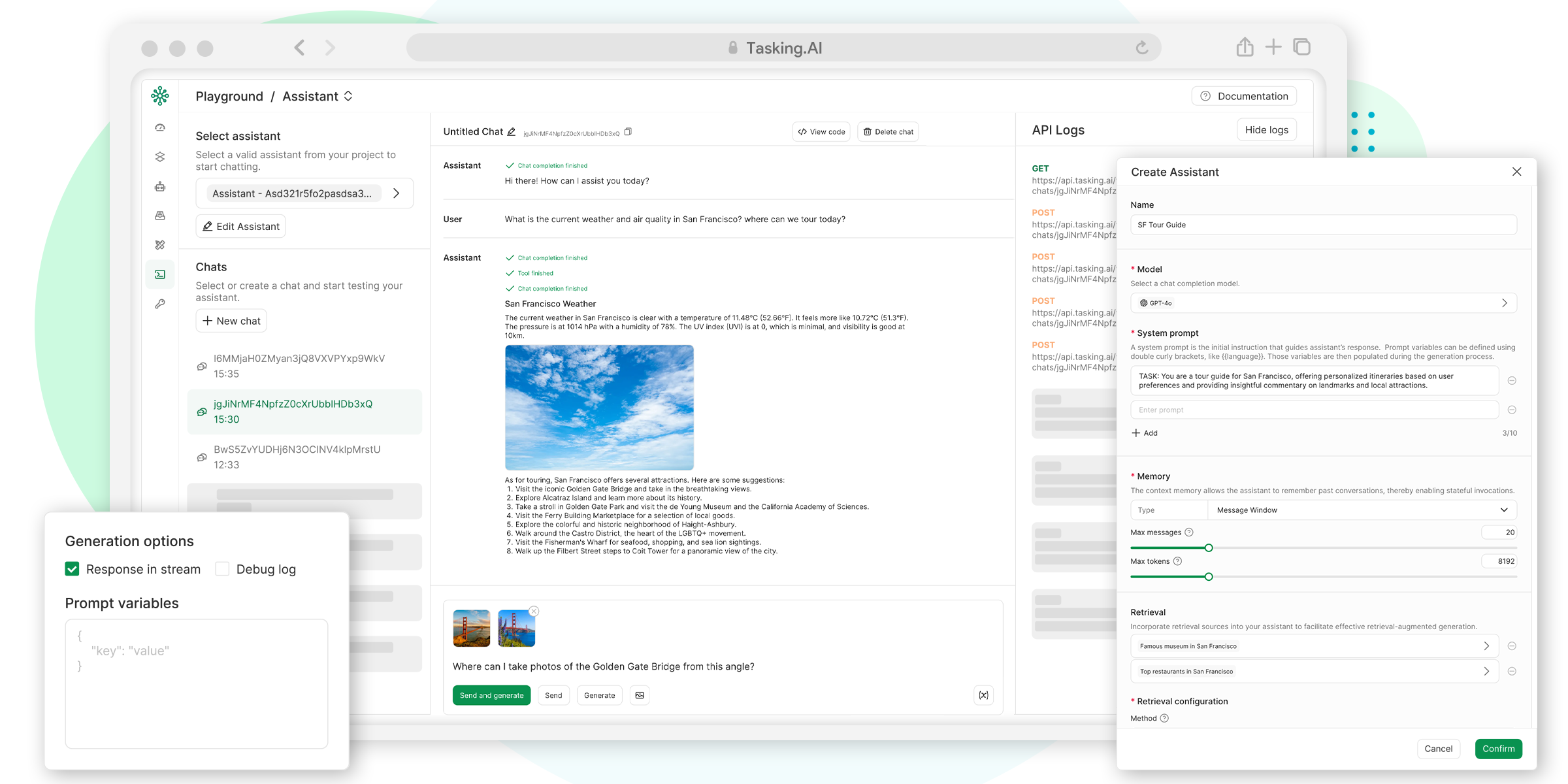
What Makes TaskingAI Different?
Most "AI platforms" are either locked into one provider or so flexible they require a PhD to configure. TaskingAI hits the sweet spot — it's modular without being complicated, and it supports multiple LLM providers (OpenAI, Anthropic, Google, plus open-source models via Ollama and llama.cpp) without locking you into any of them.
RAG That Actually Works
Retrieval-Augmented Generation is the killer feature of 2024-2025, but implementing it from scratch means choosing a vector DB, chunking strategy, embedding model, and retrieval logic. TaskingAI bundles all of this into a single pipeline. Upload your documents, and it handles the rest — embedding, indexing, and retrieval, all with a simple API call. I spent two weeks building a RAG pipeline from scratch for a previous project. With TaskingAI, it took 30 minutes.
Function Calling Without The Pain
Want your AI assistant to query a database, send an email, or call an external API? TaskingAI's function calling system lets you define tools as JSON schemas and the platform handles the orchestration. The LLM decides when to call a function, the platform executes it, and returns the result back into the conversation context. It's clean, predictable, and doesn't require you to write a custom agent loop.
Multi-LLM Orchestration
Here's something that surprised me: you can route different parts of your app to different models. Use GPT-4 for complex reasoning tasks, a local Llama model for simple Q&A to save costs, and Claude for long-form content generation — all within the same platform. The unified API means your application code doesn't care which provider is behind the scenes.
| Feature | TaskingAI | DIY Approach |
|---|---|---|
| RAG Setup | Built-in, ~30 min | 2+ weeks (vector DB, embeddings, chunking) |
| Multi-LLM Support | Unified API, 6+ providers | Custom adapter per provider |
| Conversation Management | Built-in with persistence | Roll your own with DB + caching |
| Function Calling | JSON schema → auto-orchestrated | Custom agent loop + error handling |
| Vector Store | Built-in, zero config | Pinecone/Qdrant/Weaviate setup |

The Architecture They Don't Tell You About
TaskingAI uses a modular architecture with three core components: the API server, the assistant runtime, and the retrieval engine. The API server handles RESTful endpoints for conversation management, the assistant runtime orchestrates LLM calls and function execution, and the retrieval engine manages RAG pipelines. This separation means you can scale each component independently — throw more resources at the retrieval engine if you have heavy document loads, or scale the assistant runtime for high-concurrency chat applications.
Who Is This For?
Honestly? If you're a solo developer building a side project, TaskingAI might feel like overkill. Docker compose, multiple services, and a learning curve for the API — it's built for teams and production workloads. But if you're building a real product — something customers will use — the time it saves you on infrastructure is enormous. I'd recommend it for any team building AI features into an existing product, or any startup looking to ship an AI-native application fast.
What I Wish I Knew Before Starting
Don't skip the docs. TaskingAI's API is clean but it has its own conventions — especially around authentication and conversation scoping. Also, the built-in vector store uses a local engine by default, and it works great for most use cases. You only need an external vector DB (like Pinecone or Qdrant) if you're managing millions of documents. I wasted a day setting up Qdrant before realizing I didn't need it.
Conclusion
TaskingAI is one of those tools that makes you wonder why you were doing things the hard way. It's open source (Apache-2.0), actively maintained, and solves real problems that every AI app developer faces. It won't replace custom infrastructure for every use case, but for 80% of AI applications — chatbots, RAG systems, agentic workflows — it's exactly what you need.
🚀 Explore TaskingAI on Run This Ai
Docker Compose configs, system requirements, installation guides, and more — all in one place.
View TaskingAI Tool Page →