Ultravox: The Open-Source Voice LLM for Real-Time AI Conversations
Ultravox is a fast open-source multimodal LLM that turns text into natural speech directly — no separate TTS pipeline. Learn why it is the best choice for real-time voice AI.
Ultravox is a fast, open-source multimodal large language model built by Fixie AI for real-time voice applications. Unlike traditional voice AI stacks that chain speech-to-text, an LLM, and text-to-speech together, Ultravox takes text as input and produces natural speech directly as output — with ultra-low latency that makes conversations feel human.
🚀 Want to deploy Ultravox yourself?
Docker configs, system requirements, and installation guides — all on one page.
View Ultravox Tool Page →Why Ultravox Stands Out
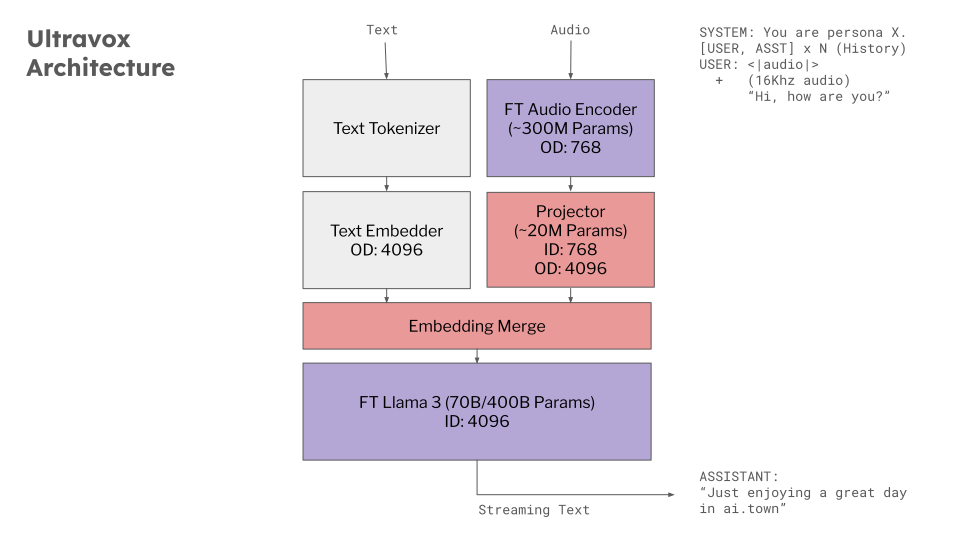
Most voice assistants rely on a three-model pipeline: transcribe speech, run the text through an LLM, then synthesize speech. Every hop adds latency and error. Ultravox collapses this into a single multimodal model. The result is a dramatic reduction in response time — ideal for voice agents, telephony systems, and conversational interfaces where a half-second delay is the difference between natural and robotic.
Key Capabilities
| Feature | Benefit |
|---|---|
| Direct speech output | No separate TTS pipeline needed |
| Ultra-low latency | Natural real-time conversation |
| Self-hostable | Full data control with Docker |
| MIT license | Free for commercial use |
Use Cases
Ultravox powers voice agents that handle phone calls, in-car assistants, customer support bots, and hands-free AI companions. Because the model is open source and runs on your own hardware, you keep complete control over voice data — a critical requirement for regulated industries like healthcare and finance.
Getting Started
Running Ultravox on your own infrastructure is straightforward: pull the official Docker image, expose a port, and point your application at the API. Requirements are modest — a minimum of 2 CPU cores and 4 GB of RAM, with 4 cores and 8 GB recommended for production workloads.
🚀 Ready to build with Ultravox?
Docker configs, system requirements, and installation guides — all on one page.
View Ultravox Tool Page →