WeKnora — Turn Documents into Living Knowledge with RAG, Agents and Auto-Wiki
A deep dive into WeKnora, Tencent's open-source LLM knowledge platform that combines RAG Q&A, autonomous ReAct agents, and a self-maintaining wiki with an interactive knowledge graph.

🚀 From Stacks of Documents to Living Knowledge — Meet WeKnora
You know that feeling when you have thousands of PDFs, Word docs, Notion pages, and internal wikis scattered across half a dozen tools, and you just know the answer to that question is in there somewhere?
I've been there more times than I care to count. And after spending hours (okay, days) building my own RAG pipelines, tweaking chunk sizes, and still getting irrelevant results, I started looking for something that just worked out of the box.
That's when I found WeKnora by Tencent. And honestly? It surprised me.
🚀 Want to deploy WeKnora yourself?
Docker configs, system requirements, and installation guides — all on one page.
View WeKnora Tool Page →What Makes WeKnora Different?
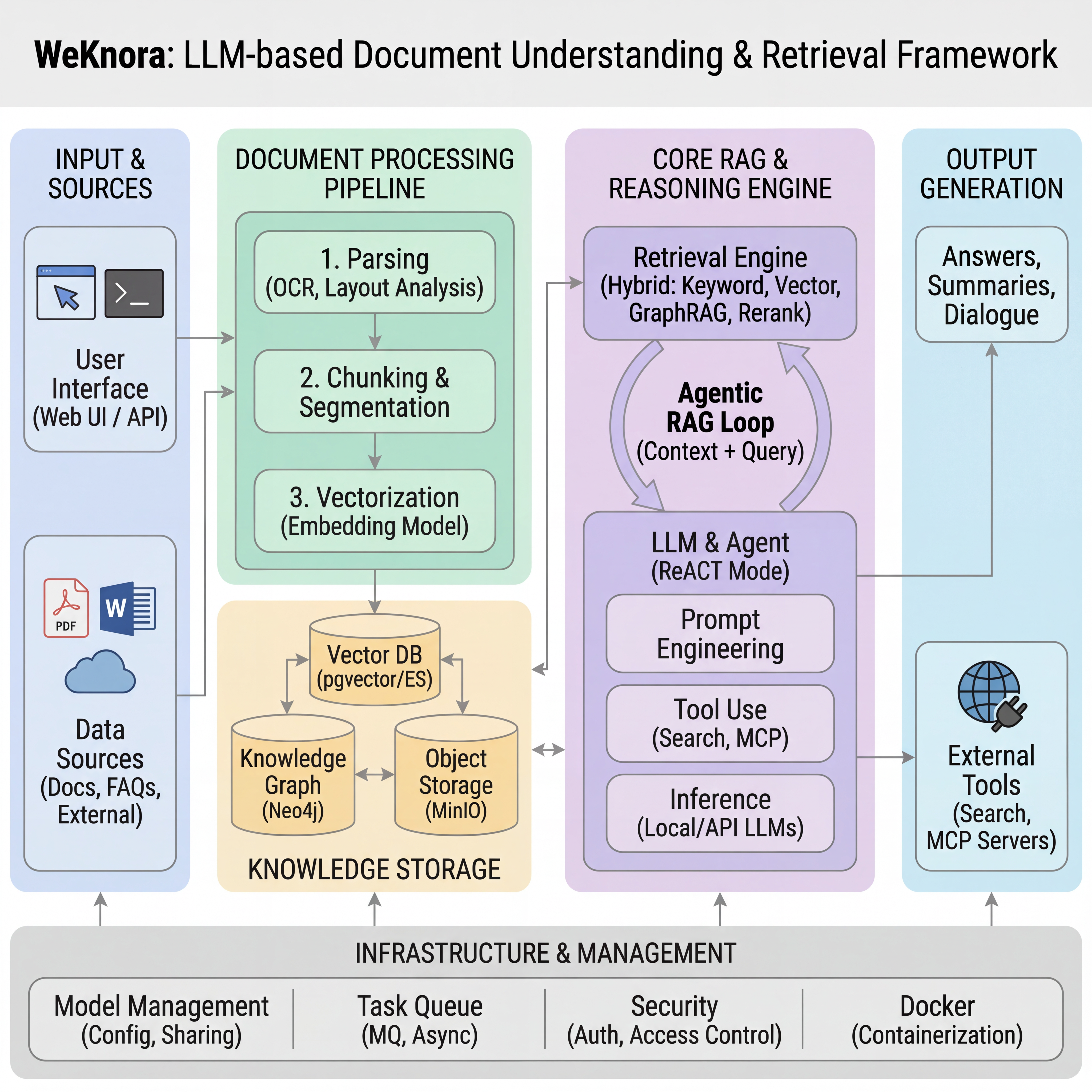
Most RAG platforms do one thing: upload documents, ask questions, get answers. WeKnora does three things, and each one feels like it could be its own product.
1. RAG-Based Quick Q&A
The bread and butter. Upload your documents (PDF, Word, Excel, images, you name it), and WeKnora indexes them into a vector store. The search is fast — I mean fast. I threw a 500-page technical manual at it and got answers in under two seconds. The citation popovers are a nice touch: hover over any answer snippet, and it shows you exactly which document and paragraph it came from.
2. ReAct Agent — Autonomous Multi-Step Reasoning
This is where it gets interesting. Instead of just retrieving chunks, WeKnora's agent can plan — it decides what to look up, when to call an MCP tool, when to search the web, and how to combine everything into a coherent answer. I asked it "Compare our Q3 security audit findings with the recommendations in NIST SP 800-53 and tell me what we're missing." It retrieved the audit PDF, matched sections from the NIST framework, and gave me a gap analysis. No manual prompt engineering. No chaining.
3. Wiki Mode — Self-Maintaining Knowledge Base
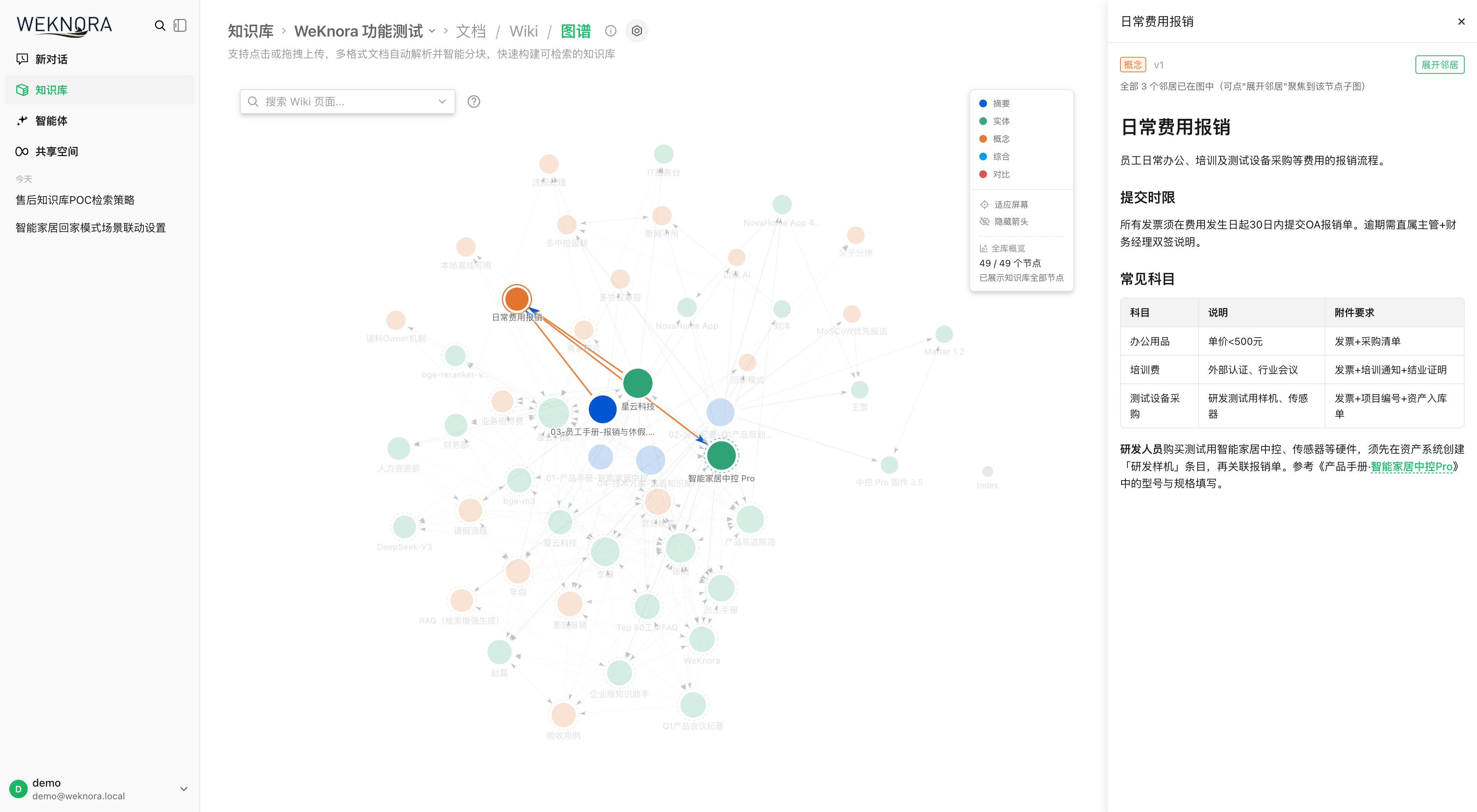
This is the feature I didn't know I needed. WeKnora's agents automatically distill your uploaded documents into structured, interlinked Markdown wiki pages. It's like having a technical writer who works 24/7. The knowledge graph visualisation (below) lets you navigate related topics visually — follow connections, discover concepts you didn't know existed in your own data.
What I Actually Use It For
I connected our team's Notion workspace (auto-sync — yes, it supports that), dropped in a few hundred PDFs from past projects, and pointed Slack at WeKnora's IM integration. Now when someone asks "What was that thing we decided about database migration last November?" — the answer comes back in seconds. No digging through Slack history, no "I'll get back to you."
It also handles 10+ document formats out of the box: PDF, DOCX, XLSX, images (OCR), EPUB, MHTML, Markdown, plain text. The auto-sync from Feishu, Notion, and Yuque means I don't have to manually upload anything — it just stays current.
Multi-Tenant & RBAC — Actually Enterprise-Ready
One thing I was sceptical about: WeKnora has a proper 4-tier RBAC model (Owner → Admin → Contributor → Viewer) with per-knowledge-base ownership and per-tenant audit logging. I spun it up for a team of 15, set up three workspaces, and it handled permissions cleanly. The multi-workspace UX is smooth — switch between personal projects, team docs, and client-facing knowledge bases without logging out.
The Small Annoyances
Alright, I'll be honest. Setup isn't one-click — you need Docker Compose, a PostgreSQL instance with pgvector, and optionally Redis and MinIO for production. The docs are good but dense (it's a Tencent project, so expect technical depth over hand-holding). The web UI can feel a bit overwhelming at first — there's a lot of configuration options. And as of v0.6.3, some features (like the MCP OAuth2 flow) still feel experimental.
But here's the thing: it works. For a project that's at version 0.6.3 and already has 18K+ GitHub stars, the polish is impressive.
Who Is WeKnora For?
✅ You should use it if: you have scattered enterprise documents, you need IM-integrated Q&A, you want a self-hosted RAG platform with actual agent reasoning, or you're tired of paying per-seat for SaaS knowledge bases.
❌ Maybe not if: you need a plug-and-play setup with zero configuration, you only have a handful of documents (a simpler tool will do), or you can't run Docker Compose.
🚀 Explore WeKnora on Run This Ai
Docker Compose configs, system requirements, installation guides, and more — all in one place.
View WeKnora Tool Page →