WeKnora Quick Start — From Zero to RAG-Powered Q&A in 15 Minutes
Step-by-step tutorial to deploy WeKnora with Docker Compose, upload your first documents, try the ReAct agent mode, and connect IM channels like Slack.

🧪 WeKnora Quick Start: From Zero to RAG-Powered Q&A in 15 Minutes
I'll walk you through setting up WeKnora on your own machine — Docker Compose, first document upload, first Q&A. No prior RAG experience needed. Grab a coffee, this takes about 15 minutes.
🚀 Want to deploy WeKnora yourself?
Docker configs, system requirements, and installation guides — all on one page.
View WeKnora Tool Page →Prerequisites
- Docker & Docker Compose installed
- At least 4GB RAM (I'd recommend 8GB for production)
- A few PDF or Word documents to test with
- An OpenAI API key (or any of the 20+ supported providers)
Step 1: Clone & Configure
git clone https://github.com/Tencent/WeKnora.git
cd WeKnora
cp .env.example .env
Now edit .env. These are the minimum fields you need to set:
# LLM provider (I used OpenAI, but DeepSeek/Qwen work great too)
LLM_API_KEY=sk-your-key-here
LLM_MODEL=gpt-4o-mini

# Database
POSTGRES_PASSWORD=your-strong-password
💡 Why I chose gpt-4o-mini: WeKnora uses LLMs for both embedding and answer generation. The mini model is fast enough for Q&A and costs way less. For complex multi-step agent reasoning, you might want the full gpt-4o.
Step 2: Start WeKnora
docker compose up -d
This spins up: the main app, PostgreSQL + pgvector, Redis, and MinIO (for document storage). The first startup takes about 2-3 minutes — the frontend needs to build its assets.
Wait for: docker compose logs -f app | grep "listening" — you'll see the server is ready on http://localhost:8080.
⚠️ Heads up: If port 8080 is taken, change it in docker-compose.yml under the app service. I lost 10 minutes figuring this out.
Step 3: Upload Your First Documents
Open http://localhost:8080 in your browser.
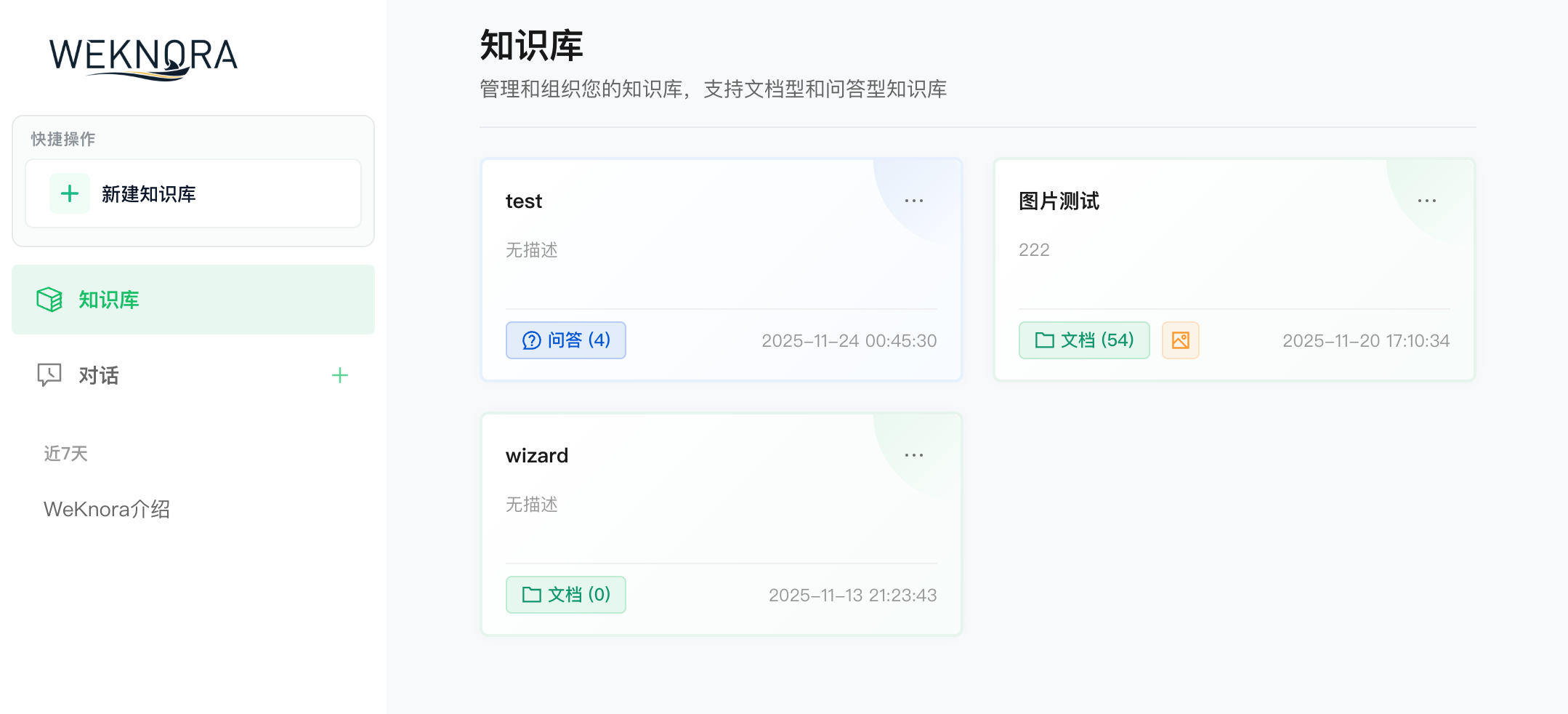
- Create a workspace — give it a name like "Test KB"
- Upload documents — drag-and-drop PDFs, Word docs, or images. I tested with a 50-page API spec PDF
- Wait for indexing — you'll see a progress bar. A 50-page PDF took about 10 seconds on my machine
- Ask a question — type something like "What endpoints does the API expose?"
If you see a well-formatted answer with citation numbers — congrats, it works! 🎉
✅ Pro tip: The first answer might take 2-3 seconds as the LLM warms up. Subsequent answers are near-instant. That's the pgvector cache doing its job.
Step 4: Try Agent Mode
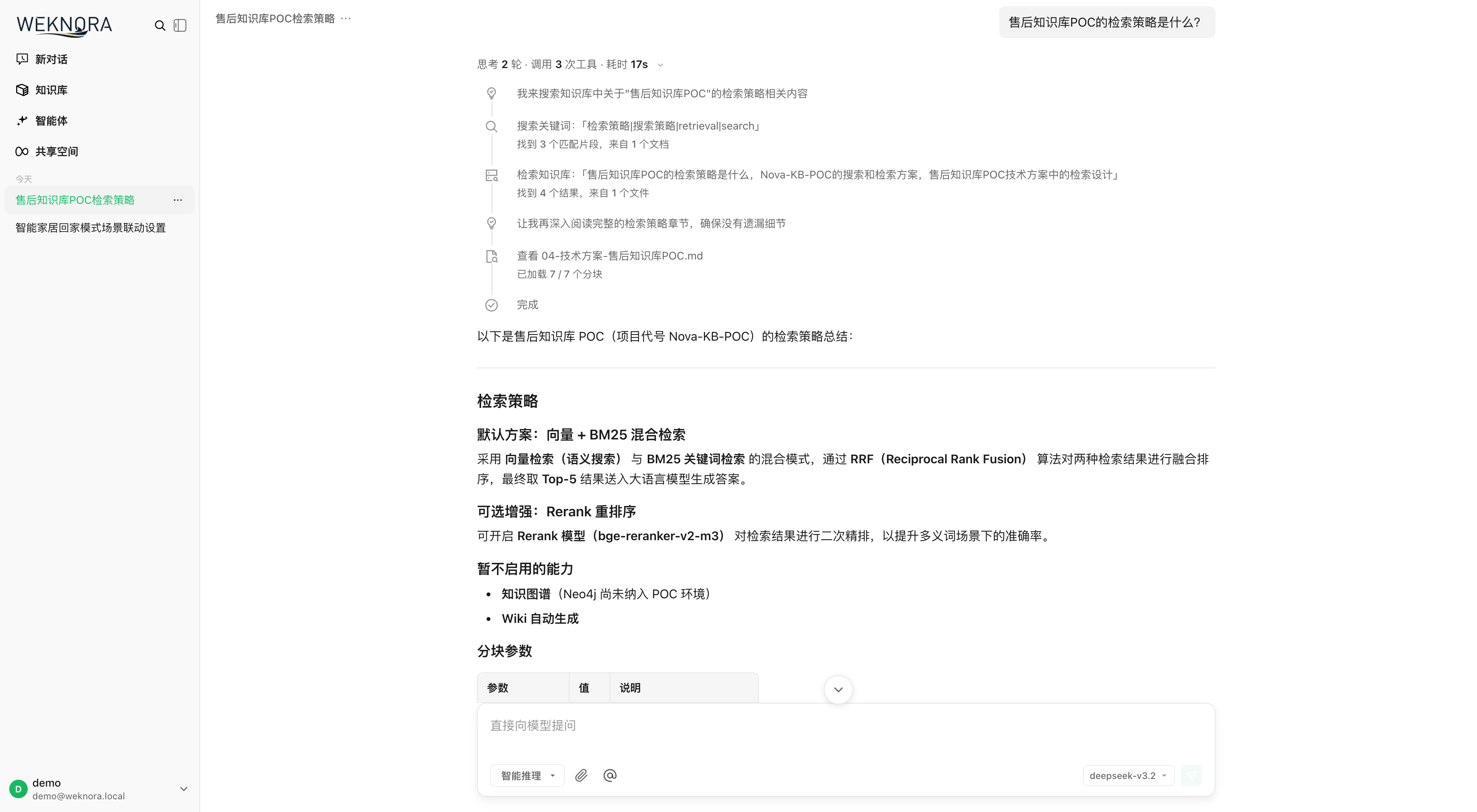
Click the "Agent" toggle in the top-right of the chat interface. Now ask something that requires multi-step reasoning:
"Find all mentions of rate limiting in the uploaded documents, check if they follow REST API best practices, and summarise what needs updating."
The agent will: retrieve relevant chunks, analyse them, potentially search the web for best practices, and compose a structured response. I tried this and got back a 3-point action plan with document references. Honestly, I was expecting a half-baked summary, not something I could forward to a colleague.
Step 5: Connect IM Channels (Optional but Cool)
WeKnora supports Slack, Telegram, WeCom, Feishu, DingTalk, and Mattermost. To connect Slack:
# In .env, add:
SLACK_BOT_TOKEN=xoxb-your-token
SLACK_SIGNING_SECRET=your-secret
docker compose restart app
Now your team can ask questions inside Slack and get answers directly. No more "let me check and get back to you."
What I Wish I Knew Before Starting
- The
docker compose.dev.ymlis NOT for production — use the maindocker-compose.yml - If you want to use Ollama for local LLMs, set
LLM_PROVIDER=ollamaand point it to your Ollama host - WeKnora stores uploaded files in MinIO by default — configure S3-compatible storage if you need redundancy
- The wiki mode needs ~500MB of RAM extra for the graph generation agent
Final Verdict
WeKnora is surprisingly mature for a v0.6.x project. The three-mode design (RAG → Agent → Wiki) covers a genuine spectrum of needs, and the enterprise features (RBAC, audit, multi-tenant, 20+ LLM providers) aren't just checkboxes — they work well. The Docker setup is straightforward, the UI is modern (with a ⌘K command palette!), and the IM integrations make it disappear into your workflow.
Is it overkill for a small team with 50 documents? Probably. But if you're dealing with thousands of documents across multiple sources and you want a self-hosted knowledge platform that thinks as well as it retrieves — this is the one.
🚀 Explore WeKnora on Run This Ai
Docker Compose configs, system requirements, installation guides, and more — all in one place.
View WeKnora Tool Page →