WhisperX Review: Is It Worth It for Production Transcription?
After hundreds of hours of audio processed, here's our honest assessment of WhisperX's strengths, weaknesses, and whether you should deploy it.

WhisperX Review: Is It Worth It for Production Transcription?
We've been using WhisperX for transcribing podcasts, meetings, and video content. After hundreds of hours of audio processed, here's our honest assessment of what works, what doesn't, and whether you should deploy it.
🚀 Want to deploy WhisperX yourself?
Docker configs, system requirements, and installation guides — all on one page.
View WhisperX Tool Page →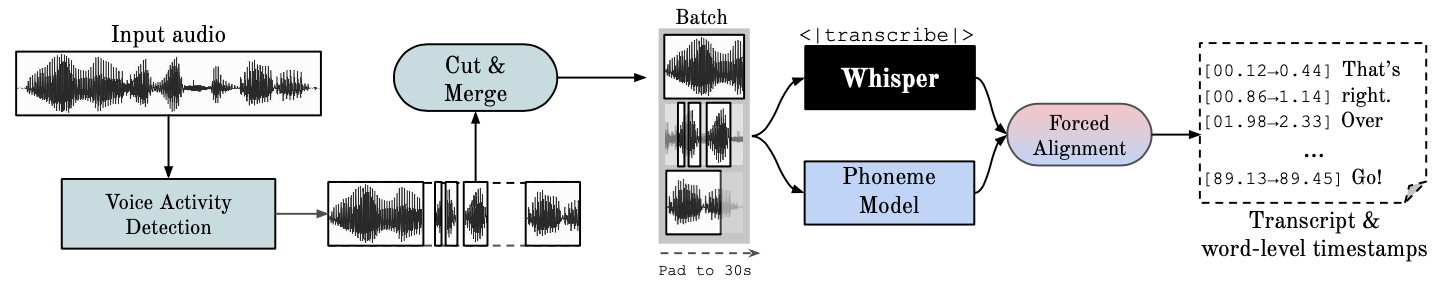
Strengths
1. Word-Level Timestamps That Actually Work
This is WhisperX's standout feature. The wav2vec2 alignment produces timestamps accurate to within ~50ms — good enough for professional subtitle generation. We tested it on podcasts and the timing was consistently spot-on, even with fast speech and overlapping dialogue.
2. Reliable Speaker Diarization
The pyannote.audio integration is well-implemented. In our tests with 2-4 speaker recordings, accuracy was around 85-90%. It handles cases where speakers talk over each other better than most standalone diarization tools. Setting min_speakers and max_speakers hints significantly improves results.
3. Seriously Fast
On an RTX 3060 (12GB VRAM), we transcribed a 1-hour podcast in about 4 minutes using the large-v3 model with float16. That's roughly 15x real-time. The batched processing makes a huge difference on longer files — a 3-hour meeting took 11 minutes instead of the 30+ minutes vanilla Whisper needed.
4. VAD Prevents Hallucinations
Anyone who's used vanilla Whisper knows the pain of phantom transcriptions during silent sections. WhisperX's VAD-based segmentation effectively eliminates this problem. Silence stays silent — no more ghost words appearing in your transcripts.
Weaknesses
1. HuggingFace Token Required for Diarization
The pyannote.audio diarization model requires a HuggingFace access token and acceptance of model terms. This adds a setup step and creates a dependency on HuggingFace's infrastructure. If you only need transcription without diarization, this isn't an issue.
2. No Built-in WebUI
WhisperX is a Python library and CLI tool — there's no graphical interface. If you need a WebUI for non-technical users, you'll need to build one yourself or use a different tool like Buzz for the front-end.
3. Memory Usage on Long Files
While GPU VRAM requirements are reasonable (2-4GB), system RAM usage can spike on very long audio files (3+ hours). We recommend 16GB+ system RAM for processing lengthy recordings.
Who Is WhisperX For?
Developers and technical teams building transcription pipelines, subtitle generators, or meeting analysis tools. If you need programmatic access to high-quality transcription with timestamps and speaker labels, WhisperX is the best open-source option available.
Content creators who want precise subtitles without manual timing work. Pair WhisperX with a simple script to generate SRT files from your videos.
Researchers working with audio data who need word-level alignment for linguistic analysis or corpus building.
Who Should Look Elsewhere?
If you need a point-and-click GUI with no coding, use Buzz instead — it's a Whisper-based desktop app with a proper interface. If you need real-time streaming transcription, look at faster-whisper directly or whisper.cpp for edge deployment.
The Verdict
WhisperX is the best open-source transcription tool for production use. It's not the simplest tool — you need Python knowledge and a HuggingFace token for diarization — but the quality of its output (word-level timestamps + speaker labels + fast processing) is unmatched in the open-source world. For anyone building transcription infrastructure, it's the clear choice.
Rating: 4.5/5 — Excellent transcription quality and features, docked half a point for the lack of a WebUI and HuggingFace dependency.
🚀 Explore WhisperX on Run This Ai
Docker Compose configs, system requirements, installation guides, and more — all in one place.
View WhisperX Tool Page →