How to Deploy Big-AGI with Docker in 5 Minutes
Step-by-step tutorial for deploying Big-AGI using Docker. Configure OpenAI, Anthropic, Google, and more in your private AI workspace.
How to Deploy Big-AGI with Docker in 5 Minutes
Getting started with Big-AGI is remarkably simple. Whether you are running on a cloud VPS, a home server, or your local development machine, the Docker deployment takes just a few minutes. This step-by-step tutorial will have you chatting with multiple AI models through your own private interface in no time.
Prerequisites
Before you begin, make sure you have Docker installed on your system. You will also need API keys from at least one AI provider — OpenAI, Anthropic Claude, Google Gemini, or DeepSeek all work out of the box. You can sign up for these services and generate API keys from their respective developer portals.
Step 1: Pull the Docker Image
Big-AGI is distributed through GitHub Container Registry (GHCR). Pull the latest image with:
docker pull ghcr.io/enricoros/big-agi:latestStep 2: Run the Container
Start Big-AGI on port 8080 with persistent data storage:
docker run -d --name big-agi -p 8080:8080 -v big-agi-data:/data ghcr.io/enricoros/big-agi:latestThe -v big-agi-data:/data flag creates a named volume to persist your settings and conversations across container restarts and upgrades.
Step 3: Configure Your API Keys
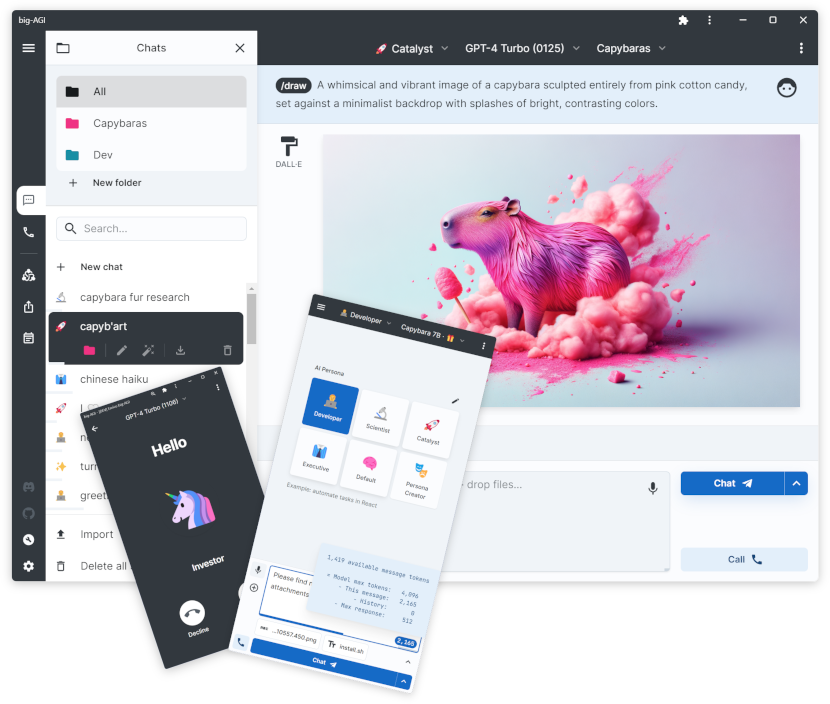
Open your browser and navigate to http://localhost:8080. You will be greeted by Big-AGI's clean, dark-themed interface. Click the settings icon (gear) in the top-right corner and add your API keys:
- OpenAI: For GPT-4, GPT-4o, GPT-4.5, GPT-5, and DALL-E image generation
- Anthropic: For Claude Sonnet 4.5, Opus, and Haiku models
- Google: For Gemini 2.5 Pro and Flash models
- DeepSeek: For DeepSeek V3 and R1 models
- xAI: For Grok models
You can add as many or as few providers as you like — Big-AGI works with any combination.
Step 4: Start Chatting
Once configured, type your first message in the chat input. You can switch between models mid-conversation using the model selector dropdown, compare responses side by side, and even use the Beam mode to have multiple AI models reason together on complex problems. Try creating specialized personas for different tasks like coding, writing, research, or creative brainstorming.
Advanced Configuration
Big-AGI supports many advanced features accessible from the settings panel. You can enable code execution (Python/JavaScript) inside chat, import PDF documents for analysis, configure voice input/output, set up custom AI personas with persistent memory, and adjust model parameters like temperature and max tokens on a per-chat basis. For multi-user setups, each browser instance maintains its own configuration, making it perfect for teams sharing a single deployment.
Updating Big-AGI
To update to the latest version, simply pull the new image and restart:
docker pull ghcr.io/enricoros/big-agi:latest
docker stop big-agi
docker rm big-agi
docker run -d --name big-agi -p 8080:8080 -v big-agi-data:/data ghcr.io/enricoros/big-agi:latest
Conclusion
Big-AGI transforms the way you interact with AI by putting a multi-provider, feature-rich workspace at your fingertips — fully self-hosted and private. With just a few Docker commands, you can have it running on any server and access it from any browser. The combination of multiple AI models, personas, code execution, and voice makes it one of the most versatile self-hosted AI tools available today.