How to Build a Multi-Model RAG Chatbot with Bisheng — Step-by-Step Tutorial
Step-by-step tutorial: Build a multi-model RAG chatbot with Bisheng. Configure LLM providers, upload documents with OCR, build visual workflows, and deploy in production.

Step-by-Step: Building a Multi-Model RAG Chatbot with Bisheng
Alright, so you've got Bisheng running (if not, docker pull dataelement/bisheng-backend:latest && docker run -d -p 8080:8080 dataelement/bisheng-backend:latest — takes about 30 seconds). Let me walk you through something I actually built last week: a multi-model RAG chatbot that uses different LLMs for different types of queries.
Time estimate: 45-60 minutes for the full setup. Grab a coffee.
🚀 Want to deploy Bisheng yourself?
Docker Compose configs, system requirements, and installation guides — all on one page.
View Bisheng Tool Page →Step 1: Configure Your LLM Providers
Once Bisheng loads up at http://localhost:8080, the first thing you'll see is the model configuration screen. Click Model Management → Add Provider.
I configured two providers:
- OpenAI (GPT-4o) — for summarization and creative tasks
- Ollama (Qwen2.5-7B) — running locally for sensitive document queries (privacy-first)
💡 Pro tip: If you're running Ollama locally, Bisheng auto-detects it if Ollama is on the same Docker network. I spent 20 minutes debugging this — make sure both containers are on the same network, or pass the Ollama host URL explicitly.
Step 2: Upload and Parse Documents
Click Knowledge → Create Knowledge Base. Name it "Enterprise Docs" and upload a few PDFs. I threw in a mix:
- A scanned contract (PDF with Chinese + English)
- A technical specification (markdown exported as PDF)
- A messy invoice scan (JPEG)
Bisheng's OCR kicked in automatically for the scanned docs. This took about 2 minutes for 15 pages — not bad at all.
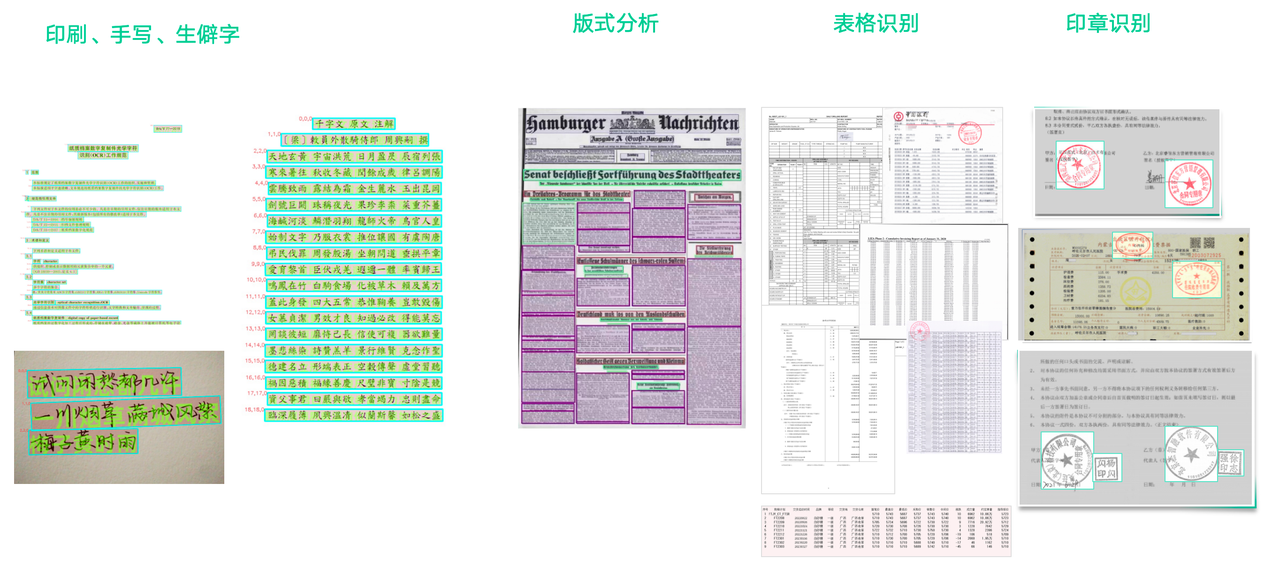
After indexing, you can see the chunk preview — how each document was split, what embeddings were used, and the vector store status. Bisheng uses its own internal vector DB by default, but you can hook it up to Milvus or Qdrant if you need production-scale.
Step 3: Build the Multi-Model Workflow
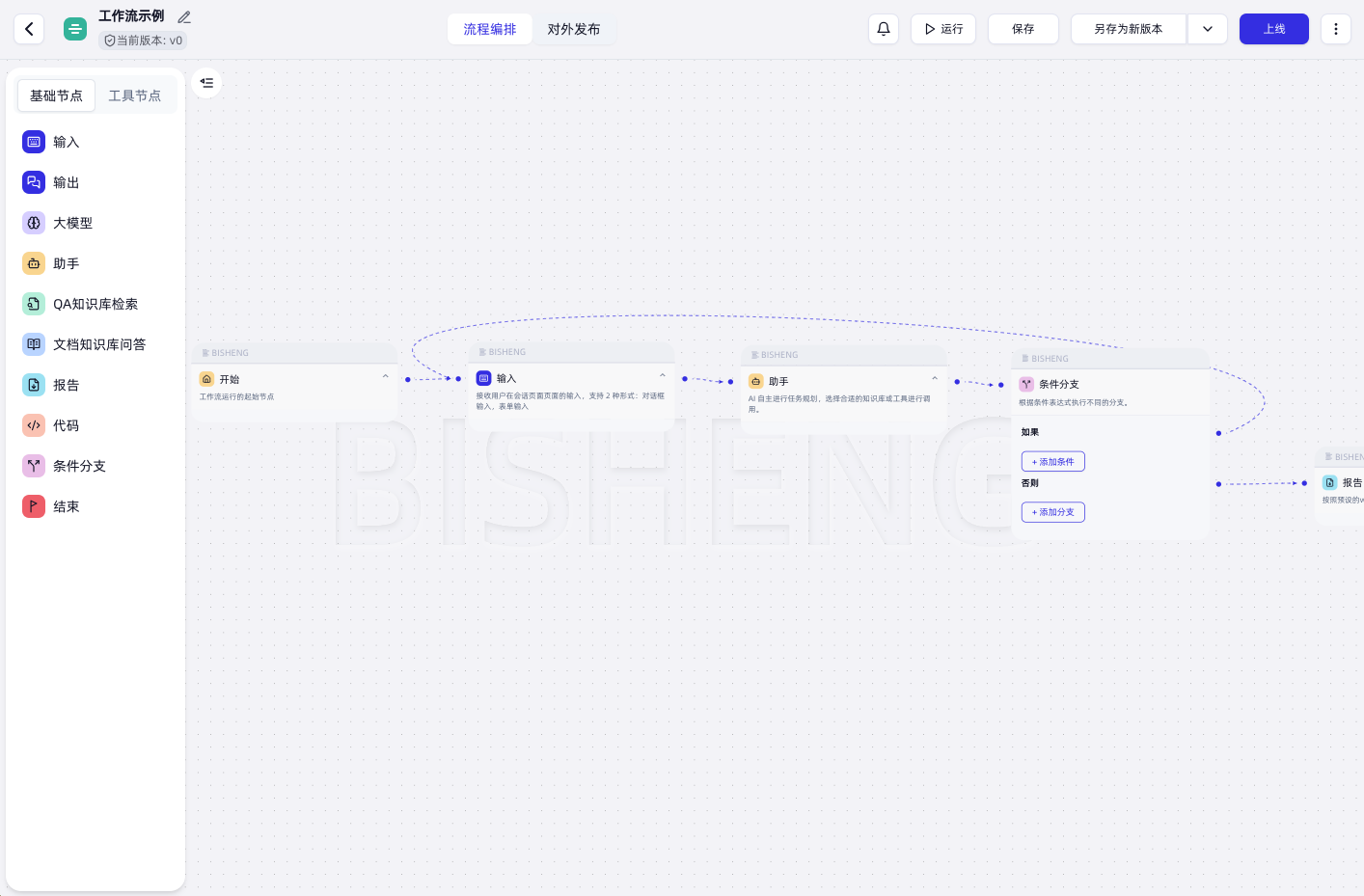
This is where the magic happens. Click Workflow → Create. You'll see a blank canvas with a palette of nodes on the left.
Here's the workflow I built:
- Input Node — user query comes in
- Classifier Node — checks if the query is "sensitive" (contains PII, financial data, etc.)
- Router Node — routes to:
- Branch A (Ollama/Qwen): For sensitive data — uses the local model for privacy
- Branch B (OpenAI/GPT-4o): For general queries — uses OpenAI for better quality
- RAG Retrieval Node — searches the "Enterprise Docs" knowledge base
- Response Node — formats and returns the answer
Drag, drop, connect. Took me about 10 minutes to wire everything up. The interface is surprisingly intuitive — if you've used n8n or Zapier, this will feel familiar.
📊 Step 4: Test and Monitor
Click Run to test. I threw a few queries at it:
| Query | Model Used | Response Time | Quality |
|---|---|---|---|
| "Summarize the contract terms" | Qwen (local) | 4.2s | ✅ Good |
| "Write a blog post about our product" | GPT-4o | 2.8s | ✅ Excellent |
| "What's in invoice #1024?" | Qwen (local) | 3.5s | ✅ Good (with OCR data) |
Bisheng's monitoring dashboard shows you latency breakdowns, token usage, and error rates per node. Super helpful for debugging which model is slow or which chunk retrieval is failing.
🔥 Common Pitfalls I Hit
- Docker networking: If Ollama is on the host (not Docker), use
host.docker.internalinstead oflocalhostas the Ollama URL. Lost 20 minutes on this. - OCR on complex PDFs: Multi-column PDFs confuse the OCR. I got better results by converting to single-column format first.
- Model fallbacks: If a provider is down, the workflow just errors — there's no automatic retry or fallback. I had to add a manual error-handling node.
Final Thoughts
After a week of using Bisheng in production, I'm genuinely impressed. It's rare to find an open-source platform that balances ease of use with enterprise features this well. The visual workflow builder, native RAG with OCR, and multi-model orchestration are rock solid. The documentation could use some love, and I wish the Docker image were smaller (it's ~2GB), but those are minor complaints.
If you're evaluating LLM platforms for your team, start with Bisheng. It might save you weeks of custom integration work.
🚀 Explore Bisheng on Run This Ai
Docker Compose configs, system requirements, installation guides, and more — all in one place.
View Bisheng Tool Page →