BricksLLM Guide: Take Control of Your LLM API Costs
BricksLLM is an open-source LLM API gateway for cost and rate limiting. Learn how it helps teams control spending across OpenAI, Azure, Anthropic, and more.

Why Your LLM Bills Are Out of Control — and How to Fix It
If you're managing a team that uses AI APIs, you've probably had that moment. You check the monthly bill and see a charge you can't explain. Someone on your team ran a massive batch job through the production API key, and now you're staring at a four-figure charge that nobody wants to take responsibility for.
That's exactly the problem BricksLLM solves. It's an open-source API gateway built specifically for LLM providers — think of it as a proxy that sits between your team and the AI APIs you use, giving you granular control over who spends what and how much.
🚀 Want to deploy BricksLLM yourself?
Docker configs, system requirements, and installation guides — all on one page.
View BricksLLM Tool Page →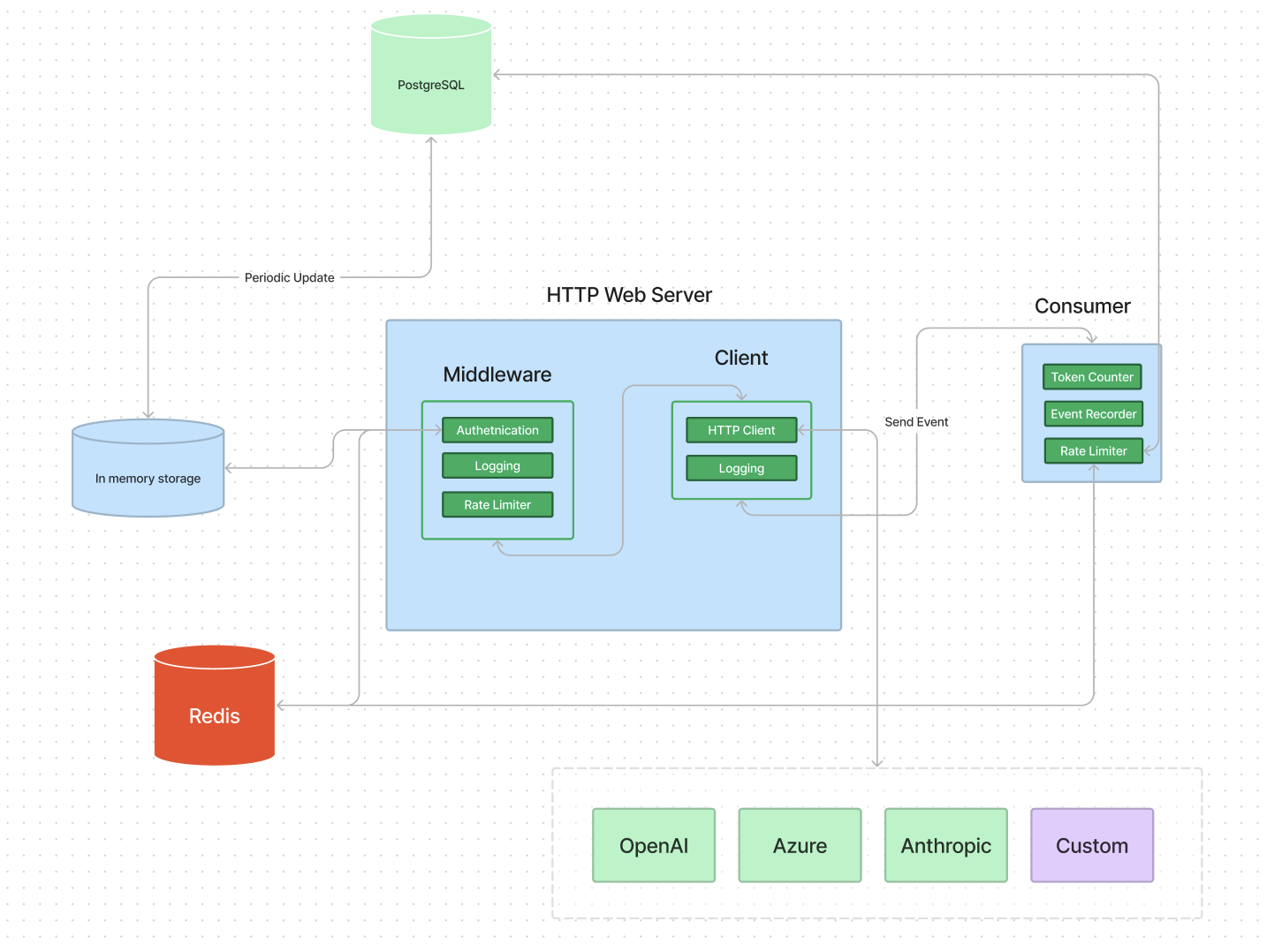
What Makes BricksLLM Different?
I've tried a few different approaches to managing LLM costs. Spreadsheets, manual tracking post-hoc, relying on the provider's own dashboards — none of them give you proper control before the money is spent.
Per-Key Cost Limits That Actually Work
This is the killer feature. You create an API key for each developer, application, or environment, and set a hard cost limit on it. When that limit is hit, the gateway stops accepting requests through that key. No surprise bills, no after-the-fact reconciliation. I gave my intern a key with a $50 weekly limit for experimentation — and the system enforced it without me having to babysit.
Real-Time Usage Analytics
The admin dashboard shows live usage data: requests per minute, tokens per minute, cost accumulation per key. You can see which applications are consuming the most resources right now, not last month. When I noticed a staging environment was using 3x more than production, I could immediately investigate — turns out someone had pointed their dev script at the wrong endpoint.
Multi-Provider Support
BricksLLM works with OpenAI, Azure OpenAI, Anthropic, vLLM, and any open-source LLM behind a compatible API. You configure it once as a unified proxy, and your team doesn't need to know which provider sits behind which endpoint. I switched from direct OpenAI calls to using BricksLLM as a middle layer — took about 30 minutes, and nobody on my team noticed the change.
💡 Pro tip: I wasted an hour wondering why rate limits weren't applying correctly. Turns out I had forgotten to configure Redis. BricksLLM needs Redis for the high-performance rate limiting — skip that step and you'll get no rate limiting at all. Don't skip the Redis step.
Budget Alerts via Webhooks
You can set multiple threshold alerts per key. When a key hits 50%, 80%, or 100% of its budget, BricksLLM fires a webhook. I hooked these into Slack, and now my team gets notified before anyone hits a hard limit — saves the "my key stopped working!" panic messages.
Who Is BricksLLM For?
Perfect for: Engineering teams that share API keys, startups managing AI costs across multiple environments, and anyone who needs to bill LLM usage back to different departments or clients.
Not for you if: You're a solo developer with a single API key and no need for granular cost tracking. The overhead of running another service might not be worth it for a single user.
🚀 Explore BricksLLM on Run This Ai
Docker Compose configs, system requirements, installation guides, and more — all in one place.
View BricksLLM Tool Page →