How to Deploy Colibri: Chat with a 744B MoE Model on Your Own Machine
Step-by-step tutorial: build Colibri from source, chat with a 744B GLM-5.2 model from your terminal, expose it via an OpenAI-compatible API, and deploy it with Docker Compose.
In the previous article we looked at what Colibri is — a pure-C engine that streams frontier MoE models from disk. Now let's get our hands dirty: build it, download a model, chat with a 744B model from your terminal, and expose it through an OpenAI-compatible API. This tutorial covers the exact commands you need.
🚀 Want to deploy Colibri yourself?
Docker configs, system requirements, and installation guides — all on one page.
View Colibri Tool Page →Step 1: Prerequisites
You need a 64-bit Linux machine with a C compiler, git, and ideally an NVMe drive — expert streaming is latency-bound, so keep the model on local NVMe or ext4, never on a network mount. The smallest supported model (OLMoE 7B) runs on a laptop; a 744B model wants ~10 GB RAM headroom plus fast storage.
Step 2: Build from source
git clone https://github.com/JustVugg/colibri.git
cd colibri/c
./setup.sh && ./coli build
That's it — pure C, no Python runtime, no dependency hell. The build produces the coli binary with all three subcommands.
Step 3: Chat with a frontier model
Point Colibri at your model directory and start chatting. For a GLM-5.2 int4 model:
./coli chat --model-dir /nvme/glm52_i4 --model-id glm-5.2You'll see the engine boot in about 30 seconds with a modest resident footprint, then a live streaming prompt:
🐦 colibri v1.4.0 — GLM-5.2 · 744B MoE · int4 · streaming CPU
✓ ready in 32s · resident 9.9 GB
› ciao!
Step 4: Serve an OpenAI-compatible API
Want to plug this into your existing tools? Start the server and point any OpenAI client at it:
./coli serve --host 0.0.0.0 --model-id glm-5.2 --ram 24

curl http://localhost:5000/v1/chat/completions \
  -d '{"model":"glm-5.2","messages":[{"role":"user","content":"Hi"}]}'
Step 5: Deploy with Docker Compose
Prefer containers? The repo ships a compose file that builds a slim image and bind-mounts the model read-only. Set the RAM budget to your host's size:
MODEL_DIR=/nvme/glm52_i4 COLI_RAM=24 \
  docker compose -f docker/docker-compose.yml up -d
The container exposes port 5000 and restarts unless-stopped — a solid base for a private ChatGPT-grade endpoint.
Step 6: Watch it think
Run ./coli web and open the dashboard to see live token metrics, the per-turn time breakdown, the VRAM/RAM/disk tier bar, and the Brain page — a real-time cortex of all 19,456 experts lighting up as tokens stream.
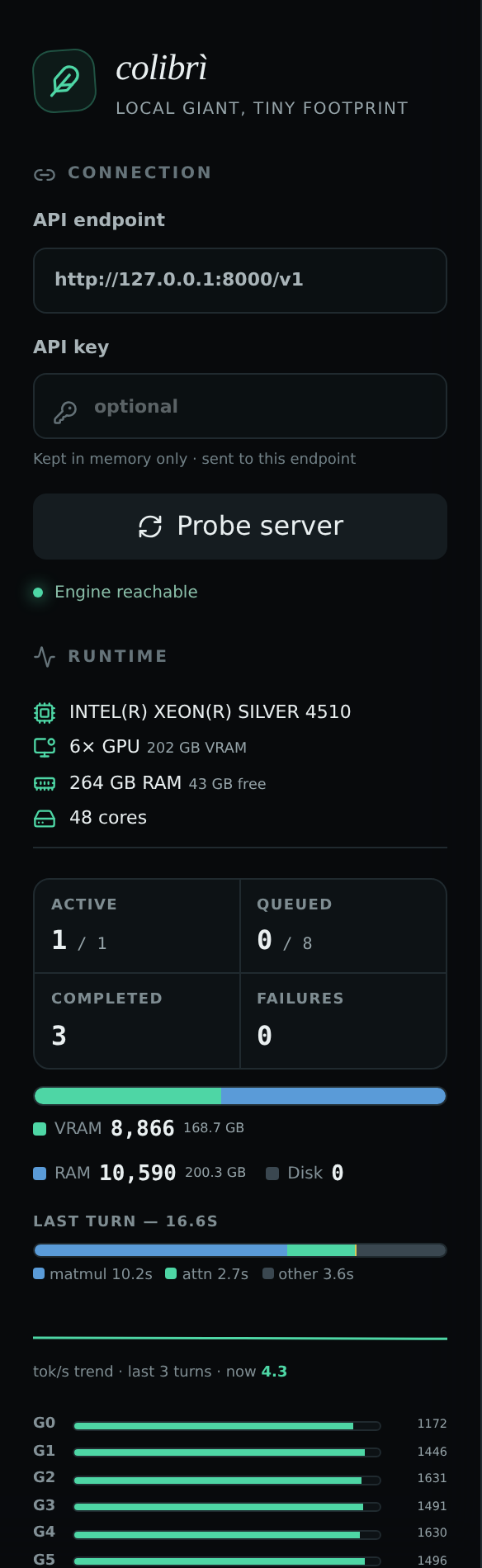
Tuning tip: raise --ram to cache more experts and speed up generation; keep the model on NVMe and give Docker 2 GB+ of shared memory for streaming workloads.
From a laptop-friendly 7B model to a 2.8T frontier MoE, Colibri turns the memory hierarchy on your desk into one big inference engine. Try the CLI first, then graduate to the OpenAI-compatible server — your existing tools won't know the difference.
🚀 Get Colibri running in minutes
System requirements, docker-compose configs, and installation guides — all on one page.
View Colibri Tool Page →