DeepAnalyze: Your Autonomous AI Data Science Assistant — A Complete Guide
Discover DeepAnalyze, the first agentic LLM for autonomous data science. Learn how it analyzes datasets, generates professional reports, and automates the entire data science pipeline without human intervention.

🎈 Your AI Data Analyst That Actually Gets the Job Done
I've spent more hours than I'd like to admit wrestling with CSV files, writing pandas scripts, and trying to remember the exact matplotlib syntax for a decent-looking chart. You know the drill — you get a dataset, spend 30 minutes cleaning it, another hour figuring out what analysis to run, and then three hours fighting with visualization libraries. By the time you have something presentable, you've forgotten what question you were trying to answer in the first place.
That's exactly where DeepAnalyze comes in. It's not another dashboard tool or a simplified Excel alternative. It's an agentic LLM — meaning it thinks, plans, and executes data science tasks autonomously. Give it a database, a CSV file, or even a messy JSON dump, and it'll figure out what to do, run the analysis, and hand you a professional report. No hand-holding required.
🚀 Want to deploy DeepAnalyze yourself?
Docker configs, system requirements, and installation guides — all on one page.
View DeepAnalyze Tool Page →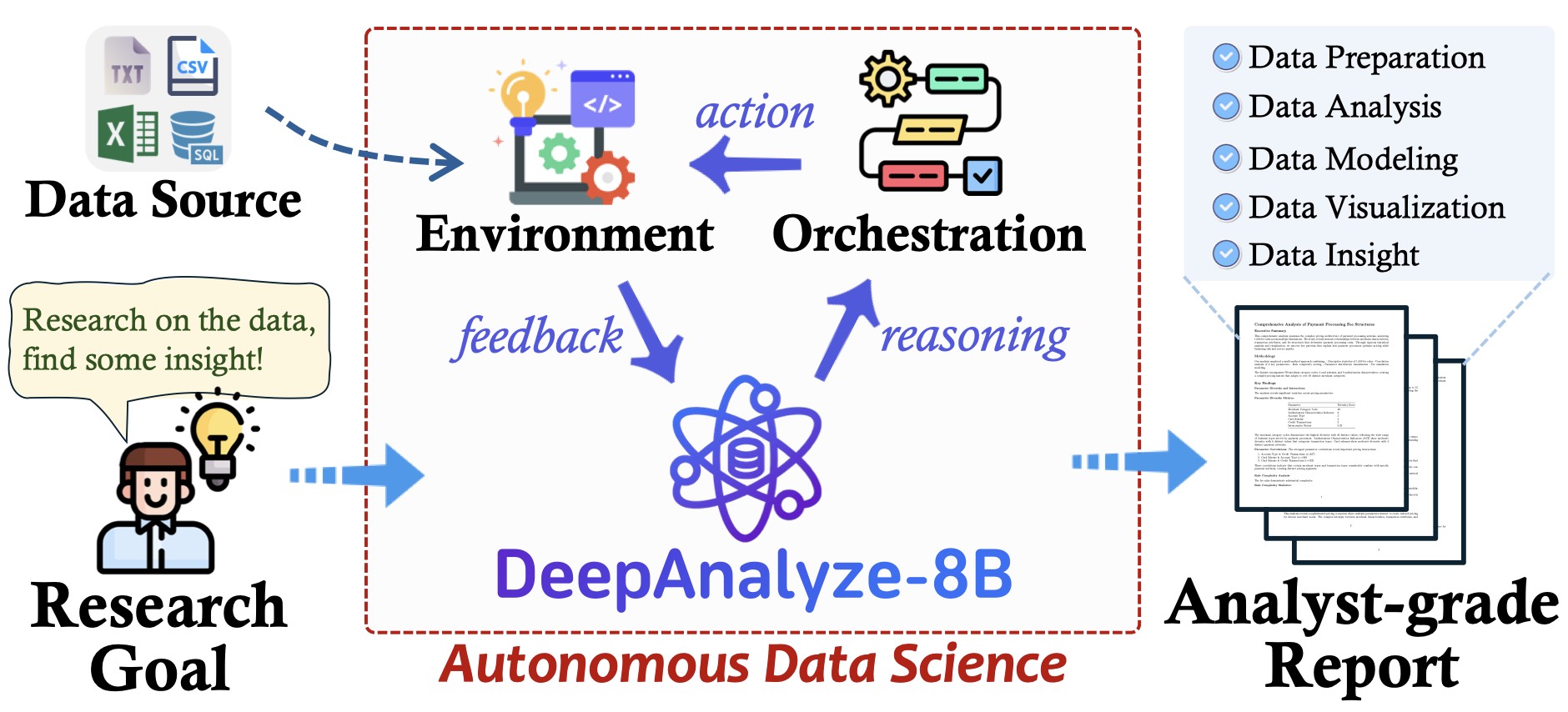
What Makes DeepAnalyze Different?
Most "AI data tools" are just ChatGPT wrappers that generate SQL queries you still have to run yourself. DeepAnalyze is the opposite — it's a full agent that actually executes code in a sandboxed Docker environment, iterates when something fails, and produces real outputs. Here's what stood out to me:
🧠 It Understands Your Data, Not Just Your Question
You can throw a folder of CSV files, a SQLite database, or even a messy JSON blob at it. DeepAnalyze inspects the schema, infers data types, and decides the best approach. I tested it with a 200MB CSV of sales data — it figured out date parsing, handled missing values, and computed monthly aggregates without me specifying a single column name.
📊 Reports That Don't Look Like They Were Generated by AI
This surprised me the most. The reports it produces include proper visualizations, statistical summaries, and natural-language insights that read like an actual analyst wrote them. Not bullet points — full narrative paragraphs with context. It even adds caveats about data quality and suggests follow-up analyses.
🔬 Fully Open-Source and Academic-Grade
DeepAnalyze comes from serious research — the team at Renmin University and Tsinghua University published a paper (arXiv 2510.16872), released the 8B model on HuggingFace, and open-sourced the entire training dataset (DataScience-Instruct-500K). This isn't a closed SaaS product — you can run it locally, fine-tune it, or extend it however you want.
🛠 The Full Pipeline, Not Just Analysis
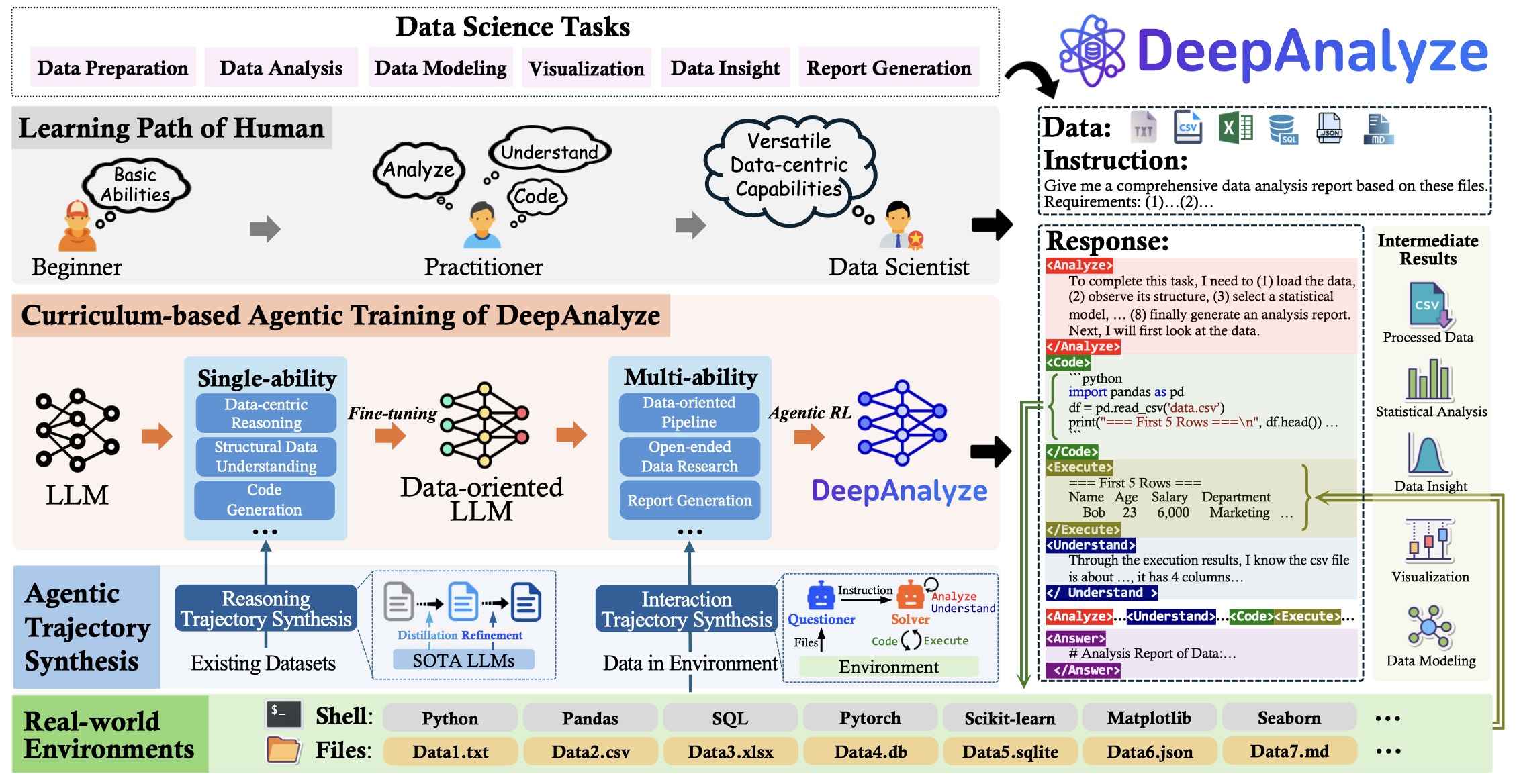
Most tools stop at "here's a chart." DeepAnalyze handles the entire pipeline: data preparation → cleaning → feature engineering → modeling → visualization → report generation. It even has a companion tool called DeepPrep for advanced data preparation, and it's being used as the official agent for the 2026 China Collegiate Computer Design Contest's Big Data Track.
Who Is This For?
Data analysts who want to automate the grunt work while keeping oversight. Students and researchers working with academic datasets. Business teams that need quick insights from internal data without waiting for the data engineering team. Anyone who's ever opened a CSV file and immediately felt tired.
It's not for real-time analytics or streaming data — DeepAnalyze is built for batch analysis of structured datasets. And if you need pixel-perfect custom visualizations, you'll still want to tweak things manually. But for 80% of data analysis work? It's genuinely impressive.
Technical Highlights
The architecture is fascinating — DeepAnalyze uses a planning-execution loop where the LLM generates a step-by-step data science plan, executes code in a sandbox, observes outputs, and adapts. It's built on top of their fine-tuned DeepAnalyze-8B model (available on HuggingFace), with Docker-based sandboxed code execution for safety. The system supports OpenAI-compatible API endpoints, so you can plug it into your existing infrastructure.
It handles structured data (Databases via SQL, CSV, Excel), semi-structured (JSON, XML, YAML), and unstructured (TXT, Markdown). The web UI (v2) features a smoother interface with HeyWhale API integration and Docker sandbox support.
Conclusion
I went into testing DeepAnalyze expecting a research prototype — something impressive in a demo but painful in practice. What I found was a genuinely useful tool that I keep coming back to. It won't replace experienced data scientists, but it'll make them faster. And for non-experts who just need answers from their data? It's a game-changer.
Give it a try — the Docker image is ready to go, and the whole thing runs locally. No data leaves your machine.
🚀 Explore DeepAnalyze on Run This Ai
Docker Compose configs, system requirements, installation guides, and more — all in one place.
View DeepAnalyze Tool Page →