Dockge: The Ultimate Self-Hosted Docker Compose Stack Manager
A deep dive into Dockge — the beautiful, reactive Docker Compose stack manager from the creator of Uptime Kuma. Features, architecture, and why every self-hoster needs it.

What Is Dockge?
If you have ever found yourself juggling multiple docker-compose.yaml files across different directories, manually typing docker compose up -d and docker compose down while wondering if there is a better way — there is. Dockge is a beautiful, reactive, self-hosted web interface for managing Docker Compose stacks. Created by louislam (the same developer behind the wildly popular Uptime Kuma), Dockge brings the same polish and UX sensibility to stack management that Uptime Kuma brought to uptime monitoring.
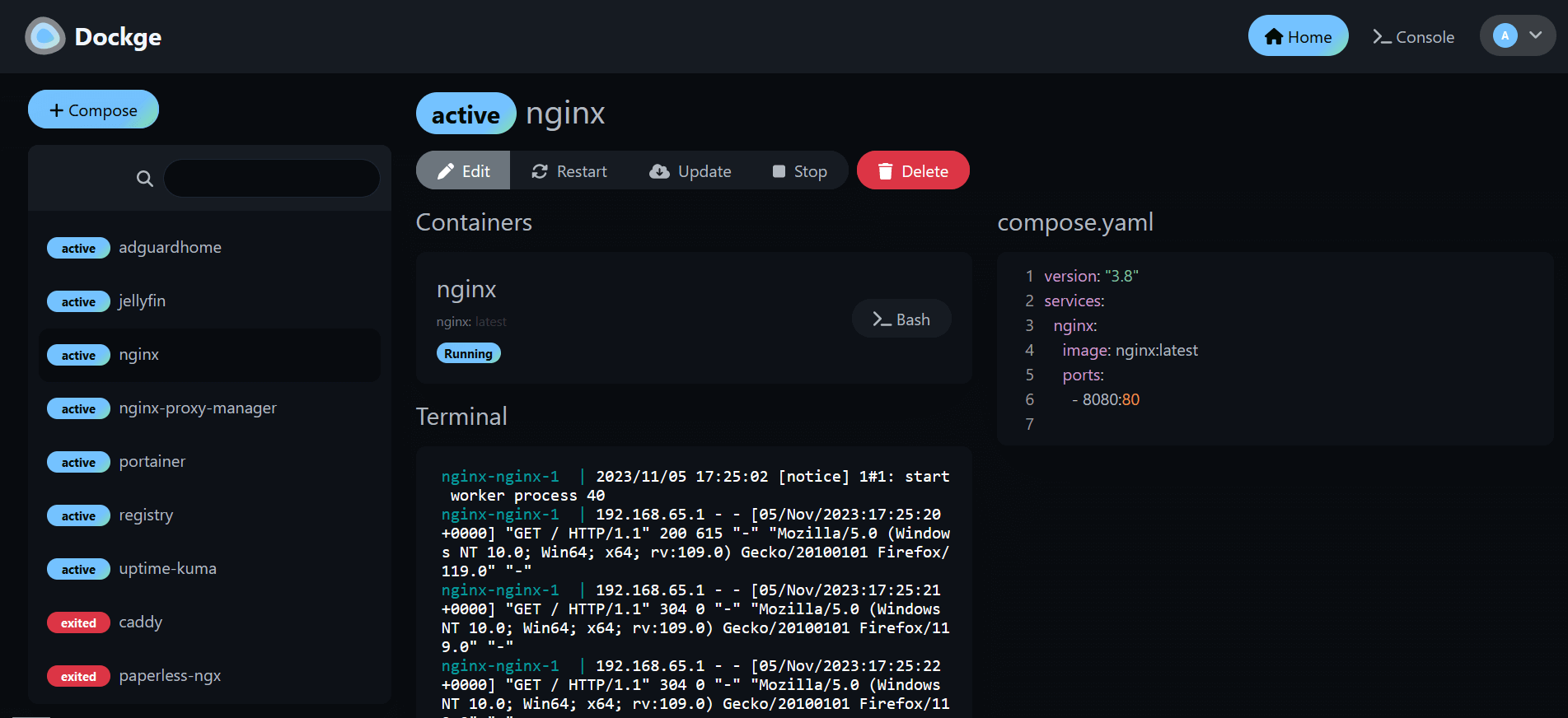
At its core, Dockge treats your compose.yaml files with respect. They remain on your filesystem exactly where you expect them, fully compatible with the normal docker compose CLI. Dockge simply provides a gorgeous web UI on top: create, edit, start, stop, restart, and delete stacks — all from a single dashboard with real-time terminal output.
Key Features
- Interactive Compose Editor — A code editor built directly into the web UI for editing your
compose.yamlfiles, with syntax highlighting and validation. - Real-Time Terminal Output — Watch stack pull, up, and down progress live in the browser. No more refreshing or tailing logs in another window.
- Multi-Agent Support — Since version 1.4.0, Dockge can manage stacks across multiple Docker hosts from a single interface. This is huge for homelabs with multiple machines.
- Convert
docker runto Compose — Paste adocker run ...command and get a ready-to-usecompose.yaml. This one feature alone saves hours of manual translation. - File-Based Storage — Your compose files live on disk, under a directory of your choice. You can edit them with any editor, commit them to Git, back them up, or use them directly from the CLI. Dockge never "kidnaps" your files.
Why Self-Host Dockge?
Docker Compose is the lingua franca of self-hosting. Nearly every self-hosted application — from Nextcloud to Home Assistant, from Jellyfin to Vaultwarden — is distributed as a compose.yaml file. As your stack grows from two containers to twenty, managing them all manually becomes tedious. Dockge centralises everything: one port, one dashboard, one place to see the status of all your stacks, restart them, update their images, and inspect their logs.
Dockge is also a natural companion to other tools already on Run This Ai. Pair it with Portainer for cluster-level container management, Dozzle for real-time log viewing, and Uptime Kuma for monitoring — all from the same ecosystem. With 23k+ GitHub stars and an MIT license, Dockge is mature, well-tested, and actively maintained.
Conclusion
Whether you are a self-hosting veteran with fifty containers or just starting your first compose stack, Dockge is one of those tools that instantly feels essential. It is lightweight (512 MB RAM is plenty), runs on any Docker host, and its reactive UI is genuinely pleasant to use. If you manage Docker Compose stacks, Dockge will change how you work.