Envoy AI Gateway Tutorial: Route Your First LLM Request in Docker
Step-by-step tutorial to run Envoy AI Gateway with Docker, route requests to any LLM provider through a single gateway, and add token-based rate limiting — with a hands-on review.
🚀 Want to deploy Envoy AI Gateway yourself?
Docker configs, system requirements, and installation guides — all on one page.
View Envoy AI Gateway Tool Page →Tutorial: Route your first LLM request through Envoy AI Gateway
In this hands-on tutorial you will run Envoy AI Gateway locally with Docker and route real requests to a provider of your choice. The standalone CLI mode (called aigw) is the fastest way to understand the concepts before moving to Kubernetes.
Prerequisites
- Docker with Docker Compose (v2 or newer)
- An API key for at least one LLM provider (OpenAI, Anthropic, or AWS Bedrock)
- Basic familiarity with YAML configuration
Step 1 — Pull the image
docker pull envoyproxy/ai-gateway-cli:latest
Step 2 — Create the gateway config
The gateway uses a Gateway API-style config. Create a file named aigw.yaml that defines a route to your provider, for example OpenAI:
apiVersion: aigateway.envoyproxy.io/v1alpha1
kind: Gateway
metadata:
  name: ai-gateway
spec:
  backends:
    - name: openai
      type: OpenAI
      config:
        apiKey: ${OPENAI_API_KEY}
Step 3 — Run the gateway
docker run --rm -p 8080:8080 \
  -e OPENAI_API_KEY=sk-... \
  -v $(pwd)/aigw.yaml:/etc/aigw/aigw.yaml \
  envoyproxy/ai-gateway-cli:latest
Step 4 — Send a request
curl http://localhost:8080/v1/chat/completions \
  -H "Content-Type: application/json" \
  -d '{"model":"gpt-4o-mini","messages":[{"role":"user","content":"Hello!"}]}'
That's it — your application just talked to OpenAI through a provider-agnostic gateway. Swap the backend to Anthropic or Bedrock later without touching your client code.
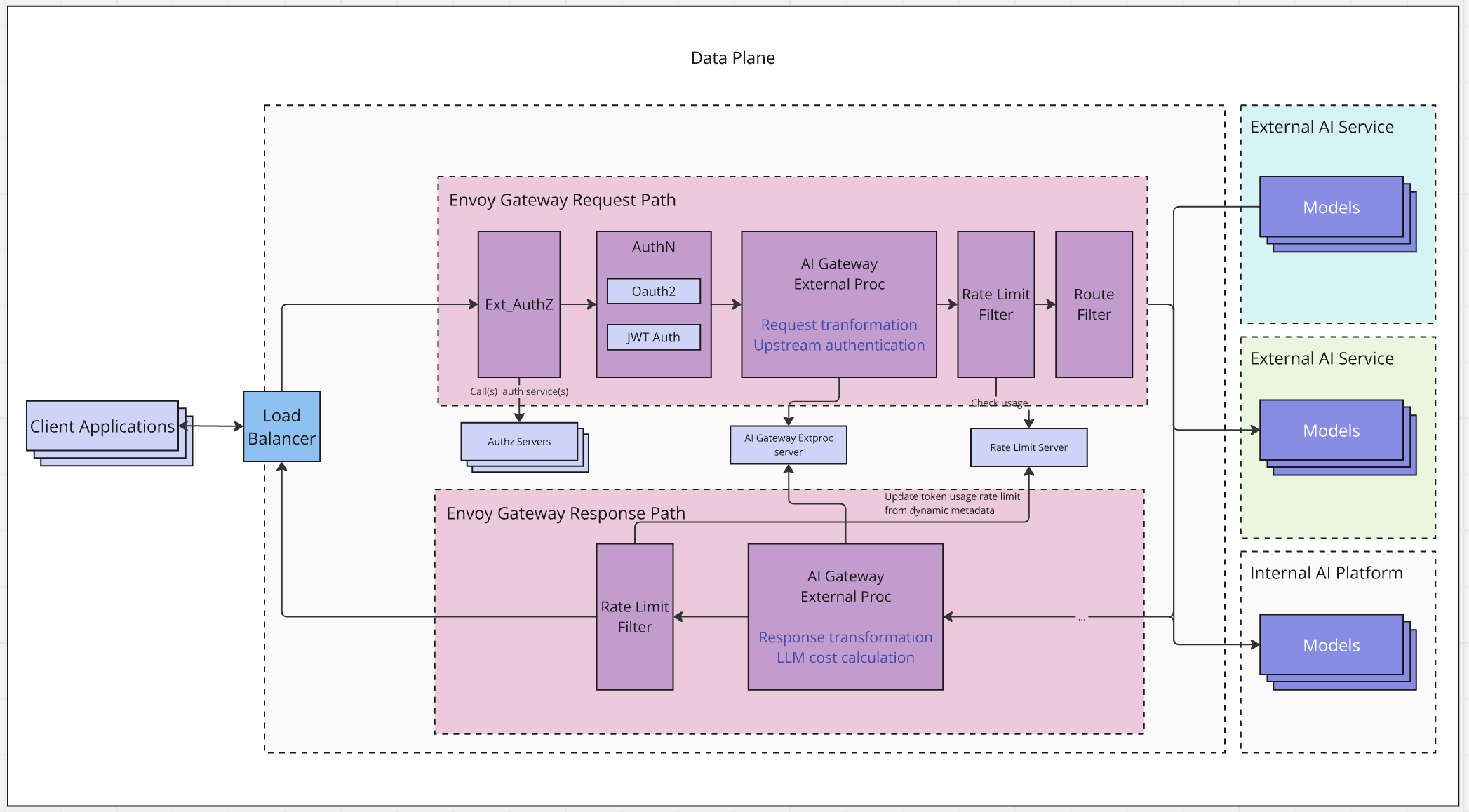
Step 5 — Add rate limiting
The real power shows when you attach policies. Add a token-based rate limit so each consumer is capped at, say, 100k tokens per minute:
apiVersion: aigateway.envoyproxy.io/v1alpha1
kind: BackendTrafficPolicy
metadata:
  name: token-limit
spec:
  rateLimit:
    type: Token
    limit: 100000
    period: minute
Review: Is it production-ready?
| Aspect | Rating |
|---|---|
| Ease of setup | ⭐️⭐️⭐️⭐️ — Docker image works out of the box |
| Enterprise features | ⭐️⭐️⭐️⭐️⭐️ — token limits, policies, observability |
| Docs | ⭐️⭐️⭐️⭐️ — clear quickstart and API reference |
| Maturity | ⭐️⭐️⭐️⭐️ — CNCF-backed, rapid release cadence |
💡 Verdict: If your team talks to more than one LLM provider, Envoy AI Gateway pays for itself in day one. The token-based rate limiting alone is worth the migration.
Ready to run it in production? Grab the official compose file and requirements from the tool page below.
🚀 Want to deploy Envoy AI Gateway yourself?
Docker configs, system requirements, and installation guides — all on one page.
View Envoy AI Gateway Tool Page →