Evidently Guide: Open-Source ML and LLM Observability Framework
A comprehensive guide to Evidently — the open-source Python framework for evaluating, testing, and monitoring ML and LLM systems. Covers 100+ metrics, Reports vs Test Suites, LLM evals with descriptors, and self-hosted monitoring.
When "It Works on My Machine" Isn't Enough
You've trained a model. It's scoring 0.94 on your test set. You deploy it, and three weeks later — the numbers are drifting. Accuracy is dropping. Users are complaining. But why?
That's the problem Evidently solves. It's an open-source Python framework that watches your ML and LLM systems from development through production. Not just "is it working" — but how it's working, what's changing, and where you need to look.
🚀 Want to self-host Evidently?
Docker configs, system requirements, and installation guides — all on one page.
View Evidently Tool Page →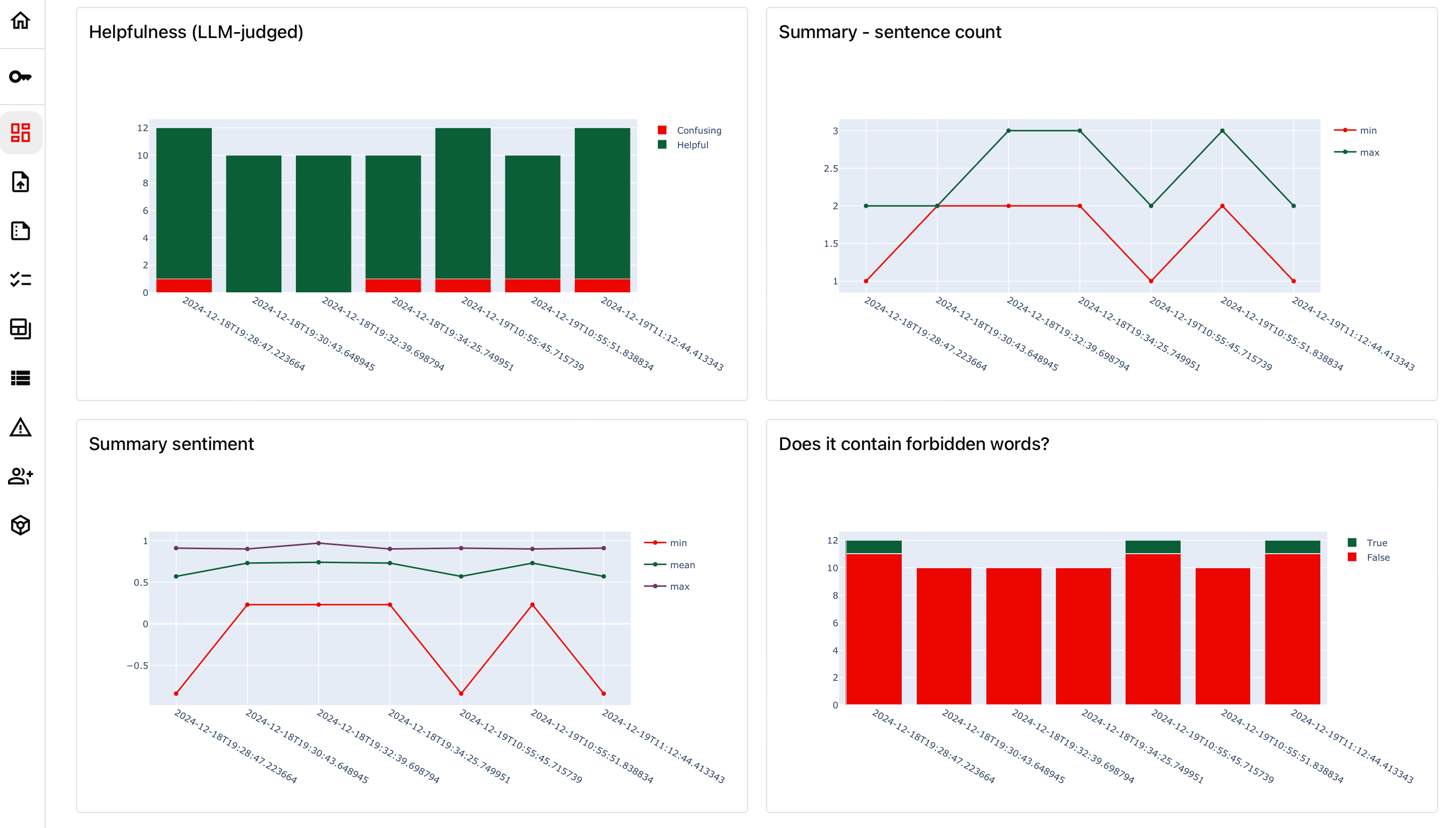
What Makes Evidently Different?
There are plenty of monitoring tools out there. But most of them expect you to pick one modality — either classic ML tabular data or Gen AI. Evidently handles both in the same framework. Tabular classification, regression, LLM evaluations, RAG pipelines — it's all the same interface.
Here's what I found genuinely useful after spending time with it:
1. 100+ Built-in Metrics That Actually Matter
Most monitoring tools give you a handful of generic metrics. Evidently has over 100 — from data drift detection (PSI, KS, Jensen-Shannon) to LLM-specific judges like sentiment, text length, and denial detection. I didn't have to build custom evaluators for basic stuff. It was all there from the start.
2. Reports + Test Suites = Two Modes for Two Mindsets
During development, you want Reports — explore, visualize, understand. Before deployment, you switch to Test Suites — add pass/fail conditions and run them in CI/CD. Same metrics, different philosophy. This split between exploration and validation is smart because it matches how teams actually work.
3. The Monitoring UI Dashboard
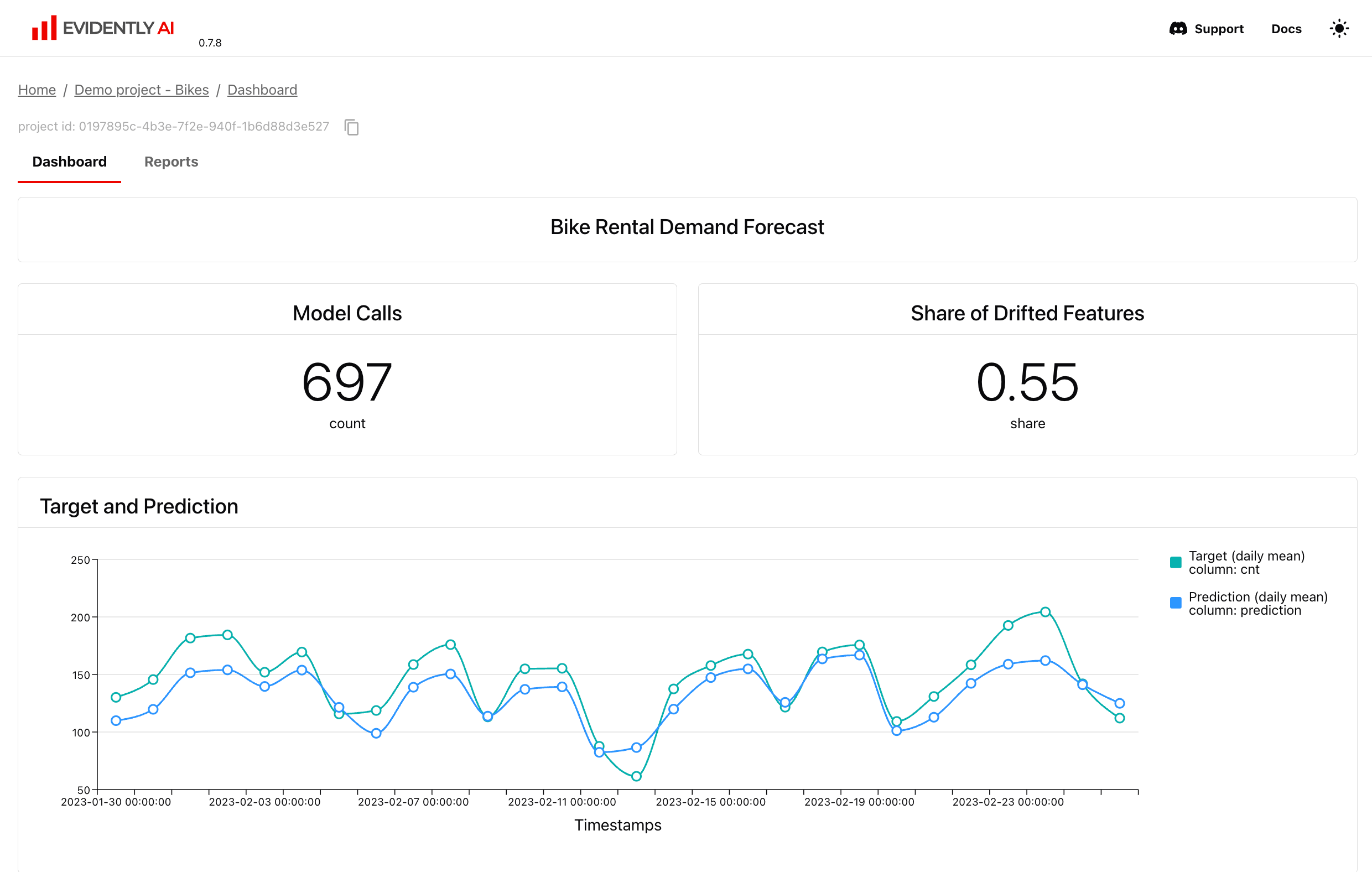
You don't have to run everything from a Jupyter notebook. Evidently's self-hosted Monitoring UI gives you a visual dashboard where metrics and test results update over time. It's not Grafana-level polished, but it's functional and straightforward. You can see drift trends, alert triggers, and historical comparisons without writing a single line of code.
4. LLM Evals Done Right — With Descriptors
The LLM evaluation system uses "descriptors" — row-level evaluators that score each response. Want to check sentiment of every answer? Add a Sentiment descriptor. Want to flag responses that contain denial phrases? Add a Contains descriptor. It's elegant because you compose evaluations declaratively instead of writing custom scoring functions.
Where Does It Shine?
Evidently is strongest when you need one observability stack for mixed ML/LLM workloads. If your pipeline has both traditional ML models (fraud detection, recommendation) and LLM components (summarization, RAG), Evidently covers both with the same tooling. That consistency saves your team from maintaining two separate monitoring systems.
It's also great for CI/CD integration. The Test Suite output is machine-readable (JSON, dict), so you can plug it into your deployment pipeline and fail builds when data drift exceeds thresholds.
What I Wish Was Better
The Monitoring UI, while functional, lacks the polish of dedicated observability platforms. Alerting configuration could be more flexible. And the documentation, while comprehensive, sometimes buries key details — I spent a while figuring out how to properly configure custom metrics for my specific use case.
Also: Evidently is a Python library first. If your team works primarily in R or Node.js, the integration won't feel as natural.
Conclusion — Who Is This For?
Evidently is for ML teams that need a practical, open-source observability layer that spans both traditional ML and Gen AI. It's particularly good if you're already in the Python ecosystem and want something that works out of the box without a massive infrastructure investment.
If you're running a single LLM chatbot in production, it might be overkill. But if you have multiple models, data pipelines, and the nagging feeling that something is drifting — Evidently gives you the visibility to actually know.
🚀 Explore Evidently on Run This Ai
Docker Compose configs, system requirements, installation guides, and more — all in one place.
View Evidently Tool Page →