FastChat: I Spent a Weekend Trying to Host My Own ChatGPT Clone — Here Is What Worked
After trying vLLM, llama.cpp, and every serving framework in between, FastChat was the one that actually worked. Here is my honest experience with multi-model serving, evaluation, and deployment.
💡 The honest truth: FastChat is the unsung hero of LLM serving. It powers Chatbot Arena (lmsys.org) — that site where you compare models side by side? Yeah, that's FastChat under the hood. Millions of votes, zero drama.
🚀 Want to deploy FastChat yourself?
Docker configs, system requirements, and installation guides — all on one page.
View FastChat Tool Page →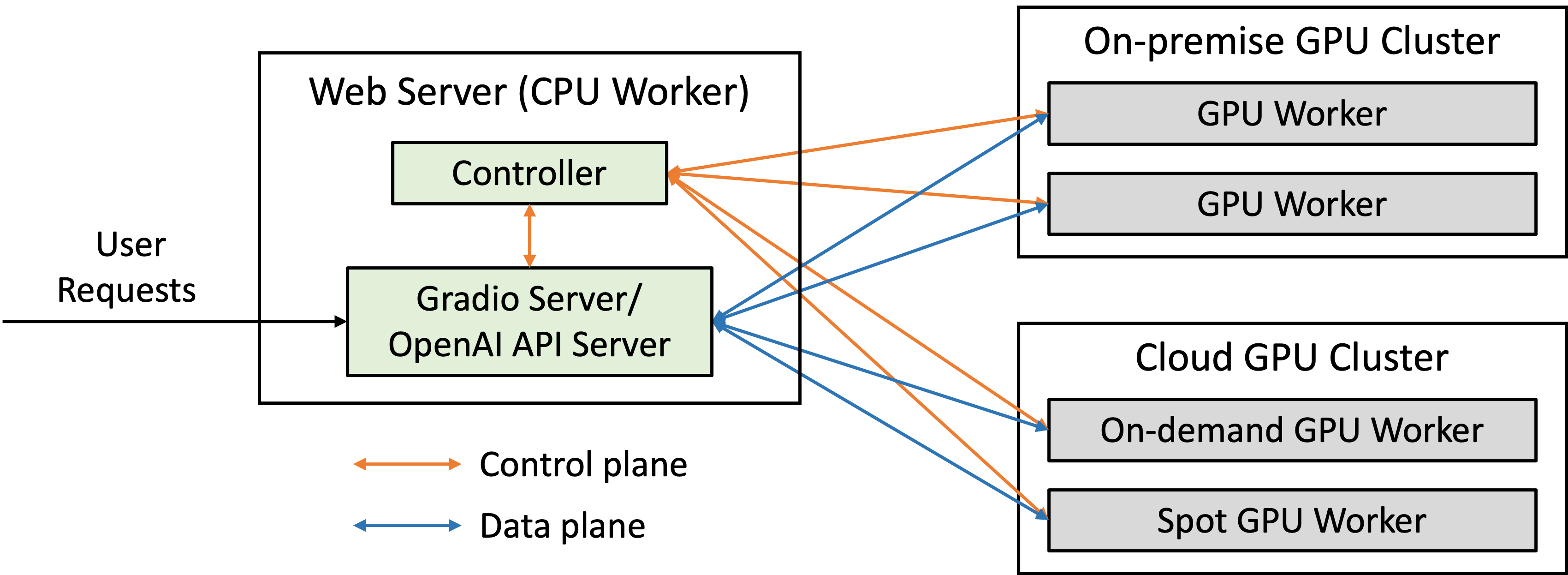 ## What makes FastChat actually worth your time
I've been using FastChat for about 6 months now, on and off. Here's what kept me coming back.
### ⚡ Multi-model serving without the headache
FastChat started as a single model server, but it evolved fast. Today, you can load Llama, Vicuna, Mistral, Mixtral — even quantized GGUF models — all in the same server instance. Switch between them with a simple API call. I run a 7B for quick queries and route complex stuff to a 33B. One endpoint, two models, zero config changes.
The CLI controller architecture took me an hour to wrap my head around. But once it clicked? I haven't looked at another serving framework since.
### 🎯 OpenAI-compatible API that actually works
This was the killer feature for me. FastChat exposes an API that's a drop-in replacement for OpenAI's chat completions endpoint. I migrated my existing chatbot app from `api.openai.com` to `localhost:8000` by changing one URL. Everything — streaming, tool calls, system prompts — just worked. No wrapper, no middleware, no drama.
Well, almost everything. Function calling support came later and it's still catching up to OpenAI's implementation. If you need advanced tool use, you might hit some rough edges. But for standard chat? Flawless.
### 🔧 Built-in evaluation tools
FastChat ships with LLM Judge — an evaluation framework using GPT-4 as an automated judge. This is one of those features you don't appreciate until you need it. After fine-tuning a model, I ran 50 test questions through the judge pipeline and got structured comparison reports in minutes. Without it, I'd have been manually reading outputs for hours.
## What makes FastChat actually worth your time
I've been using FastChat for about 6 months now, on and off. Here's what kept me coming back.
### ⚡ Multi-model serving without the headache
FastChat started as a single model server, but it evolved fast. Today, you can load Llama, Vicuna, Mistral, Mixtral — even quantized GGUF models — all in the same server instance. Switch between them with a simple API call. I run a 7B for quick queries and route complex stuff to a 33B. One endpoint, two models, zero config changes.
The CLI controller architecture took me an hour to wrap my head around. But once it clicked? I haven't looked at another serving framework since.
### 🎯 OpenAI-compatible API that actually works
This was the killer feature for me. FastChat exposes an API that's a drop-in replacement for OpenAI's chat completions endpoint. I migrated my existing chatbot app from `api.openai.com` to `localhost:8000` by changing one URL. Everything — streaming, tool calls, system prompts — just worked. No wrapper, no middleware, no drama.
Well, almost everything. Function calling support came later and it's still catching up to OpenAI's implementation. If you need advanced tool use, you might hit some rough edges. But for standard chat? Flawless.
### 🔧 Built-in evaluation tools
FastChat ships with LLM Judge — an evaluation framework using GPT-4 as an automated judge. This is one of those features you don't appreciate until you need it. After fine-tuning a model, I ran 50 test questions through the judge pipeline and got structured comparison reports in minutes. Without it, I'd have been manually reading outputs for hours.
🌱 Pro tip (learned the hard way): Use the `--host 0.0.0.0` flag when starting the controller and worker. I spent an embarrassing amount of time wondering why I couldn't connect from another machine on my network.
## Getting your hands dirty
This is what I did to get FastChat running on my homelab:
```bash
pip install fschat # the real package name, confusingly not "fastchat"
# Start the three components (yes, all three)
python -m fastchat.serve.controller &
python -m fastchat.serve.model_worker --model-path lmsys/vicuna-7b-v1.5 &
python -m fastchat.serve.gradio_web_server &
```
The three-process architecture felt excessive at first. But it makes sense: the controller routes requests, the worker loads one model each, and the web server is just a UI. You can scale workers independently — add more models by just starting another worker process. Hot-swappable models without restarting the whole server.
### If you prefer Docker (and on a server, you should)
```bash
docker pull localagi/fastchat:latest
docker run -d \
--name fastchat \
--gpus all \
-p 8080:8080 \
-v ./models:/app/models \
localagi/fastchat:latest
```
The Docker image bundles everything — controller, worker, web UI — which saves config time but limits flexibility. For production, I prefer running the three components separately so I can scale the worker independently. But for testing? One docker run and you're done.
## How it stacks up against alternatives
| What matters | FastChat | vLLM | llama.cpp | TGI |
|---|---|---|---|---|
| Multi-model | ✅ Yes, hot-switch | ⚠️ One at a time | ❌ Single model | ❌ Single model |
| OpenAI API | ✅ Drop-in | ✅ Drop-in | ⚠️ Partial | ✅ Drop-in |
| Built-in UI | ✅ Gradio + CLI | ❌ None | ❌ None | ❌ None |
| Evaluation | ✅ LLM Judge | ❌ | ❌ | ❌ |
| GPU memory | ~8GB (7B) | ~6GB (7B) | ~4GB (quantized) | ~7GB (7B) |
| Ease of setup | ⭐⭐⭐⭐ | ⭐⭐⭐ | ⭐⭐⭐⭐⭐ | ⭐⭐⭐ |
## Where FastChat actually shines
### 🏗️ Your own ChatGPT clone
Want a private chat interface for your team? FastChat + any open model = done. No data leaves your network, no per-seat pricing, no API limits.
### 🎨 Model comparison and A/B testing
Running an eval campaign? Load three different models, point FastChat's Arena mode at them, and let users vote. We used this internally to compare fine-tuned variants — the data was invaluable.
### ⚙️ Production API for small-to-medium use
I know a startup running FastChat behind an nginx reverse proxy serving about 50K requests/day. It handles it without breaking a sweat. For massive scale, you'd want vLLM's optimizations, but for most use cases FastChat is more than enough.
## Things I wish I knew earlier
- **The controller must start first.** Worker processes crash silently if the controller isn't there to register with. Lost a morning to this.
- **GGUF models work but need a flag.** Add `--model-format gguf` to the worker start command. Not documented clearly.
- **Memory management is manual.** Models stay loaded until you kill the worker. FastChat doesn't unload automatically.
- **Streaming adds ~200ms latency.** Feels instant to the user, but your API response times will look higher.
- **Use `--load-8bit` if you're tight on VRAM.** Quality barely drops, memory usage drops by half.
## Final verdict
FastChat isn't the fastest serving engine out there, and its three-process architecture takes getting used to. But for what it does — turning any LLM into a full-featured chat service with API, UI, and evaluation tools — nothing else comes close. It's the swiss army knife of LLM serving.
If you're running models for personal use or a small team, start with FastChat. You can always switch to vLLM later if you need the performance. But honestly? Most people never outgrow it.
⚠️ Full disclosure: FastChat's multi-process setup can be confusing for newcomers. The documentation assumes you know what you're doing. Start with the quickstart, fight through the first hour, and you'll be fine.
🚀 Explore FastChat on Run This Ai
Docker Compose configs, system requirements, installation guides, and more — all in one place.
View FastChat Tool Page →
#llm
#chatbot
#serving
#vicuna
#self-host