How to Deploy Verba with Docker: Step-by-Step Setup Guide
Step-by-step guide to deploy Verba RAG chatbot with Docker Compose, including Weaviate setup, configuration, and troubleshooting tips.

How to Deploy Verba with Docker: Step-by-Step Setup Guide
This guide walks you through getting a production-ready Verba RAG system running with Docker.
Prerequisites
- Docker and Docker Compose installed
- At least 4GB of RAM recommended
- An API key for your LLM provider (OpenAI, Cohere) or Ollama for local operation
Step 1: Pull the Image
docker pull semitechnologies/verba:latestStep 2: Create docker-compose.yml
version: "3.8"
services:
  weaviate:
    image: semitechnologies/weaviate:latest
    command: --host 0.0.0.0 --port 8080 --scheme http
    environment:
      OPENAI_APIKEY: ${OPENAI_API_KEY}
      QUERY_DEFAULTS_LIMIT: 25
      AUTHENTICATION_ANONYMOUS_ACCESS_ENABLED: "true"
      PERSISTENCE_DATA_PATH: /var/lib/weaviate
    volumes:
      - ./data/weaviate:/var/lib/weaviate
    restart: unless-stopped

  verba:
    image: semitechnologies/verba:latest
    ports:
      - "8081:8080"
    environment:
      OPENAI_API_KEY: ${OPENAI_API_KEY}
      WEAVIATE_URL_VERBA: http://weaviate:8080
    volumes:
      - ./data/verba:/data
    restart: unless-stopped
    depends_on:
      - weaviate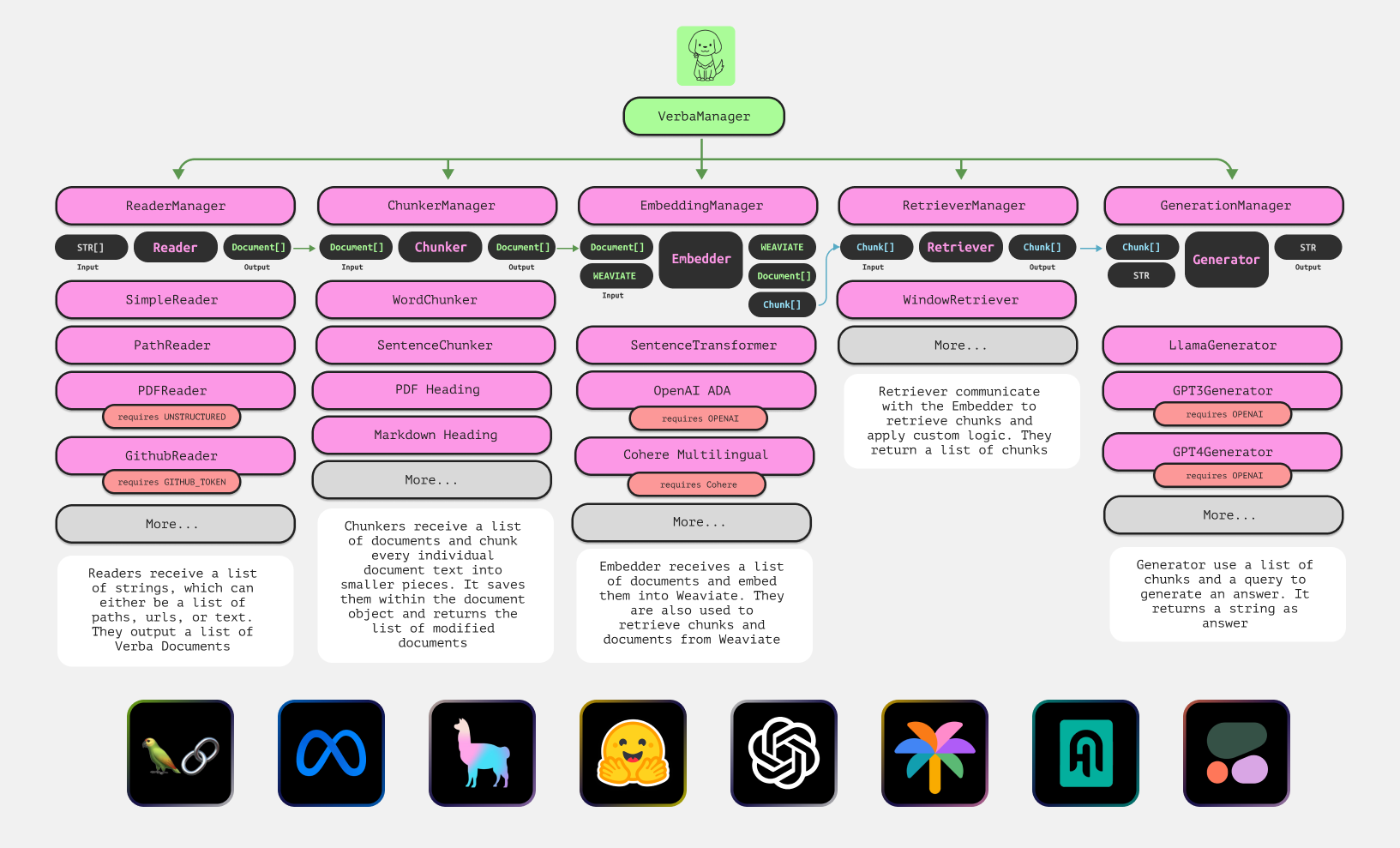
Step 3: Launch and Access
OPENAI_API_KEY=sk-your-key docker compose up -dFor Ollama (local): docker compose -f docker-compose.ollama.yml up -d
Open http://localhost:8081 in your browser. Upload documents, choose your embedder, and start asking questions.
How It Works
When you upload a document, Verba chunks the text, generates embeddings via your configured embedder, and stores them in Weaviate. When you ask a question, it finds the most relevant chunks, sends them to the LLM along with your question, and returns a cited answer. All processing happens on your own hardware.
Troubleshooting Tips
- Connection refused: Weaviate may not be ready yet — check
docker compose logs weaviate - No results: Verify your document shows in the data explorer tab
- API errors: Double-check your LLM API key
Next Steps
Once running, explore different embedders, adjust chunk sizes, or connect external data sources. Verba's modular design makes experimentation easy.