LaVague Tutorial: Automate Web Tasks with Natural Language Instructions
A step-by-step tutorial showing how to install LaVague and build your first AI Web Agent that navigates websites, fills forms, and extracts data — all using plain English instructions.
🚀 Want to deploy LaVague yourself?
Docker configs, system requirements, and installation guides — all on one page.
View LaVague Tool Page →Getting Started with LaVague in 5 Minutes
In this tutorial, you'll build a working AI Web Agent that navigates Hugging Face's documentation and finds specific pages — all by describing what you want in plain English.
Prerequisites
- Python 3.9+
- An OpenAI API key ($5 credit is plenty to start)
- Chrome or Firefox browser (for Selenium)
Step 1: Install LaVague
pip install lavague
This installs the core framework along with Selenium driver support.
Step 2: Set Your API Key
export OPENAI_API_KEY="sk-your-key-here"
LaVague uses GPT-4o by default for both the World Model and Action Engine. You can configure alternative LLM backends — see the customization docs.
Step 3: Write Your First Agent
Create a file agent.py:
from lavague.core import WorldModel, ActionEngine
from lavague.core.agents import WebAgent
from lavague.drivers.selenium import SeleniumDriver

selenium_driver = SeleniumDriver(headless=True)
world_model = WorldModel()
action_engine = ActionEngine(selenium_driver)
agent = WebAgent(world_model, action_engine)

agent.get("https://huggingface.co/docs")
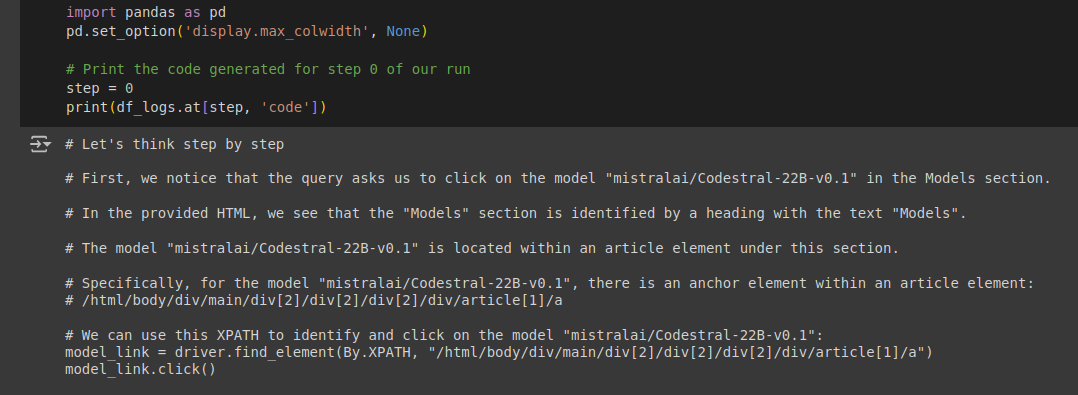
agent.run("Go on the quicktour of PEFT")
Step 4: Run It
python agent.py
Watch as LaVague navigates through the Hugging Face docs, finds the PEFT library page, and clicks through to the quick-tour section — all without you writing a single CSS selector or XPath expression.
Step 5: Add the Interactive Gradio Demo
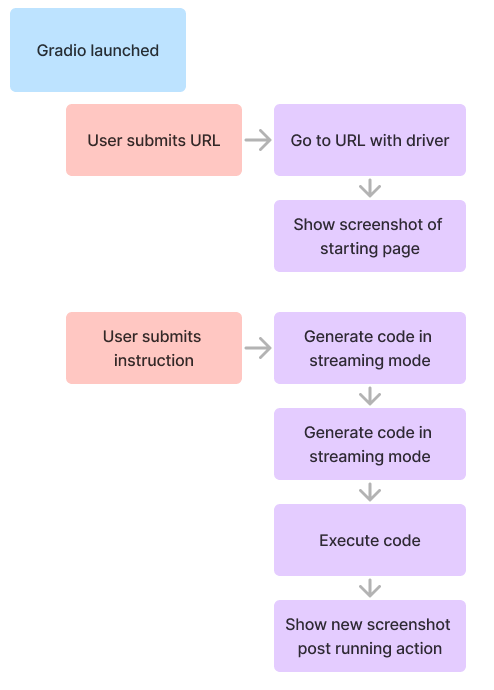
LaVague includes a built-in Gradio interface for interactively testing your agents:
agent.demo("Go on the quicktour of PEFT")
Customizing Your Agent
LaVague supports extensive customization:
| Driver | Switch between Selenium, Playwright, or Chrome Extension |
| LLM Backend | Use OpenAI, Anthropic, local models via Ollama, or any OpenAI-compatible API |
| Contexts | Pre-configured settings for different use cases |
| Headless Mode | Run agents server-side without a display |
| Telemetry | Opt-in data collection to help build better LAMs (can be disabled) |
Advanced: Try LaVague QA
For QA engineers, LaVague QA extends the framework to convert Gherkin feature files into automated browser tests. This bridges the gap between natural-language test specs and executable test suites — a game changer for teams practicing behavior-driven development.
Cost Considerations
Each agent step makes LLM calls. A typical 5-step task on a simple page costs approximately $0.01-0.03. For complex multi-page workflows, use the built-in token counter to estimate costs before running at scale.
🚀 Want to deploy LaVague yourself?
Docker configs, system requirements, and installation guides — all on one page.
View LaVague Tool Page →