Self-Host Memanto with Docker: Complete Setup Tutorial
Step-by-step tutorial: deploy the Memanto Docker image, open the web UI, connect CrewAI/LangChain agents, and run fully on-premises for data control.
Self-hosting Memanto is surprisingly simple — the official moorcheh/memanto Docker image gets you a working semantic memory layer in minutes. In this tutorial you'll deploy Memanto with Docker Compose, open the web UI, and connect it to an AI agent.
🚀 Want to deploy Memanto yourself?
Docker configs, system requirements, and installation guides — all on one page.
View Memanto Tool Page →Step 1: System Requirements
Memanto is lightweight enough for a small VPS. The recommended baseline is 2 CPU cores and 4 GB RAM for development; production deployments with heavy RAG workloads should budget 4 cores and 8 GB.
Step 2: Deploy with Docker Compose
Create a docker-compose.yml and start the service:
services:
  memanto:
    image: moorcheh/memanto:latest
    restart: unless-stopped
    ports:
      - 8080:8080
    volumes:
      - ./data/memanto:/data
docker compose up -d
That's it — Memanto is now running on http://localhost:8080. The volume mount keeps your memories persistent across container restarts.
Step 3: Explore the Web UI
The dashboard lets you browse stored memories, inspect semantic search results, and manage what your agents remember — a big usability win over digging through raw vector databases.
Step 4: Connect Your Agents
Memanto exposes a REST API plus SDKs, so wiring it into CrewAI or LangChain takes a few lines. Agents store conversation summaries and query the memory layer semantically before answering. The result: they remember users, recall project context, and stop asking the same questions twice.
Step 5: Go On-Premises for Full Control
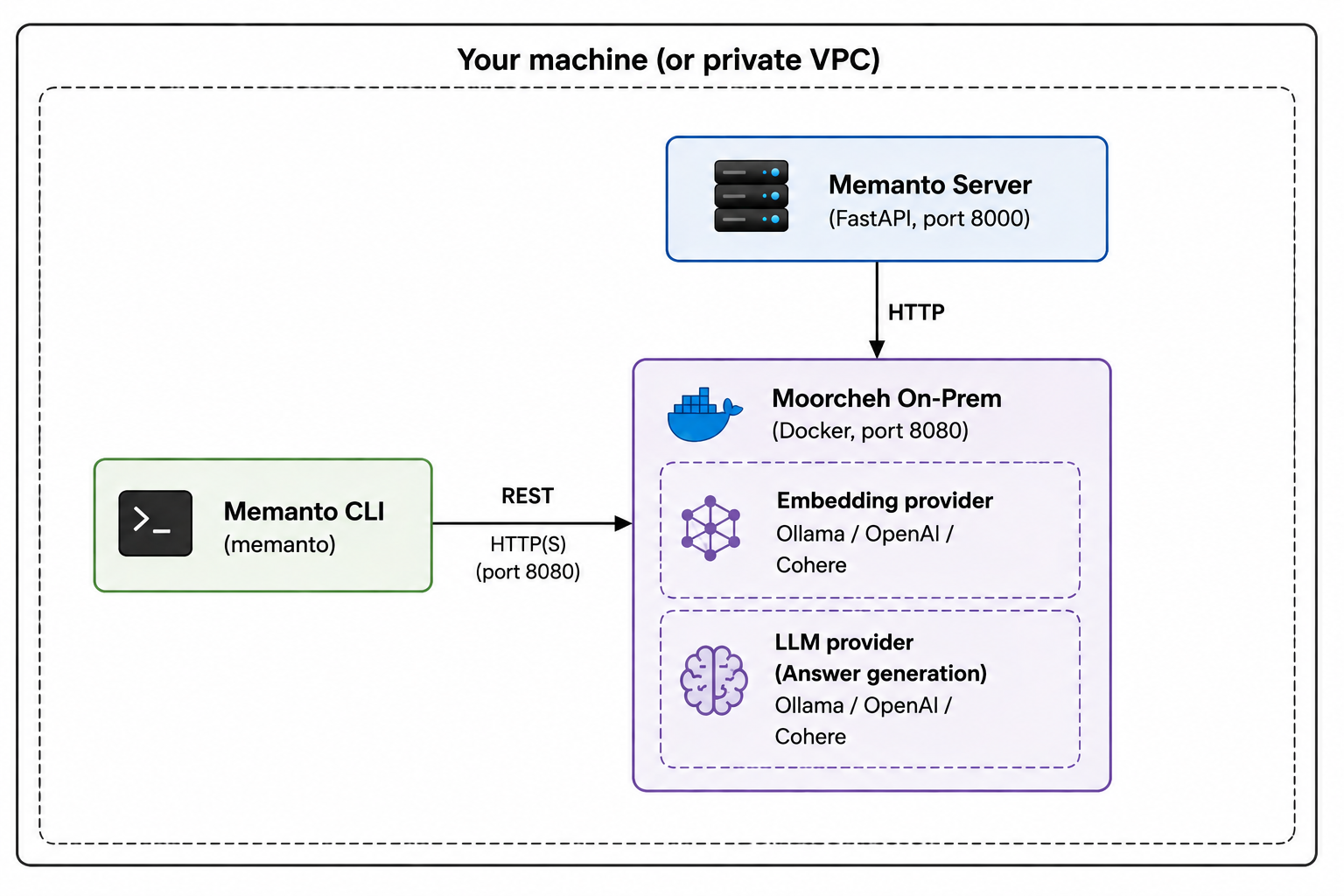
For regulated environments, Memanto's on-premises architecture keeps all memory data inside your network. No third-party vector stores, no data leaving your infrastructure.
Final Checklist
- ✅ Docker image pulls and container starts cleanly
- ✅ Web UI reachable on port 8080
- ✅ Persistent volume mounted for memory data
- ✅ REST API responding to agent queries
With Memanto deployed, your agents finally have a brain that remembers. Happy building!
🚀 Want to deploy Memanto yourself?
Docker configs, system requirements, and installation guides — all on one page.
View Memanto Tool Page →