Radar Tutorial: Find Broken Workloads in Kubernetes in 30 Seconds
Step-by-step tutorial: install Radar locally, explore the topology view and event timeline, and let AI agents investigate cluster issues through its built-in MCP server.
Radar Tutorial: See What's Broken in Your Cluster in 30 Seconds
In this tutorial you'll install Radar locally, point it at your cluster, and investigate a real issue using the topology view and event timeline. Radar runs on your laptop and talks to the Kubernetes API directly — zero install on your cluster.
🚀 Want to deploy Radar yourself?
Docker configs, system requirements, and installation guides — all on one page.
View Radar Tool Page →Step 1: Install Radar
Radar ships as a single binary with installers for every platform. On macOS or Linux:
brew install skyhook-io/tap/radar
kubectl radar
For Kubernetes users who prefer kubectl plugins, install via Krew:
kubectl krew install radar
kubectl radar
Windows users can install with scoop install radar, and desktop apps are available for macOS, Linux, and Windows. In-cluster deployment is possible with the official Helm chart if you prefer.
Step 2: Explore the Topology View
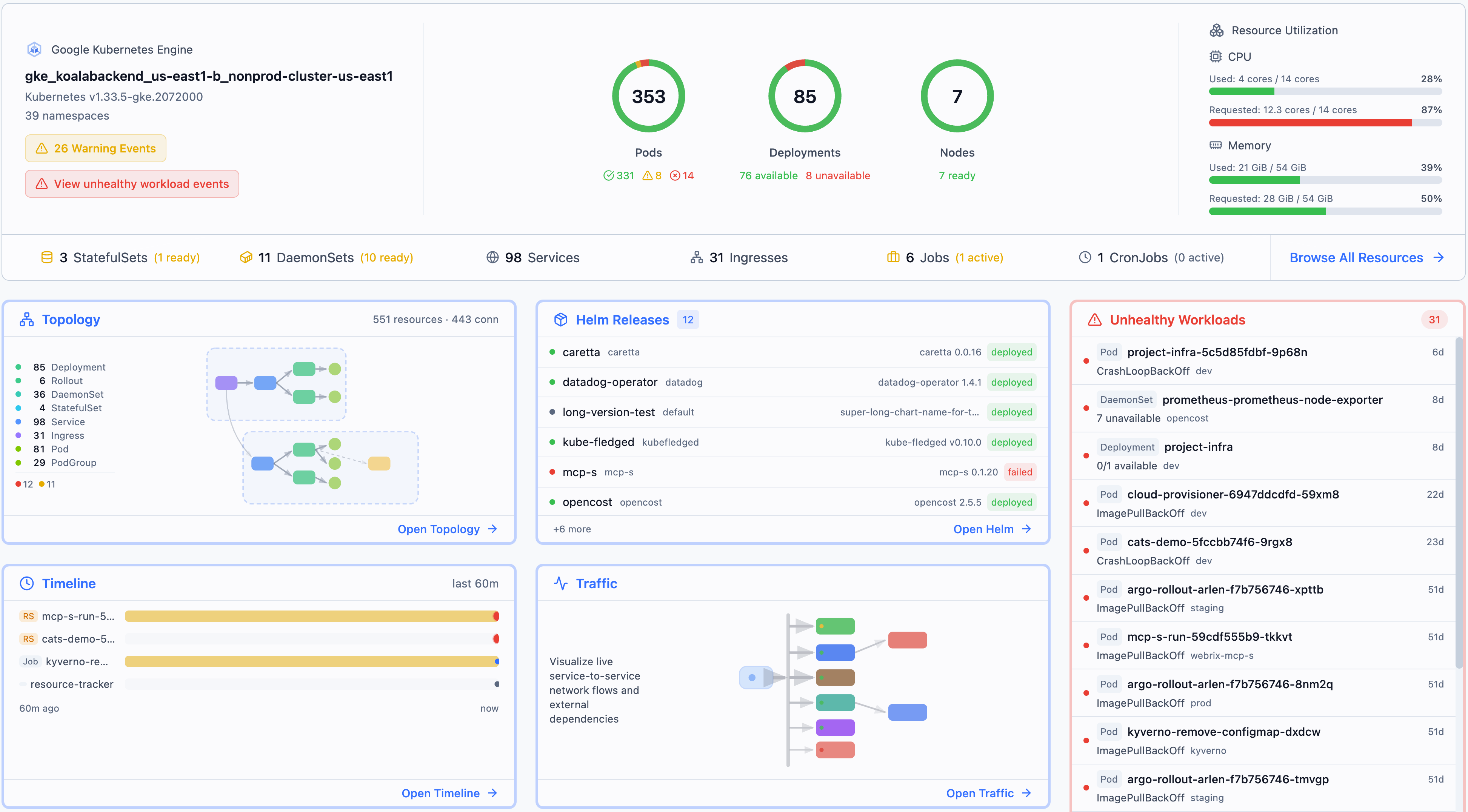
Once launched, the Topology view renders your namespaces as an interactive map: deployments, statefulsets, services, and ingresses with live connection lines. Broken resources glow red immediately, so you can spot the failing pod before checking a single log.
Step 3: Use the Event Timeline
Click any resource to open its event timeline — a chronological replay of every event: scheduling attempts, image pulls, health check failures, and restarts. This answers the "why" question: you see the CrashLoopBackOff reason, the exact probe that failed, and the image pull error, all in one scrollable feed.
Step 4: Let an AI Agent Investigate With MCP
Radar's killer feature is its built-in MCP server. Connect your AI assistant (Claude, Cursor, or any MCP client) and ask questions like "what pods are in CrashLoopBackOff in prod?" or "what changed in the payments namespace in the last hour?" The agent queries Radar's MCP interface, reads the topology and timeline, and returns an answer with the evidence — all with proper auth and an audit trail.
Final Thoughts
Radar replaces a pile of disjointed tooling with one fast, local-first UI. It's Apache-2.0, free forever, and the MCP integration makes it uniquely agent-ready for AI-driven operations.
🚀 Want to deploy Radar yourself?
Docker configs, system requirements, and installation guides — all on one page.
View Radar Tool Page →