Real-ESRGAN: The AI Image Upscaler With 36k Stars That Restores Detail, Not Just Pixels
Real-ESRGAN uses GAN-based super-resolution to upscale and restore images with remarkable quality. Includes anime and face-enhancement models. Here's how to use it.

What Is Real-ESRGAN?
Real-ESRGAN is the open-source AI image upscaler that's been quietly powering thousands of enhancement tools, mods, and workflows. With over 36,000 GitHub stars, it's the most popular super-resolution model available — and it runs entirely on your own hardware.
Developed by TencentARC, Real-ESRGAN uses Generative Adversarial Networks (GANs) trained on massive datasets of degraded and high-quality image pairs. It doesn't just upscale — it restores. Fine details that were lost to compression, low resolution, or noise are reconstructed, producing results that often look better than the original.
🚀 Want to deploy Real-ESRGAN yourself?
Docker configs, system requirements, and installation guides — all on one page.
View Real-ESRGAN Tool Page →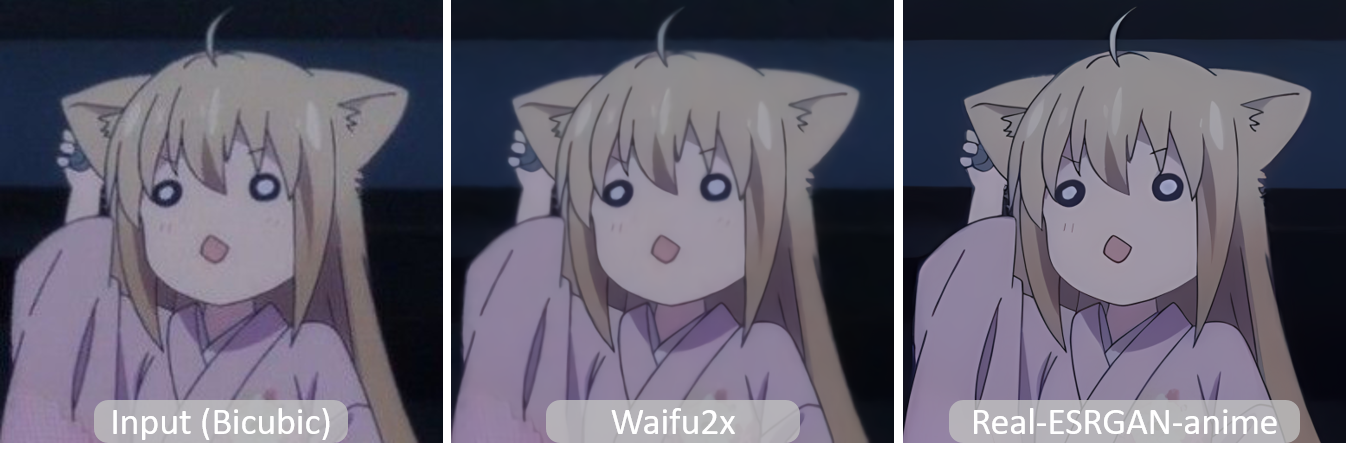
The comparison above shows Real-ESRGAN's anime model in action — notice how fine lines, colors, and textures are restored from the low-resolution input.
Why Real-ESRGAN Dominates Image Upscaling
1.GAN-Based Restoration, Not Just Interpolation
Traditional upscalers use bicubic or Lanczos interpolation — they just stretch pixels and blur edges. Real-ESRGAN uses a GAN architecture that actually generates new detail. It understands what a face, a building, or a texture should look like and reconstructs it at higher resolution. This is why upscaled images look sharper and more detailed, not just bigger.
2. Specialized Anime Model
Real-ESRGAN includes a dedicated RealESRGAN_x4plus_anime model optimized for anime, manga, and digital art. It preserves the clean lines, flat colors, and stylistic features of anime artwork — something general-purpose upscalers often destroy with unwanted photorealistic artifacts.
3. Built-in Face Enhancement (GFPGAN)
Faces are notoriously hard to upscale — they're what viewers look at most, and any artifact is immediately noticeable. Real-ESRGAN integrates GFPGAN for face enhancement, which restores facial details even from very low-resolution or blurry photos. It's like having a dedicated face restoration tool built in.
4. Batch Processing & CLI
Real-ESRGAN includes a command-line interface that supports batch processing — point it at a folder of images and it'll upscale them all. This makes it ideal for processing large image collections, video frames, or manga volumes without writing any code.
5. CPU Support — No GPU Required
While a GPU makes Real-ESRGAN much faster, it also works on CPU-only systems. A single image might take 10-30 seconds on CPU instead of 1-2 seconds on GPU, but it works — making it accessible to anyone regardless of their hardware.
Getting Started
Installation
pip install realesrgan
# Or clone the full repo:
git clone https://github.com/xinntao/Real-ESRGAN.git
cd Real-ESRGAN
pip install -r requirements.txt
Upscale an Image (Python)
from realesrgan import RealESRGANer
from basicsr.archs.rrdbnet_arch import RRDBNet

# Load model
model = RRDBNet(num_in_ch=3, num_out_ch=3, num_feat=64,
                num_block=23, num_grow_ch=32, scale=4)
upsampler = RealESRGANer(
    scale=4, model_path='weights/RealESRGAN_x4plus.pth',
    model=model, tile=0, tile_pad=10, pre_pad=0,
    half=True  # use fp16 for faster processing on GPU
)

# Enhance
import cv2
img = cv2.imread('input.png', cv2.IMREAD_UNCHANGED)
output, _ = upsampler.enhance(img, outscale=4)
cv2.imwrite('output.png', output)
CLI Batch Processing
# Upsscale all images in a folder
python inference_realesrgan.py -i inputs/ -o outputs/ -n RealESRGAN_x4plus

# Use anime model
python inference_realesrgan.py -i inputs/ -o outputs/ -n RealESRGAN_x4plus_anime

# With face enhancement
python inference_realesrgan.py -i inputs/ -o outputs/ -n RealESRGAN_x4plus --face_enhance
Self-Hosting with Docker
docker pull wpafbo79/real-esrgan:latest

docker run -d \
  --name real-esrgan \
  --gpus all \
  -v ./inputs:/inputs \
  -v ./outputs:/outputs \
  wpafbo79/real-esrgan:latest \
  -i /inputs -o /outputs -n RealESRGAN_x4plus
Real-ESRGAN vs Other Upscalers
| Feature | Real-ESRGAN | GFPGAN | CodeFormer |
|---|---|---|---|
| General upscaling | ★★★★★ | ★★★☆☆ | ★★★☆☆ |
| Anime model | ✅ | ❌ | ❌ |
| Face enhancement | ✅ (integrated) | ✅ (dedicated) | ✅ (dedicated) |
| Batch processing | ✅ | ✅ | ✅ |
| CPU support | ✅ | ✅ | ✅ |
| Max upscale | 4x | 4x | 4x |
Best Use Cases
Photo Restoration
Bring old, low-resolution family photos back to life. The face enhancement module works wonders on blurry faces.
Anime & Manga Upscaling
The dedicated anime model is the gold standard for upscaling anime artwork and manga pages while preserving the art style.
Game Texture Enhancement
Upscale retro game textures for HD remasters. Many game modding communities use Real-ESRGAN as their go-to texture enhancer.
Video Frame Processing
Extract frames from low-quality video, upscale them with Real-ESRGAN, and reassemble for enhanced video quality.
Tips for Best Results
- Use
--face_enhancefor photos with people — GFPGAN integration dramatically improves faces - Try the anime model (
RealESRGAN_x4plus_anime) for digital art and illustrations - Use
half=Trueon GPU for 2x speedup with minimal quality loss - Use
tileparameter for large images to avoid OOM errors (try tile=512 on 4GB VRAM) - For 8x upscaling — run the 4x model twice, or use the x2 model four times for extreme detail
Conclusion
Real-ESRGAN isn't just an upscaler — it's a restoration engine. Its GAN-based approach produces results that genuinely look better than the input, not just bigger. With 36k GitHub stars, dedicated anime and face models, CPU support, and easy Docker deployment, it's the clear choice for anyone serious about image enhancement.
🚀 Explore Real-ESRGAN on Run This Ai
Docker Compose configs, system requirements, installation guides, and more — all in one place.
View Real-ESRGAN Tool Page →