ScrapeGraphAI Guide: LLM-Powered Web Scraping Made Simple
Learn how ScrapeGraphAI uses LLMs and graph-based pipelines to revolutionize web scraping — no more CSS selectors or brittle regex patterns.

😩 Tired of Writing CSS Selectors That Break Every Time a Website Updates?
I've been there. You spend hours crafting the perfect BeautifulSoup selector, the regex is just right, and then — boom — the website changes its HTML structure overnight and your scraper returns nothing. It's infuriating, and honestly, it made me question whether web scraping was worth the headache.
Then I found ScrapeGraphAI — and it completely changed how I think about data extraction.
🚀 Want to deploy ScrapeGraphAI yourself?
Docker configs, system requirements, and installation guides — all on one page.
View ScrapeGraphAI Tool Page →What Is ScrapeGraphAI?
ScrapeGraphAI is an open-source Python library (28K+ GitHub stars, MIT license) that uses Large Language Models to build scraping pipelines automatically. Instead of writing brittle CSS selectors or XPaths, you tell it what you want — "extract all product names and prices from this e-commerce page" — and the LLM figures out the DOM structure.
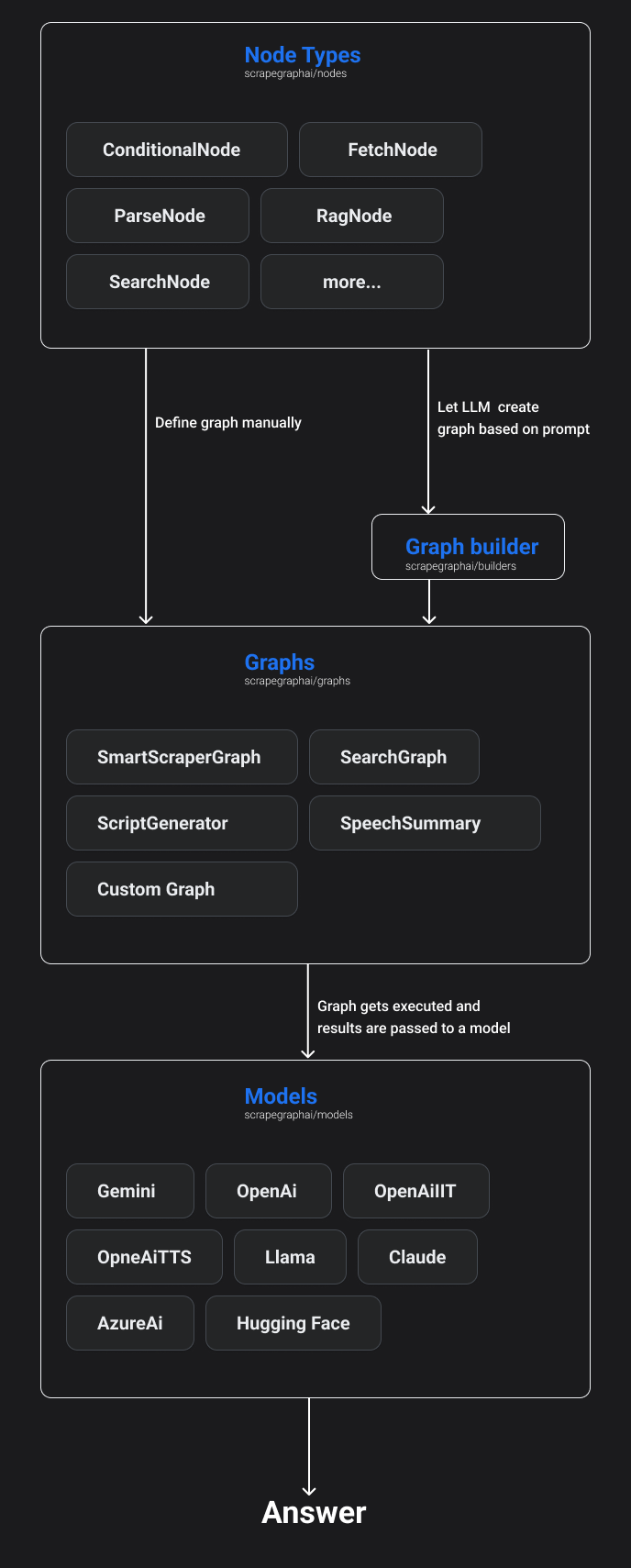
The magic lives in its modular graph architecture. Each node in the graph is a discrete operation: fetch the page, identify the data, extract it, transform it. You can combine nodes like Lego blocks to build complex scraping workflows without writing boilerplate code.
Why I Actually Switched
Look, I've tried every scraping tool under the sun. BeautifulSoup is great but requires constant maintenance. Selenium is a resource hog. Scrapy has a steep learning curve for anything beyond basic crawls.
What sold me on ScrapeGraphAI was this: I gave it a URL and said "find the table with pricing data" — and it just worked. No selectors, no trial-and-error with XPath expressions. The LLM (I used Ollama locally with Mistral) parsed the DOM, identified the pricing table, and returned clean JSON.
Here's what actually impressed me after a week of heavy use:
🧠 LLM-Backend Flexibility
You can swap between GPT-4, Gemini, Ollama, or Hugging Face models with a single config change. This is huge — I can prototype with GPT-4 (most accurate) and then switch to a local model for production (cheaper, privacy-preserving).
🔗 Graph Types for Every Need
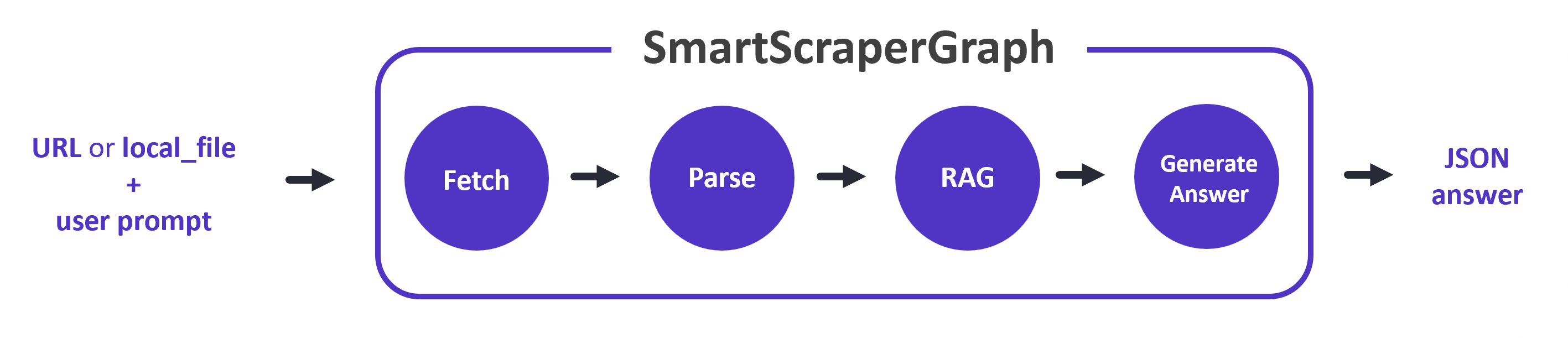
ScrapeGraphAI ships with multiple pre-built graph types. SmartScraperGraph for single-page extraction, SearchGraph for crawling across multiple pages, SpeechGraph for voice-queried scraping, and ScriptCreatorGraph that generates standalone Python scripts for your pipeline.
🐳 Docker from Day One
The official Docker image (mcp/scrapegraph:latest) is under 500MB and cold-starts in under 3 seconds. The docker-compose.yml in the repo sets up both the API server and the queue worker — no manual Python environment setup needed.
What Could Be Better?
Being honest here: it's not perfect. LLM-based scraping is slower than traditional methods — expect 2-5 seconds per page vs sub-second with plain requests+BeautifulSoup. And if you're using a cloud LLM API, you're paying per token, which adds up at scale.
Also, the documentation, while good, sometimes assumes you know which graph type to use. I spent a good 30 minutes figuring out that SearchGraph needs a different prompt format than SmartScraperGraph.
Who Is This For?
✅ You'll love it if: You build RAG pipelines, AI agents that need web data, or you're tired of maintaining scraping code against changing websites.
❌ Skip it if: You need high-throughput scraping (thousands of pages/min), or you want something that works without any LLM dependency.
Bottom Line
ScrapeGraphAI isn't a replacement for every scraper — but for AI-powered data extraction where accuracy matters more than raw speed, it's the best thing I've used. The ability to describe what you want in plain English and get structured JSON back feels like magic, even after the tenth time.
🚀 Explore ScrapeGraphAI on Run This Ai
Docker Compose configs, system requirements, installation guides, and more — all in one place.
View ScrapeGraphAI Tool Page →