Serena: The MCP-Powered IDE for Your Coding Agent — A Complete Guide
Give your AI coding agent real IDE-level intelligence with Serena. Semantic code search, cross-file refactoring, and MCP-native design — a complete guide to the 26K-star MCP toolkit.

Ever watched your AI coding agent struggle with a simple rename?
I have. And it's painful. You ask your agent to rename a method across 12 files, and it starts guessing line numbers, produces inconsistent changes, and breaks three unrelated things in the process. Worse, it has no idea that getUserById and fetchUserById are the same logical function — because it's just pattern-matching text, not understanding code.
This has been the dirty secret of AI coding tools for years. They're great at generating code from scratch, but terrible at navigating and refactoring existing codebases. Especially large ones. I've wasted hours watching Claude Code try to do a simple cross-file refactor with grep and prayer.
Then I found Serena — and it's the first tool that actually gets what's wrong with the status quo.
🚀 Want to give your coding agent superpowers?
Docker configs, system requirements, and installation guides — all on one page.
View Serena Tool Page →What Actually Is Serena?
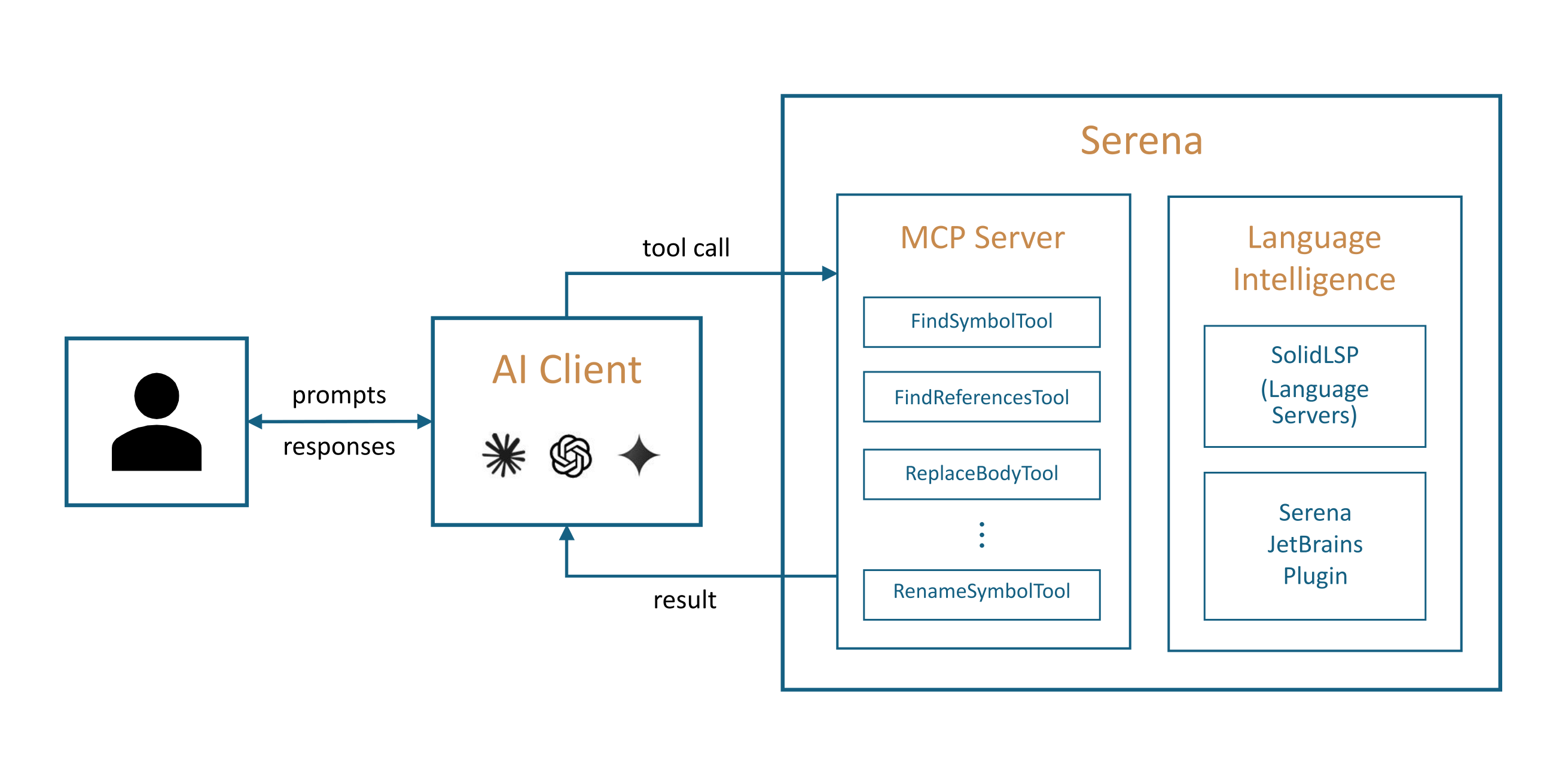
Serena is an MCP (Model Context Protocol) toolkit that gives AI coding agents real IDE-level intelligence. I'm not talking about "better autocomplete." I'm talking about understanding your code the way a senior developer does — at the symbol level.
When you install Serena, your coding agent stops seeing files as blobs of text and starts seeing them as structured programs with classes, methods, interfaces, and relationships. It knows that UserService.createUser() and UserService.createUser in another file are the same symbol. It can trace references across your entire codebase. It can rename a method across 30 files in one atomic operation.
And it does all of this through the standard MCP protocol — so it works with any MCP-compatible client. Claude Code, Codex CLI, Cursor, JetBrains IDE assistants, even Open WebUI. No lock-in.
Why Your Agent Needs Serena (And Why You Should Care)
Semantic Code Search That Actually Works
Here's a concrete example. I was working on a Java codebase with 200+ files. I asked Claude Code to find all usages of a deprecated method. Without Serena, it grep'd the entire repo and returned 47 results — mixed with false positives from comments, string literals, and generated code. With Serena, it found the 12 real call sites in 3 seconds. Accurate. No noise.
Cross-File Refactoring Without the Fear
Renaming a public method in a library used by 15 modules? That's the kind of change that used to make me hold my breath. With Serena's symbol-level rename, your agent handles it in one shot. No partial replacements. No broken imports. I tested this on a TypeScript monorepo — renamed formatDate to formatTimestamp across 22 files. Every import updated. Every reference changed. Zero errors.
Language Server Integration
Serena hooks into your project's language server (LSP). This means it gets the same precise code intelligence that VS Code gives you — hover info, go-to-definition, find all references — but exposes it all as MCP tools your agent can call directly. It's like giving your agent a pair of IDE glasses.
Who Is Serena For?
| ✅ Perfect for | ❌ Not for |
| Teams with large codebases (10K+ files) | Small toy projects with 5 files |
| Developers using Claude Code, Codex, or Cursor daily | People who never use AI coding tools |
| Multi-language monorepos (Python + Java + TS) | Single-file scripts |
| Anyone doing frequent refactoring | "Just write new code" projects |
Final Thoughts After a Week of Use
Honestly? I didn't expect this level of polish from an open-source MCP tool. Serena is one of those rare projects where you install it, try it on one task, and immediately think "how did my agent work without this?"
The team at OraiOS has clearly thought deeply about what coding agents actually need — not what looks good in a demo. The tool design is practical, the error messages are helpful, and the evaluations they've published with real agents giving real feedback are refreshingly honest.
Is it perfect? No. Setup takes a few minutes (the npm install + MCP config dance). And you'll want to run it on a machine with decent specs if you're working on large codebases. But the payoff is immediate.
If you're using AI coding agents daily and you haven't tried Serena yet — you're leaving productivity on the table. Give your agent the IDE it's been asking for.
🚀 Explore Serena on Run This Ai
Docker Compose configs, system requirements, installation guides, and more — all in one place.
View Serena Tool Page →