Getting Started with txtai: Docker Deployment and RAG Quick Start
Deploy txtai with Docker in 5 minutes. Step-by-step guide to running the embeddings database, indexing documents, and running semantic search and RAG queries.

Getting Started with txtai in 5 Minutes
txtai is the easiest way to add semantic search and RAG to your applications — and getting it running with Docker takes just minutes. This guide walks you through deploying txtai with Docker, indexing your first documents, and running semantic queries against them.
Prerequisites
You just need Docker installed on your machine. txtai runs as a single container with everything baked in — no separate databases, no API keys, no Python environment setup required.
Step 1: Pull and Run txtai
Start by pulling the official txtai Docker image and running it with persistent storage:
docker pull neuml/txtai-gpu:latest
docker run -d --name txtai -p 8080:8080 -v $(pwd)/data/txtai:/data neuml/txtai-gpu:latest
The container exposes the txtai REST API on port 8080. Data is persisted in the ./data/txtai directory on your host machine.
Step 2: Index Your Documents
Once the container is running, you can start indexing documents via the API. txtai accepts plain text, JSON, or URLs:
curl -X POST http://localhost:8080/upsert \
  -H "Content-Type: application/json" \
  -d '{"documents":[{"id":"1","text":"txtai is an embeddings database for semantic search"},{"id":"2","text":"RAG pipelines combine retrieval with LLM generation"},{"id":"3","text":"Docker makes deployment simple and portable"}]}'
Then call /index to build the vector index from the upserted content:
curl -X GET http://localhost:8080/indexStep 3: Search Semantically
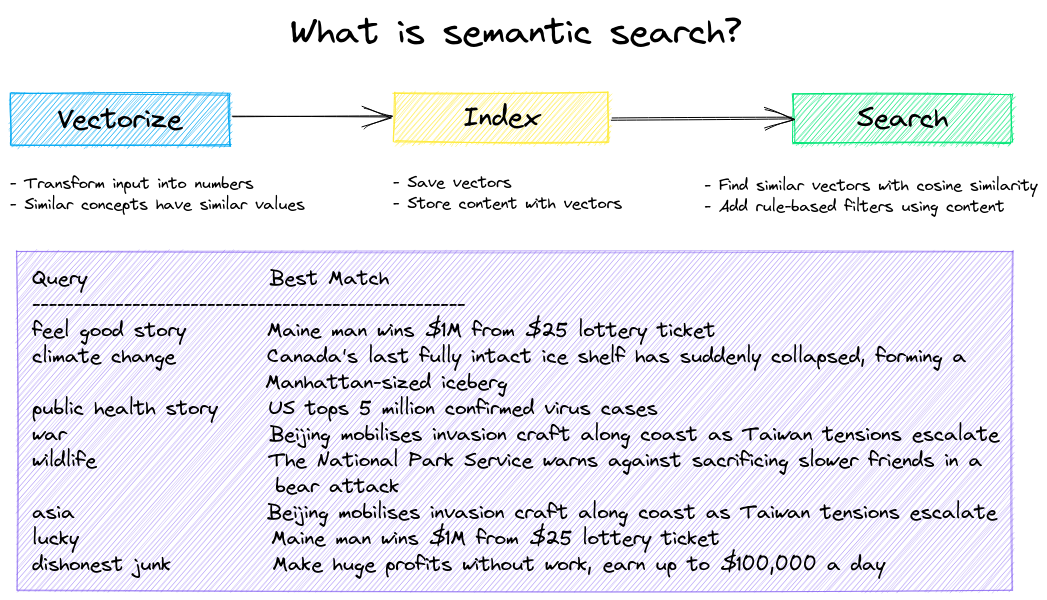
Now you can search your indexed content by meaning, not just keywords:
curl -X POST http://localhost:8080/search \
  -H "Content-Type: application/json" \
  -d '{"query":"searching with vectors"}'
txtai returns the most relevant results ranked by semantic similarity, even when your query uses completely different words than the indexed content.
Step 4: Run a RAG Query
For RAG, combine txtai with any LLM. txtai retrieves relevant context, and you feed it to an LLM for grounded generation:
curl -X POST http://localhost:8080/rag \
  -H "Content-Type: application/json" \
  -d '{"query":"What can I build with txtai?","llm":{"provider":"ollama","model":"llama3"}}'
Why Use Docker for txtai?
The Docker deployment handles all dependencies — Python, PyTorch, ONNX, and the embedding models — inside a single container. No pip installs, no virtual environments, no dependency conflicts. Just pull, run, and start building your semantic search application.
Next Steps
Check the official txtai documentation for guides on workflows, custom embeddings, API configuration, and production deployment with Docker Compose.