SnapOtter
SnapOtter
Requirements
Recommended VPS
Hostinger · KVM 2
2 vCPU · 8192 MB · 100 GB
Hostinger · KVM 2
2 vCPU · 8192 MB · 100 GB
Hostinger · KVM 4
4 vCPU · 16384 MB · 200 GB
Affiliate disclosure
Docker Compose
# Generated by Run This Ai — docker-compose.yml
services:
  snapotter:
    image: snapotter/snapotter:latest
    restart: unless-stopped
    ports:
      - 8080:8080
    volumes:
      - ./data/snapotter:/data
SnapOtter — Alternatives
SnapOtter — Alternatives
Why Look for Alternatives?
SnapOtter is excellent, but depending on your needs, you might consider these alternatives. Here is an honest comparison.
Top Alternatives
1. CloudConvert ☁️
Best for: Users who prefer a managed service
| Feature | SnapOtter | CloudConvert |
|---|---|---|
| Hosting | Self-hosted | Cloud |
| Price | Free | Pay-per-conversion |
| Privacy | ✅ Complete | ❌ Files uploaded |
| Offline | ✅ Yes | ❌ No |
| Formats | 150+ tools | 200+ formats |
| API | ✅ Yes | ✅ Yes |
CloudConvert supports more formats but your files go through their servers. Great for one-off conversions but expensive at scale.
2. FFmpeg (CLI) 🎬
Best for: Developers and automation
FFmpeg is the gold standard for media processing — SnapOtter actually uses FFmpeg under the hood for video/audio operations.
| Feature | SnapOtter | FFmpeg |
|---|---|---|
| Interface | Web UI | Command line |
| Ease of use | ✅ Drag & drop | ❌ Complex syntax |
| Image tools | ✅ 40+ tools | ❌ Limited |
| PDF tools | ✅ Built-in | ❌ Requires plugins |
| Automation | ✅ API + UI | ✅ Scriptable |
Verdict: Use FFmpeg if you love the terminal. Use SnapOtter if you want a GUI.
3. Stirling PDF 📄
Best for: PDF-only operations
| Feature | SnapOtter | Stirling PDF |
|---|---|---|
| Focus | All file types | PDF only |
| Tools | 150+ (25 PDF) | 50+ PDF tools |
| Image editing | ✅ Yes | ❌ No |
| Video/audio | ✅ Yes | ❌ No |
| Docker deploy | ✅ Yes | ✅ Yes |
Stirling PDF is more specialized for PDF workflows. SnapOtter is better if you need multi-format processing.
4. File Converter (Desktop) 💻
Best for: Occasional personal use
| Feature | SnapOtter | File Converter |
|---|---|---|
| Platform | Web (any device) | Desktop only |
| Batch processing | ✅ Yes | ✅ Yes |
| Self-hosted | ✅ Yes | ❌ Desktop app |
| Multi-user | ✅ Yes | ❌ Single user |
| API access | ✅ Yes | ❌ No |
When to Choose SnapOtter
Choose SnapOtter when you:
- Need privacy — your files stay on your server
- Process multiple file types (images + PDFs + video + audio)
- Want a web UI accessible from any device
- Need batch processing and an API
- Run a homelab or self-hosted infrastructure
When to Choose Something Else
Choose an alternative when you:
- Need only PDF tools → Stirling PDF
- Prefer CLI → FFmpeg
- Want zero maintenance → CloudConvert
- Do occasional desktop conversions → File Converter
Summary
| Tool | Best For | Price | Self-hosted |
|---|---|---|---|
| SnapOtter | All-in-one file toolkit | Free | ✅ Yes |
| CloudConvert | Managed cloud service | Pay-per-use | ❌ No |
| FFmpeg | CLI automation | Free | ✅ Yes |
| Stirling PDF | PDF workflows | Free | ✅ Yes |
| File Converter | Desktop use | Free | ❌ Desktop |
SnapOtter — Full Review 2026
SnapOtter — Full Review 2026
Overview
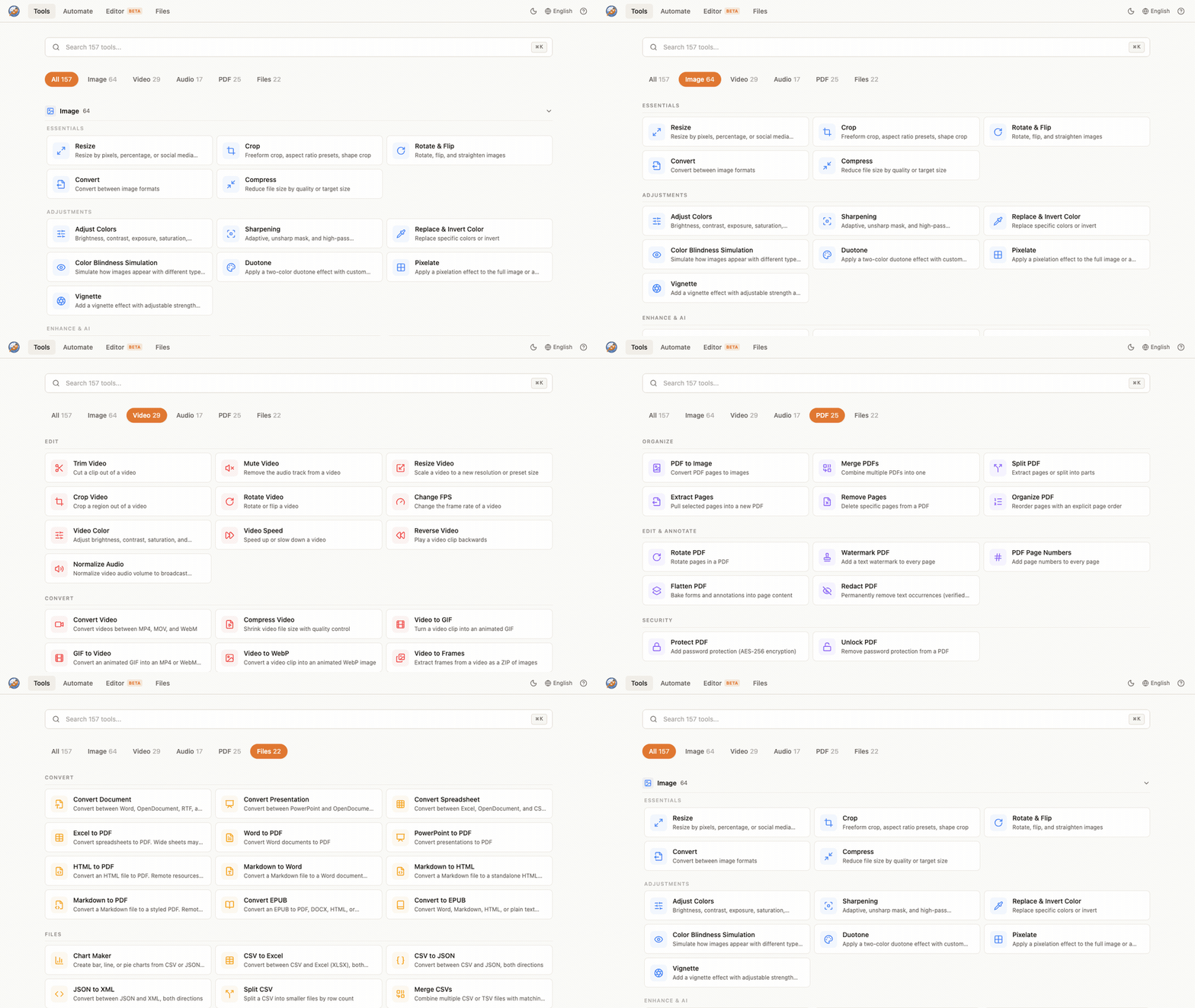
SnapOtter is a self-hosted file toolkit that brings over 150 tools for processing images, PDFs, videos, audio, and files — all running locally on your own hardware. No data leaves your server, no subscription fees, no API limits.
Why SnapOtter Stands Out
🚀 Performance
Built with TypeScript and modern web technologies, SnapOtter handles file processing with remarkable speed. The Docker-based deployment means it runs on any Linux machine with minimal overhead.
🔒 Privacy First
Unlike cloud-based file converters (looking at you, CloudConvert and Zamzar), SnapOtter processes everything locally. Your sensitive documents never touch a third-party server. This is crucial for:
- Legal documents and contracts
- Medical images and records
- Confidential business files
- Personal photos and media
🛠️ 150+ Tools at Your Fingertips
| Category | Tools | Examples |
|---|---|---|
| 🖼️ Image | 40+ | Resize, compress, convert, AI upscale, OCR, watermark |
| 25+ | Merge, split, compress, OCR, extract pages, sign | |
| 🎬 Video | 30+ | Convert formats, trim, extract audio, compress, GIF |
| 🎵 Audio | 20+ | Convert, normalize, split chapters, transcribe |
| 📁 Files | 35+ | Archive, batch rename, checksum, find duplicates |
🎨 Beautiful Web UI
The interface is clean, modern, and intuitive. All tools are organized by category with drag-and-drop upload, batch processing, and real-time progress tracking.
Comparison with Alternatives
| Feature | SnapOtter | CloudConvert | File Converter | Self-hosted |
|---|---|---|---|---|
| Self-hosted | ✅ Yes | ❌ No | ❌ No | ✅ Yes |
| Free | ✅ Yes | ⚠️ Limited | ✅ Yes | ✅ Yes |
| Privacy | ✅ Full | ❌ Cloud | ⚠️ Varies | ✅ Full |
| AI Features | ✅ Yes | ❌ No | ❌ No | Varies |
| Offline | ✅ Yes | ❌ No | ❌ No | ✅ Yes |
| API | ✅ Yes | ✅ Yes | ❌ No | Varies |
Verdict
Rating: ⭐⭐⭐⭐⭐ (5/5)
SnapOtter is the best self-hosted file conversion toolkit available today. It combines privacy, power, and ease of use in a single Docker container.
Pros
- ✅ Complete privacy — fully offline
- ✅ 150+ tools covering all file types
- ✅ Modern, intuitive web UI
- ✅ Docker one-command deploy
- ✅ Active development (created March 2026)
- ✅ Free and open source (AGPL-3.0)
Cons
- ❌ No clustering/multi-node support yet
- ❌ Relatively new project (limited community)
- ❌ Requires Docker knowledge for setup
Final Thoughts
If you regularly work with files and care about privacy, SnapOtter is a no-brainer. It replaces a dozen cloud services with one self-hosted solution that costs nothing but the server it runs on.
SnapOtter — Installation Guide
SnapOtter — Installation Guide
Prerequisites
Before you begin, make sure you have:
- Docker installed (version 24.0+)
- Docker Compose (version 2.20+)
- A system with at least 1GB RAM (2GB recommended)
- 10GB free disk space for file processing
Quick Start (1 minute)
The fastest way to run SnapOtter:
docker run -d
  --name snapotter
  -p 3030:3030
  -v snapotter-data:/app/data
  snapotter/snapotter:latest
Open http://localhost:3030 in your browser.
Docker Compose (Recommended)
Create a docker-compose.yml:
version: "3.8"
services:
  snapotter:
    image: snapotter/snapotter:latest
    container_name: snapotter
    ports:
      - "3030:3030"
    volumes:
      - snapotter-data:/app/data
    restart: unless-stopped

volumes:
  snapotter-data:
Then run:
docker compose up -dConfiguration
SnapOtter works out of the box, but you can customize:
| Variable | Default | Description |
|---|---|---|
PORT |
3030 | Web UI port |
DATA_DIR |
/app/data | File storage path |
MAX_FILE_SIZE |
500MB | Maximum upload size |
Accessing the Web UI
Once running, visit:
- Web UI: http://localhost:3030
- API: http://localhost:3030/api
Using 150+ Tools
SnapOtter includes tools for:
- 🖼️ Image: Resize, crop, convert, compress, AI upscale
- 📄 PDF: Merge, split, compress, OCR, extract text
- 🎬 Video: Convert, trim, extract audio, compress
- 🎵 Audio: Convert, normalize, split, transcribe
- 📁 Files: Archive, compress, batch rename
Next Steps
- Visit the GitHub repository
- Star the project if you find it useful!
- Report issues on the GitHub issue tracker
SnapOtter — FAQ
SnapOtter — Frequently Asked Questions
General
What is SnapOtter?
SnapOtter is a self-hosted file toolkit with 150+ tools for processing images, PDFs, videos, audio, and files — all running locally via Docker.
Is SnapOtter free?
Yes! SnapOtter is open source under AGPL-3.0. There is also a commercial license available for proprietary use.
Do I need internet access?
No! Once deployed via Docker, SnapOtter works fully offline. All processing is done locally.
Technical
What are the system requirements?
- Minimum: 1 CPU core, 1GB RAM, 10GB disk
- Recommended: 2 CPU cores, 2GB RAM, 20GB disk
Does it run on ARM (Raspberry Pi)?
Yes! The Docker image supports both amd64 and arm64 architectures.
Can I use SnapOtter as an API?
Absolutely. SnapOtter exposes a REST API at /api for programmatic access and automation.
Privacy & Security
Where are my files stored?
Files are stored in the Docker volume you configure (default: /app/data). They never leave your server.
Is encryption supported?
All processing is local. For network access, use a reverse proxy with HTTPS (e.g., Nginx + Let's Encrypt).
Usage
How many files can I process at once?
SnapOtter supports batch processing — you can process hundreds of files simultaneously. Performance depends on your server resources.
Can multiple users access it?
Yes! The web UI is accessible from any device on your network. Perfect for team use.
What file formats are supported?
SnapOtter supports virtually all common formats across images (JPEG, PNG, WebP, AVIF, SVG), PDFs, videos (MP4, MKV, AVI, MOV), audio (MP3, WAV, FLAC, AAC, OGG), and archives (ZIP, TAR, 7z, RAR).
SnapOtter — Overview
SnapOtter — Overview
What is SnapOtter?
SnapOtter is a powerful, self-hosted file toolkit that gives you 150+ tools for processing images, PDFs, videos, audio, and files — all running on your own infrastructure. Everything is processed locally, ensuring your data never leaves your server.
Key Features
- 🖼️ Image Processing: Resize, crop, compress, convert formats, AI upscale, OCR text extraction, watermark, add filters, and batch process thousands of images
- 📄 PDF Manipulation: Merge multiple PDFs, split documents, compress file size, OCR scanned documents, extract specific pages, add digital signatures
- 🎬 Video Tools: Convert between formats, trim segments, extract audio tracks, compress for web, create GIFs, add subtitles
- 🎵 Audio Processing: Convert audio formats (MP3, WAV, FLAC, AAC), normalize volume, split by chapters, transcribe speech to text
- 📁 File Operations: Archive and extract (ZIP, TAR, 7z), batch rename with patterns, verify checksums, find and remove duplicates
Why Self-Host SnapOtter?
| Benefit | Description |
|---|---|
| 🔒 Privacy | All processing happens locally — no file uploads to third parties |
| 💰 Free | No subscriptions, no API credits, no hidden costs |
| 🚀 Fast | Zero network latency — files process at local hardware speed |
| 📡 Offline | Works without internet access |
| 🔄 API | REST API for automation and integration |
| 👥 Multi-user | Accessible from any device on your network |
Quick Facts
- License: AGPL-3.0 (free for everyone)
- Deployment: Docker — one command to run
- Language: TypeScript
- GitHub Stars: 1,800+
- Created: March 2026
- Repository: github.com/snapotter-hq/SnapOtter
Getting Started
docker run -d -p 3030:3030 snapotter/snapotter:latestOpen http://localhost:3030 and start processing files instantly.
Who Is It For?
- Homelab enthusiasts who self-host their tools
- Privacy-conscious users who avoid cloud services
- Businesses processing sensitive documents
- Developers needing a file processing API
- Content creators working with media files
Related tools
Stable Diffusion WebUI
Generative image models in your browser
ComfyUI
The most powerful and modular diffusion model GUI with a graph/nodes interface for Stable Diffusion
whisper.cpp
High-performance C++ port of OpenAI Whisper for fast local speech recognition
Fooocus
AI image generator focusing on prompts and generating — a Midjourney-like experience offline
Coqui TTS
Open-source deep learning toolkit for text-to-speech, battle-tested in research and production
ChatTTS
High-quality conversational text-to-speech model optimized for natural daily dialogue